Effective task management is a cornerstone of successful project management. With teams often juggling multiple tasks, deadlines, and priorities, a reliable system is essential to keep everything on track.
Jira, a widely used project management tool, is designed to streamline task management and enhance team collaboration. In this article, we’ll discuss practical tips for making Jira task management more effective, focusing on how project managers can optimize workflows, increase visibility, and boost team productivity.
What is Jira task management?
Jira task management refers to the process of creating, tracking, and managing tasks in Jira, an issue and project tracking tool developed by Atlassian. It is particularly popular among Agile teams but is flexible enough to be used for a variety of project management methodologies, including Scrum, Kanban, and traditional Waterfall.
In Jira, tasks are typically represented as “issues,” which can be of various types, such as stories, bugs, and tasks. These issues are tracked through customizable workflows, where they move from one status to the next—such as “To Do,” “In Progress,” and “Done.”
Besides, Jira helps project managers oversee the progress of these tasks, allocate resources, and make data-driven decisions about the direction of projects.
By structuring tasks clearly and leveraging Jira’s features, project managers can gain visibility into team performance and ensure the timely delivery of project milestones.
Key features of Jira task management
Jira offers several features that make task management efficient and scalable for teams of all sizes. Understanding these features is essential for optimizing task management.
1. Task creation
Jira enables users to create a range of tasks, including stories, bugs, epics, and subtasks. Each task can be fully customized with descriptions, priorities, due dates, and assigned team members.
2. Workflows
Jira’s workflow engine lets project managers define the steps tasks should go through, from initial creation to completion. Therefore, teams can track tasks through various stages, ensuring clarity and accountability.
3. Boards
Scrum and Kanban boards provide a visual representation of tasks, allowing teams to see the status of each task at a glance. Scrum boards are ideal for iterative development, while Kanban boards help teams optimize their workflow by limiting work in progress.
4. Task assignment and prioritization
Tasks can be assigned to team members, ensuring that everyone knows their responsibilities. Jira also enables task prioritization, helping teams focus on high-priority work.
5. Filters and search
Jira’s powerful search functionality allows project managers to quickly filter and locate tasks, ensuring nothing falls through the cracks. Moreover, you can also customize filters to track specific types of tasks, users, or project stages.
6. Reports and dashboards
Jira provides built-in reporting tools to track team performance, task progress, and project health. Additionally, dashboards allow managers to monitor key performance indicators (KPIs) at a glance.
Types of task management in Jira
Jira supports various types of task management methodologies, giving teams the flexibility to choose what works best for their project:
1. Agile task management (Scrum/Kanban)
Teams using Agile methodologies like Scrum or Kanban can manage tasks in Jira by utilizing boards that display the status of tasks in real-time. Scrum teams can use sprints to focus on small batches of work, while Kanban teams can optimize flow by limiting work in progress.
2. Traditional task management
For teams that don’t follow Agile methodologies, Jira can be used to manage tasks with a more traditional, linear workflow. As a result, this may involve a more detailed breakdown of tasks, clear milestones, and well-defined deadlines.
3. Issue tracking
In addition to task management, Jira also excels at tracking bugs, defects, and other issues that arise during the course of a project. You can also treat these issues as tasks, helping teams stay organized and avoid overlooking important details.
4. Task dependencies
Jira also allows project managers to manage task dependencies. For example, if Task A must be completed before Task B, Jira can track these relationships, preventing bottlenecks and delays in the workflow.
5. Time tracking
Time tracking is a critical component of effective task management, especially for larger projects. Jira’s time-tracking features allow project managers to monitor the amount of time spent on each task, ensuring that teams remain within project timelines.
10 tips to make Jira task management effective
Effective Jira task management isn’t just about using the tool. It is about leveraging its features to streamline your workflow, enhance communication, and improve team performance.
Here are some practical tips to help project managers make the most of Jira’s task management capabilities.
1. Define clear task descriptions
Each task in Jira should have a clear and concise description outlining what needs to be done. Incomplete or ambiguous descriptions can lead to confusion and delays. Task descriptions should include acceptance criteria, the purpose of the task, and any relevant details that help the team understand the scope.
By ensuring that tasks are well-defined, you prevent miscommunication and set clear expectations for team members, making it easier to manage progress throughout the task lifecycle.
2. Use Epics, Stories, and Sub-Tasks effectively
Breaking down tasks into manageable components is key to maintaining a smooth workflow. Therefore, you should use Epics to group related tasks, Stories to define individual features or requirements, and Sub-tasks for specific actions required to complete a story.
For example, if you’re developing a new feature, create an Epic for the overall feature, with Stories for each component. Then, break those Stories into Sub-tasks, such as research, design, development, and testing.
As a result, this granular approach helps ensure that no aspect of the task is overlooked, making tracking progress more efficient.
3. Optimize workflow customization
Jira offers highly customizable workflows to suit the needs of different teams. As a result, this allows you to tailor your workflows to reflect how your team works—whether that’s a simple flow from “To Do” to “In Progress” to “Done.” Or, you can create a workflow to reflect a more complex setup with additional stages, like “Review,” “QA,” or “Blocked.”
By aligning Jira’s workflows with your team’s processes, you can ensure that tasks are completed efficiently and according to your project’s requirements. Additionally, you should automate repetitive actions (such as moving tasks to the next status once a sub-task is completed) to reduce manual intervention and streamline your process.
4. Prioritize tasks using Jira’s built-in features
Effective task prioritization is essential to ensuring that critical tasks are completed on time. To do that, you should use Jira’s priority field to set task urgency, from “High” to “Low.” Besides, you should also consider creating custom labels or fields to add more context to tasks, such as categorizing them based on business impact or complexity.
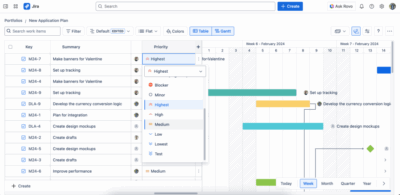
This feature ensures that your team knows which tasks to focus on first, reducing the risk of missing deadlines or working on the wrong priority in Jira.
5. Use Kanban/Scrum Boards for visibility
One of Jira’s strongest features is its visual task tracking boards, using Scrum boards for iterative development in sprints. Or, you can also use Jira Kanban boards for continuous work with a focus on managing flow. These boards offer a visual snapshot of task progress, allowing team members to see at a glance which tasks are completed, in progress, or yet to be started.
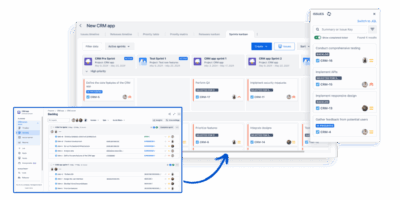
Additionally, boards also make it easier to spot bottlenecks or issues early. Kanban’s work-in-progress limits can help prevent team overload, ensuring that everyone stays focused on a manageable number of tasks.
6. Set realistic deadlines and track time
When setting deadlines for tasks in Jira, it’s important to be realistic about how much work can be completed in a given timeframe. Therefore, you should avoid setting tight deadlines that can lead to burnout. Instead, you can allow buffer time for unforeseen issues and ensure that team members have enough time to produce quality work.
Besides, Jira’s time-tracking features enable project managers to keep track of how much time is spent on each task. Monitoring time spent on tasks can provide valuable insights into workload distribution and help you adjust timelines if needed.
7. Keep the team informed with notifications
Jira allows users to set up notifications for task updates, which can be critical for keeping everyone informed. Whether it’s when a task is assigned to someone, moved to a new stage, or marked as complete, ensure that team members are notified when key changes occur.
However, it’s important to balance notifications so as not to overwhelm the team with unnecessary alerts. That’s why customizing notification schemes can ensure that only relevant updates are communicated, keeping the team focused and informed.
8. Regularly update task status
Regularly updating task statuses is crucial for maintaining clarity and accountability. Encourage your team to move tasks through the appropriate workflow stages as work progresses, so everyone is aware of the status at any given time.
As a result, this habit ensures that no task gets lost in the shuffle and that project managers can easily track the health of the project.
9. Monitor progress with dashboards and reports
Jira’s customizable dashboards and reporting tools provide a wealth of information on task progress, team performance, and project health. Project managers should use these tools to regularly assess how tasks are moving through the workflow, identify potential delays, and make data-driven decisions.
For example, using reports such as Burndown Charts or Velocity Charts can help Scrum teams track sprint progress. Meanwhile, cumulative flow diagrams can help Kanban teams identify process bottlenecks.
10. Use Jira add-ons and integrations
While Jira is powerful on its own, you can always enhance its functionality further through add-ons and integrations. For instance, tools like GanttTable add project portfolio management capabilities, allowing project managers to manage tasks alongside broader project timelines and dependencies.
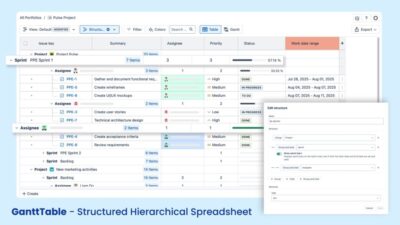
By integrating Jira with other tools like Slack or Trello, you can further streamline task management and improve team communication.
Conclusion
Effective task management in Jira is not just about creating tasks and checking them off—it’s about optimizing workflows, improving team collaboration, and ensuring timely project delivery. By following the tips outlined in this article, project managers can make Jira task management more efficient and ultimately drive project success.
Whether you’re managing small tasks or large-scale projects, leveraging Jira’s robust features—along with the right processes—will help your team stay focused, organized, and productive. With a bit of customization and careful planning, Jira can become a powerful tool in your project management toolkit.