For most Jira users, the platform is an excellent engine for tracking issues and sprints — but when it comes to visualizing timelines, balancing workloads, and managing cross-project dependencies, Jira’s native features often fall short. As teams scale and projects multiply, it becomes harder to answer simple questions like:
– “Who’s overloaded next week?” or “When exactly can we deliver this milestone?”
That’s where Jira add-ons step in. Tools like GanttTable and TeamBoard ProScheduler bring scheduling, visualization, and resource management directly into Jira. Both are products of DevSamurai, a partner known for building intuitive, productivity-focused extensions for Atlassian products.
Suppose you’re trying to decide which one fits your team’s workflow. In that case, this article breaks down the strengths, differences, and best-fit scenarios for GanttTable vs. ProScheduler, helping you choose the right approach for your organization.
Understanding GanttTable
GanttTable for Jira is a Forge-based app that combines the flexibility of a spreadsheet interface with the visual clarity of a Gantt chart. The goal of GanttTable is to give project managers a unified workspace where they can organize Jira issues, manipulate data, and plan timelines — all within the same tool.
1. Spreadsheet-style Jira work item management
At its core, GanttTable replaces Jira’s standard issue view with a grid-based layout that feels like working in Excel. You can manage all the issues — tasks, epics, bugs, and sub-tasks — in a table format, allowing for easy inline editing of custom fields, due dates, and assignees.
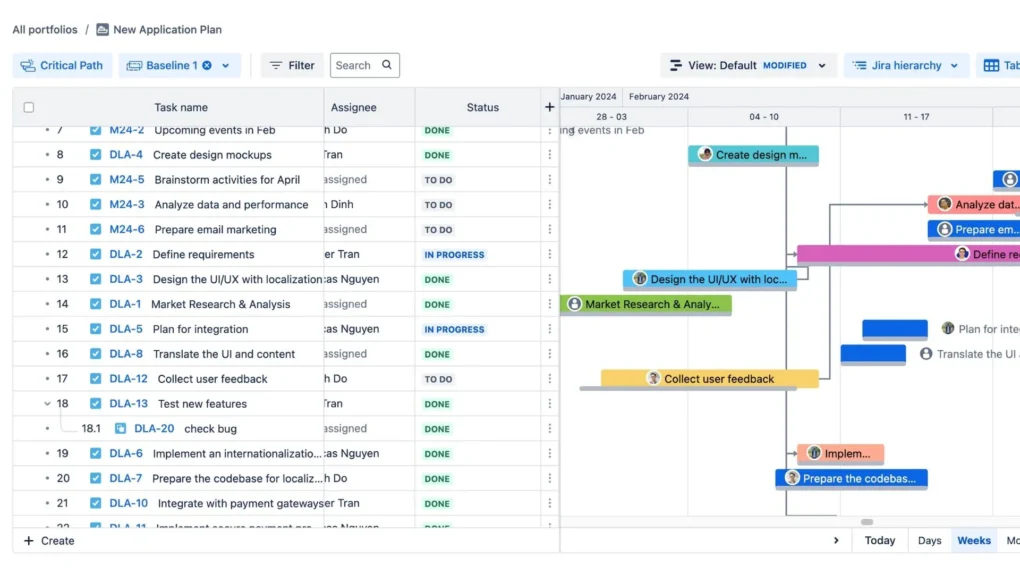
This interface is ideal for project managers who prefer working in a grid to keep track of large volumes of issues.
- Bulk edit: Quickly update multiple fields across various issues by copying and pasting data between rows or columns.
- Smart columns and formulas: Leverage built-in smart columns calculating values like remaining effort or time spent, saving time on manual tracking. For example, you can create formulas to compute the total estimated effort based on subtasks. Or, you can also automatically define a custom column that flags overdue issues.
2. Customizable hierarchies
GanttTable allows you to define custom issue hierarchies beyond the default Jira structure. This gives you the flexibility to organize your projects the way you see fit, whether by team, product, or any other custom field. These hierarchies can be easily visualized in the grid, ensuring that all tasks and sub-tasks are logically aligned.
- Hierarchical grouping: You can group tasks by any criteria (e.g., sprints, assignees, or custom labels), making it easier to break down complex projects into manageable pieces.
- Multiple views: Once issues are grouped, you can filter them based on specific attributes, providing better visibility into different project components.
3. Gantt chart for visualization
While GanttTable’s core is the advanced Excel-like table, it also provides a Gantt chart visualization for a more traditional view of timelines, dependencies, and milestones. This allows project managers to easily see when tasks start and finish and how they relate to one another across different projects.
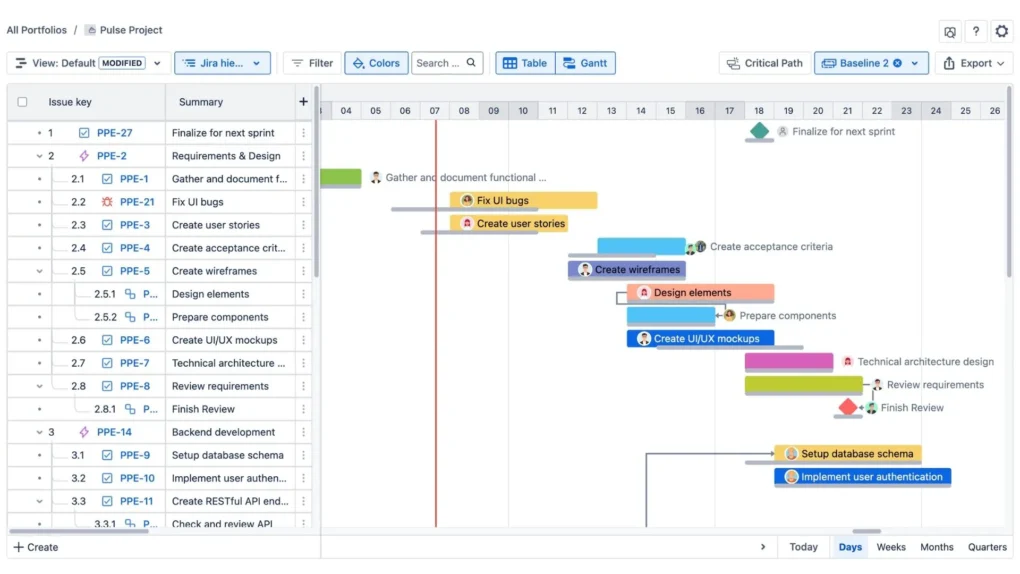
- Timeline management: Each Jira issue is represented by a bar on the Gantt chart, where you can set start and end dates. Dependencies between tasks are displayed, so you can identify bottlenecks or missed deadlines.
- Milestones and critical path: Highlight key milestones within your project and see how they align with the overall schedule. The critical path functionality shows which tasks are crucial for on-time delivery, helping you focus on what truly matters.
4. Portfolio management across multiple projects
GanttTable isn’t just limited to single projects. You can aggregate multiple Jira projects into one table, providing portfolio-level visibility. This is especially valuable for teams running multiple initiatives simultaneously.
- Cross-project planning: Consolidate tasks from various projects, set up dependencies between them, and ensure alignment.
- Centralized scheduling: View all projects in one place and ensure that deadlines are met, resources are allocated properly, and team efforts are aligned.
Understanding Teamboard ProScheduler
TeamBoard ProScheduler is a feature-rich project, resource, and time management app for Jira that goes far beyond traditional Gantt charts. Unlike GanttTable, which focuses more on managing tasks on the fly, ProScheduler is built for teams that need to manage people as well as projects.
With enhanced resource planning, time tracking, and portfolio oversight, ProScheduler is designed for enterprise-level project and program managers.
1. Comprehensive resource and task scheduling
ProScheduler enables you to plan and manage resource capacity across multiple projects. You can define each team member’s working hours, availability, and time off to ensure no one is overloaded.
- Custom working hours: Set custom work hours for different teams or individuals based on their availability and roles.
- Holiday & absence management: Easily manage and track team members’ holidays, vacations, or leaves to ensure that absences do not impact your schedules.
- Workload view: The heatmap-style visualization shows when resources are over- or under-utilized, helping you adjust allocations early and prevent delays.
- Schedule board: A calendar-like board allows you and your members to allocate resources and plan tasks.
2. Powerful WBS Gantt and timeline management
Just like GanttTable, ProScheduler provides a Gantt chart for visualizing tasks, but it offers deeper functionality for scheduling and resource planning. ProScheduler’s Gantt chart integrates resource allocation alongside task timelines, providing a more holistic view of your project’s progress.
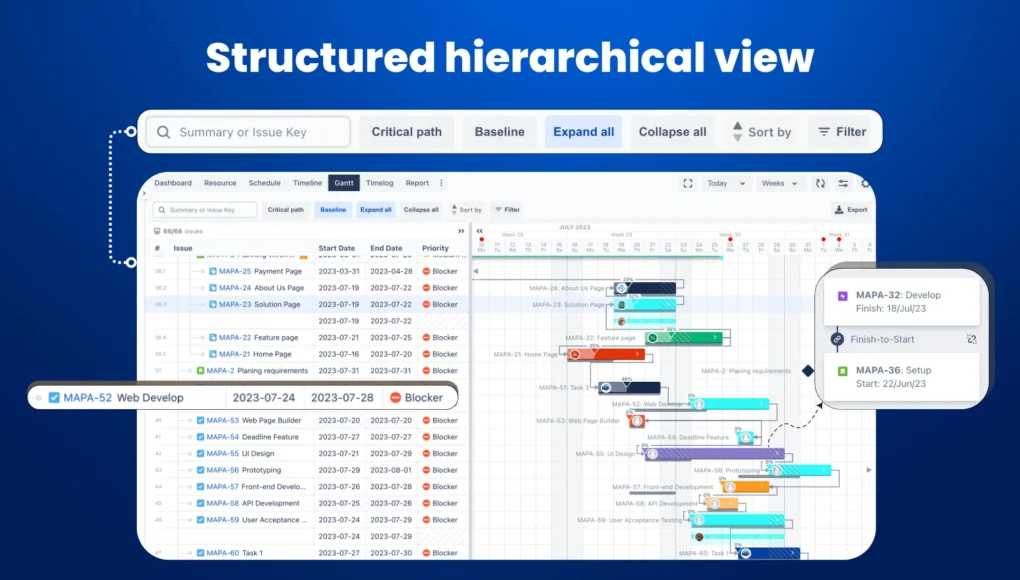
- Drag-and-drop scheduling: You can adjust task schedules, shift resources, and change timelines with simple drag-and-drop functionality.
- Dependencies and critical path: You can define dependencies between tasks, set milestones, and view the critical path to determine the impact of any delays.
3. Resource utilization tracking
One of the standout features of ProScheduler is utilization tracking. Unlike GanttTable, which primarily focuses on managing tasks and timelines, ProScheduler helps you ensure that your team’s capacity is being used effectively.
Additionally, you can get a utilization dashboard for an at-a-glance view of your team’s capacity utilization and adjust workloads as needed.
4. Portfolio and program management
ProScheduler isn’t just for individual projects; it is designed for managing programs and portfolios. Therefore, it becomes a great choice for large organizations with multiple, interdependent projects.
- Portfolio dashboard: Get a comprehensive view of all ongoing projects, track their progress, and adjust schedules across the portfolio.
- Cross-project scheduling: ProScheduler allows you to set up schedules across multiple projects and manage resource allocations without having to track each project individually.
GanttTable vs. ProScheduler: Side-by-side comparison
| Feature | GanttTable | ProScheduler |
| Timeline visualization | Support a dedicated Gantt chart | Schedule board, timeline, and workload view |
| Work item hierarchies | Highly customizable hierarchies | Simple hierarchy view |
| Customization | Smart columns, custom structures | Custom fields, team calendars, filters |
| Portfolio management | Supported custom hierarchies across multiple projects | Built-in portfolio dashboards |
| Resource management | Limited, with basic assignments | More advanced with capacity, holidays, and workload charts |
| Grouping | Support grouping by project, assignee, or status | Support grouping by project, assignee, or status |
What about the cost?
Pricing can be a deciding factor, especially for startups and mid-sized teams.
GanttTable
As of late 2025, GanttTable is still in public beta, making it free for all Jira Cloud users. The vendor has announced that when Atlassian’s new user-based pricing model takes effect, GanttTable will move to a paid plan — but only active users (those who actually open and use the app) will count toward billing.
This usage-based model could make it very cost-effective for organizations with large Jira user bases but smaller planning teams.
ProScheduler
ProScheduler follows a standard tiered pricing model:
- A free plan is available for up to 10 users (Cloud version).
- From $1.25 per user/month for 11–100 users, decreasing with volume.
Data Center pricing follows Atlassian’s app structure, typically based on user tiers.
While ProScheduler costs more overall, it offers more comprehensive functionality: workload views, time tracking, and multi-project dashboards.
GanttTable vs. ProScheduler: which tool to go for?
The right answer depends on your organization’s maturity level and management style. Here’s how to decide like a project manager.
Choose GanttTable if you:
- Prefer a spreadsheet-driven workflow to manipulate data quickly.
- Need timeline visibility but not detailed resource tracking.
- Manage smaller teams or independent projects that rely on flexibility.
- Want a modern, Forge-based Cloud app with minimal configuration.
- Value a clean UI and straightforward usability over deep analytics.
Think of GanttTable as a modern planning canvas — agile, intuitive, and great for scenario testing or planning backlogs visually. It’s particularly strong for product owners, Scrum masters, or project coordinators who want to visualize issue timelines without turning Jira into a full PPM system.
Choose ProScheduler if you:
- Need resource and task planning across multiple teams.
- Want to monitor actual vs. planned time and forecast workload distribution.
- Manage large, multi-phase projects or programs where resource allocation drives delivery timelines.
- Require dashboards and reporting for executives or clients.
- Operate in hybrid or enterprise environments (Cloud and DC).
ProScheduler shines for project and resource managers running complex portfolios where people’s availability is the primary constraint. It brings the rigor of classic resource management — something Jira lacks natively — without leaving your Jira environment.
Conclusion on GanttTable vs. ProScheduler
When evaluating GanttTable vs. ProScheduler, the right choice depends on your team’s needs.
GanttTable is ideal for teams looking for a flexible, visual planning tool with a simple spreadsheet-style interface. It’s perfect for managing timelines, task dependencies, and multiple projects without the need for deep resource tracking or time management.
On the other hand, ProScheduler is built for teams that require advanced resource management, workload balancing, and in-depth time tracking. It’s designed for managing multiple projects and resources, making it suitable for enterprise-level operations.
Ultimately, both tools enhance Jira’s project management capabilities, but GanttTable suits smaller teams or those focused on task organization. Meanwhile, ProScheduler is better for teams needing comprehensive resource and time management.
Try both to determine which tool best aligns with your team’s workflow and project management needs.