Moving to Atlassian Isolated Cloud solves a security problem. It does not, however, make your projects run themselves. Teams that move into an isolated environment still have deadlines, still have dependencies, and still have a manager somewhere asking why the timeline slipped. They still need to see their work laid out against a calendar.
The Gantt chart is the default way to do that. Bars, dependencies, milestones, and a line marking where “today” sits: it is the shared language of project planning, and that need doesn’t vanish when you move into a locked-down environment.
Here is the catch. Isolated Cloud is deliberately restrictive, so you cannot simply grab the first Gantt app you find on the Marketplace and install it. In this environment, getting a Gantt chart is less about which chart looks nicest and more about which app is even allowed through the door.
This article walks through why the need exists, why most tools cannot meet it here, and what to look for.
A quick look at Atlassian Isolated Cloud
Isolated Cloud is Atlassian’s single-tenant cloud offering. Instead of sharing a platform with every other Atlassian customer, one organization gets a dedicated instance running on infrastructure set aside just for it.
That includes dedicated compute, storage, and networking inside its own virtual private cloud, with data residency and strict egress controls built in. It is aimed at regulated organizations that want the cloud without sharing walls with anyone else.
The part that matters for this article is a side effect of that design. The same isolation that keeps your data walled off also limits which apps are permitted to run inside the environment. That one fact is what turns “add a Gantt chart” from a two-minute install into an actual decision.
Why choose a Gantt chart for Isolated Cloud over Data Center
Almost every team that lands in this segment is already running Gantt charts somewhere. And for most of them, that somewhere is Atlassian Data Center.
So the real question is not whether they need timelines. It is where that planning work should live now. A few reasons point toward Isolated Cloud.
1. The clock is the forcing function
Data Center reaches end of life on March 28, 2029. Any Gantt setup running there is on borrowed time, whether it feels like it today or not. Therefore, Isolated Cloud is the route that lets a team modernize without giving up the isolation that kept them on Data Center in the first place.
2. Same isolation, far less to maintain
On Data Center, you own the servers, the patching, the scaling, and the security perimeter, which can be a lot of plumbing to keep an eye on.
On the other hand, Isolated Cloud keeps the dedicated-infrastructure isolation but hands the day-to-day operational load to Atlassian: managed updates, platform-level security, and no hardware to babysit. You get to keep the detached house without personally fixing the pipes every winter.
3. You are re-selecting apps anyway
Data Center apps are built for the self-hosted platform and do not carry over one-to-one, because cloud uses a different app model. As a result, migration almost means you need a fresh choice of Gantt tooling. That makes it the natural moment to pick a tool designed for the isolated environment, rather than trying to rebuild a server app in a place it was never meant to live.
4. Residency and egress stop being your job
On Data Center, you enforce residency by controlling where your servers physically sit. That means the responsibility rests entirely on your shoulders. Meanwhile in Isolated Cloud, residency and egress control are properties of the platform, so your Gantt and project data inherit those guarantees without you running the infrastructure that provides them.
However, none of this is a free lunch. Isolated Cloud costs more than self-hosting in license terms and comes with a smaller app catalog. For the planning workload specifically, the trade is straightforward. You swap do-it-yourself control for managed isolation and a supported path past 2029.
The catch: why most Gantt apps cannot run in Isolated Cloud
Here is where good intentions meet a locked door. To run inside Isolated Cloud, an app has to meet the Runs on Atlassian bar. In plain terms, that means it must be on Atlassian’s Forge platform, use only Atlassian-hosted compute and storage, and match the host product’s data residency.
All of that while declaring no external data egress in its manifest, something Atlassian can check directly through the Forge command-line tool.
Still, most established Gantt and roadmap apps do not clear that bar, and not because they are badly made. They are simply from an earlier era. A large share of the popular ones are Connect-era apps that route your project data to their own servers to do the heavy lifting.
That design is perfectly normal on commercial cloud and completely disqualifying inside an isolated environment, where data leaving the boundary is exactly what you paid to prevent.
The result is a bit of a mirage, and the Marketplace still looks packed with timeline and roadmap tools. However, once you filter for what can actually run in Isolated Cloud, the shelf for this category thins out fast.
What to look for in a Gantt solution for Isolated Cloud
If you are choosing a tool for this environment, the checklist splits into two halves. The first half is about whether the app is allowed in at all. The second is about whether it is any good once it is there. Both matter, because passing the security bar with a weak feature set just leaves you with a compliant tool nobody wants to use.
On eligibility, you should look for an app that is Forge-native and carries the Runs on Atlassian badge. Such apps keep all of their data on the Atlassian platform and do not send anything out over external egress. On residency, confirm it respects the region your environment is pinned to.
Besides, you can hold it to the same standard you would anywhere else for capability. A real Gantt tool handles task dependencies, auto-scheduling, milestones, baselines, and critical path. It also scales up to portfolio-level timelines across multiple projects, whereas a pretty timeline that cannot model dependencies is a picture, not a planning tool.
GanttTable: a tailor-made Gantt chart for Isolated Cloud
Both tests above, allowed in and actually capable, are the ones GanttTable for Jira was built to pass. It is worth taking them in that order, because eligibility is the test that trips up most of the competition.
1. What makes GanttTable applicable for Gantt chart for Isolated Cloud
GanttTable was entirely Forge-ready from day one, so there was no older version to retrofit or awkwardly bolt on. It carries the Runs on Atlassian badge, runs with no third-party servers, and stores all of its data on the Atlassian platform, with egress under the customer’s control.
So basically, it is already live on Isolated Cloud as one of a limited set of planning tools that qualify, which is less a marketing line than a direct result of its engineering. An app that keeps everything inside Atlassian’s infrastructure was always going to have an easy time getting in.
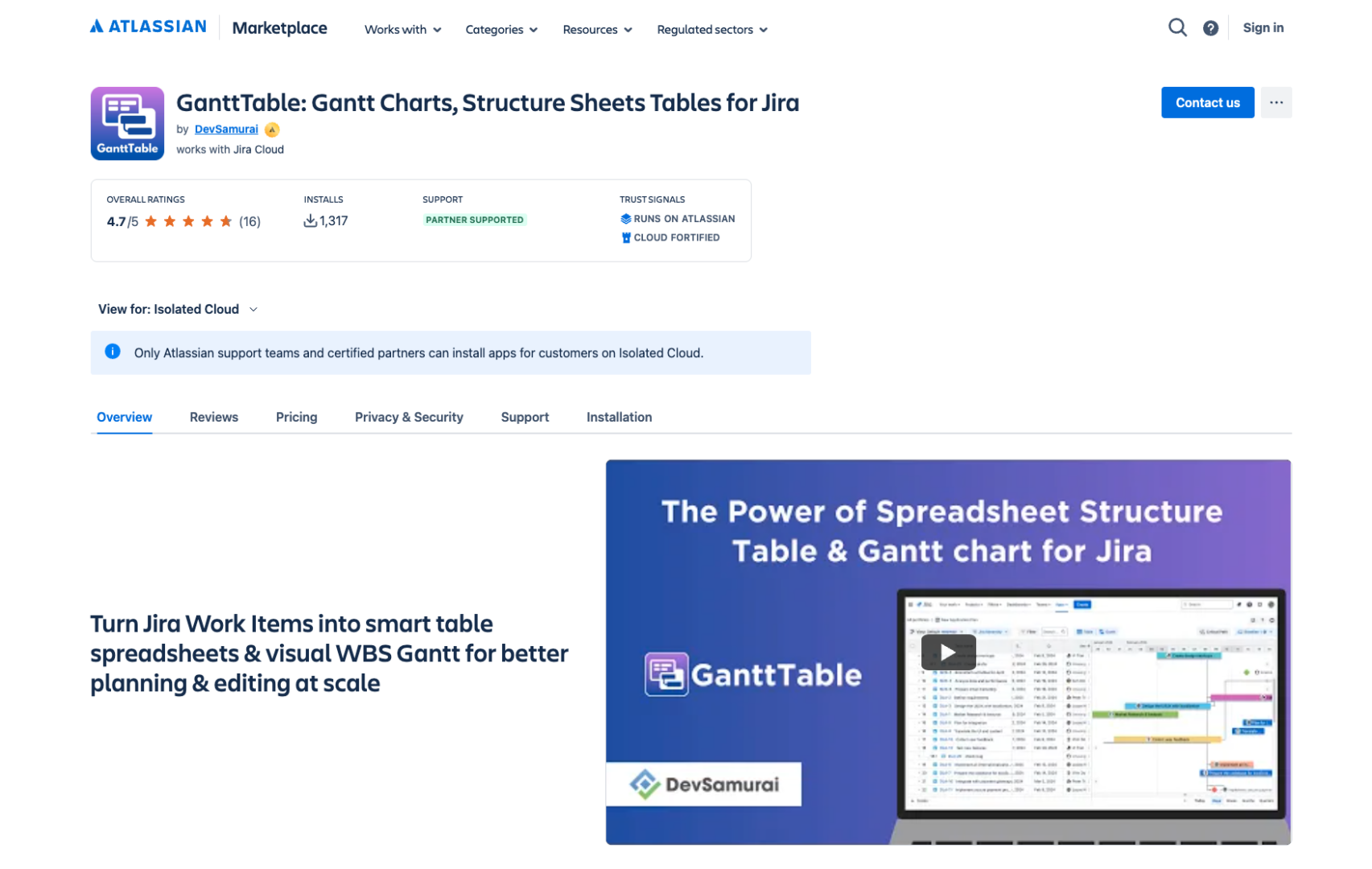
For a bit of extra proof, the same properties let GanttTable clear an even stricter bar: Atlassian Government Cloud, which is authorized at FedRAMP Moderate and enforces NIST 800-53 controls. Passing that regime is a fairly convincing way to show architectural fit for isolation without simply claiming it.
2. Why go with GanttTable to visualize your projects in Isolated Cloud
Clearing the security bar would not mean much if the tool could not plan a project. Here are the core capabilities and what each one means once you are working inside Isolated Cloud.
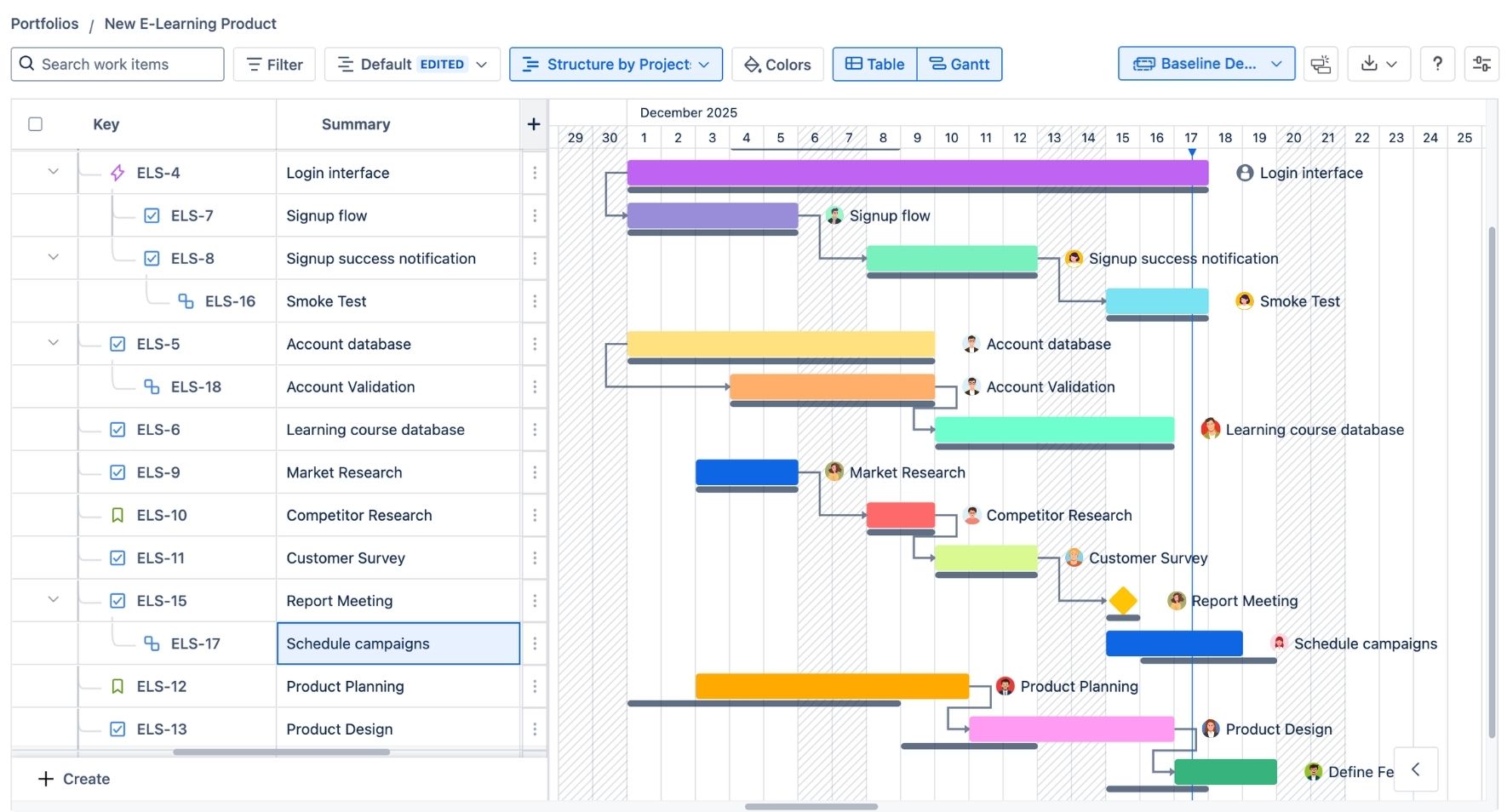
- Table and Gantt in one view: A spreadsheet-style grid sits next to the timeline, so you can edit work like a sheet and read it like a chart. Both render Forge-side, with no outside service touching your issues.
- Gantt chart and roadmap: GanttTable turns Jira work items into a visual timeline and roadmap. The rendering happens in-environment, so your schedule and project structure are never shipped off to an external charting server.
- Task dependencies: You can map relationships using default or custom work-item links. The dependency data lives on Atlassian-hosted storage, not in some vendor database across the internet.
- Auto-scheduling: This feature automatically adjusts task dates and downstream tasks when the original plan shifts. The scheduling logic runs inside Forge, so recalculating a timeline never sends your data out to do the math.
- Milestones and baselines: Milestones mark the dates that matter; baselines snapshot the original plan, including start and finish dates, durations, and dependencies. Those snapshots sit on the Atlassian platform next to the live data. As a result, historical plans get the same residency and egress protection as everything else.
- Critical path: Highlights the chain of tasks that decides your finish date. It is calculated in-environment, so analysis of your most sensitive timeline stays put.
- Portfolio and multi-project timelines: Tracks progress across several Jira projects on one board. Cross-project rollups, often the most revealing view a company has, stay inside the tenant boundary.
- Custom hierarchies and saved views: Build a Work Breakdown Structure or a custom hierarchy, then save views or set a default for the whole team. Even the view definitions are stored Forge-side.
The point of all this is not the length of the feature list. It is the absence of a step backward. In an environment built specifically to keep data from wandering off, GanttTable lets a team keep full project visualization without reopening the egress or residency exposure that isolation was meant to close.
You do not have to choose between planning your projects properly and keeping a clean security posture.
Conclusion
Inside Isolated Cloud, the right Gantt tool is the one that is both permitted to run and genuinely capable of the work. Those are two separate tests, and plenty of well-known apps pass the second while failing the first.
GanttTable is one of the few that clears both, which is why it can sit inside the boundary. And it can still give a regulated team the timelines, dependencies, and portfolio views they had before the move, minus the servers they used to maintain and the 2029 deadline hanging over them.