If you’re moving to Atlassian Isolated Cloud, a user story map is one of the tools you’ll want to bring with you. The good news: you can. ProductGo runs a full user story map inside Isolated Cloud, so your planning stays exactly where your security team wants it, inside the boundary.
This guide is for teams migrating to Isolated Cloud, mostly from Data Center, and for anyone who wants tighter control over where their planning data lives. We’ll cover what a story map is, what changes when you move, and how ProductGo handles it.
Let me be upfront about one thing: yes, we make ProductGo. But we’ve tried to keep this honest, including the parts that aren’t perfect. You’ll see them below.
What is a user story map, and why does it matter in Jira?
A user story map is a visual layout of your product, organized by the user’s journey rather than a flat list of tickets. You arrange the big goals across the top and break the work down beneath each one, so you can see the whole product at a glance.
The layout usually has three levels:
- Goals sit at the top and represent what users are trying to accomplish.
- Activities or epics sit below each goal and describe the larger areas of work required.
- User stories make up the bottom layer and represent the specific features or tasks the team delivers.
Read left to right; it’s the user’s journey. Read top to bottom; it’s your priorities.
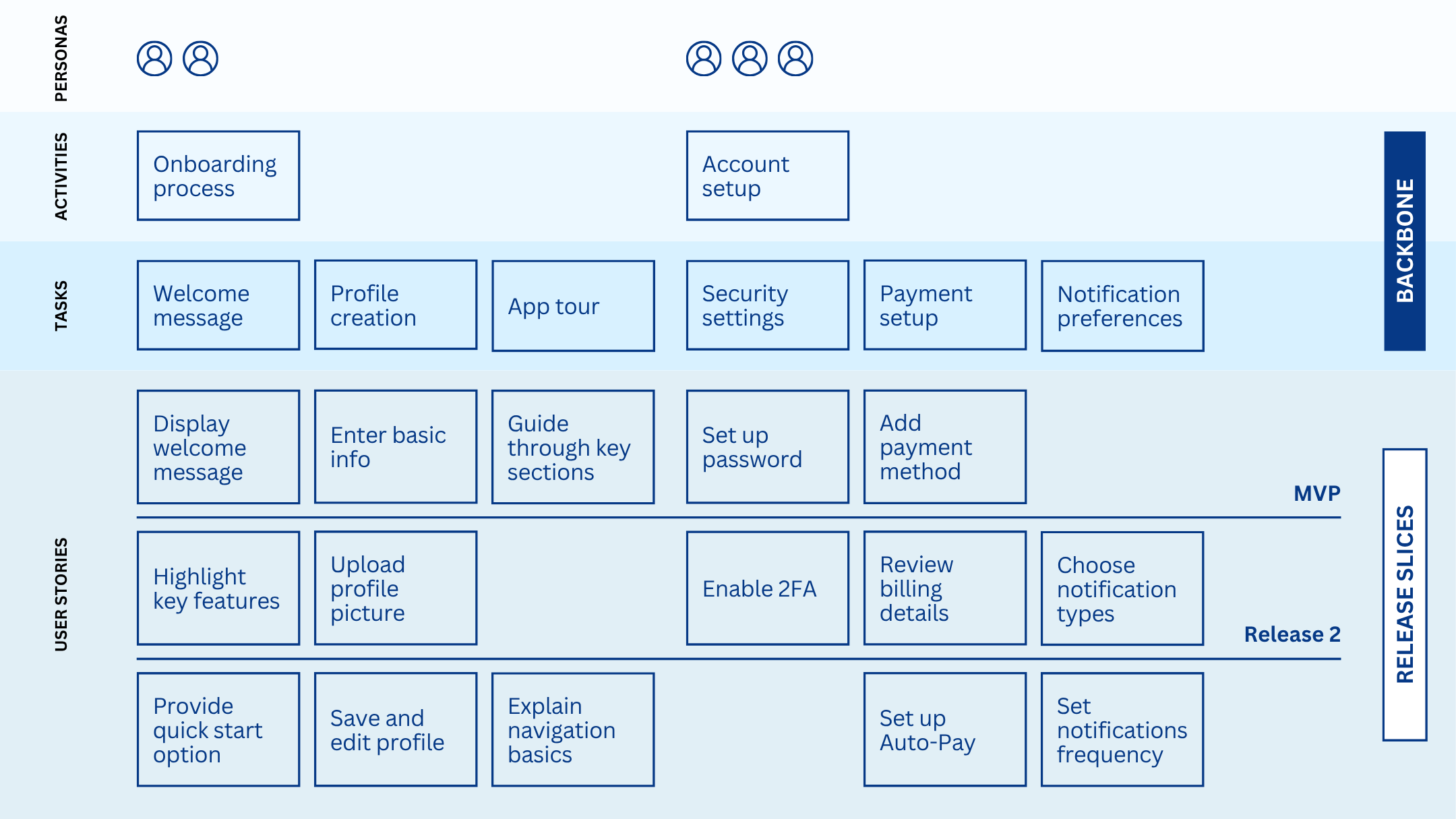
Here’s why it matters. A plain Jira backlog is a long vertical list. It’s great for tracking tickets and less great for seeing the bigger picture. A story map turns that list into something you can actually read, which makes prioritizing and release planning far easier.
In my experience, the moment a team sees their backlog as a map, the conversation changes. People stop arguing about individual tickets and start talking about the product. That shift alone is worth the effort.
What happens to your story maps when you migrate from Data Center to Isolated Cloud?
Short answer: your story maps move with you, with a few differences in the Isolated Cloud version.
Migrating is also the natural moment to rethink your whole app stack. Not every Data Center app has an Isolated Cloud version yet, so it’s worth checking each tool you rely on before you move.
The core story mapping experience remains available. Your product structure, roadmap planning, and visual organization continue to work in Isolated Cloud.
The main differences come from features that require information to leave your environment. Since Isolated Cloud is designed around a strict security boundary, some capabilities that depend on external services or external sharing work differently.
One thing we’ve noticed working with Data Center teams: the story map is often the tool people worry about most, because it holds the shape of the whole product roadmap. The relief when they realize it comes across, and stays inside their new secure environment, is usually the moment the migration stops feeling scary.
→ Read more: Atlassian Data Center vs. AGC vs. Isolated Cloud
Can you use a story mapping tool in Atlassian Isolated Cloud?
Yes, but the application must be built specifically for Isolated Cloud.
Unlike the standard Atlassian Marketplace, Isolated Cloud only supports apps that meet its requirements. Applications need to be built on Atlassian Forge and carry the Runs on Atlassian designation, meaning they operate entirely within Atlassian’s infrastructure rather than relying on external hosting.
That’s why the Isolated Cloud app catalog is smaller than the standard Marketplace. Each app has to be rebuilt specifically for this environment. That creates a smaller but more controlled ecosystem. The limitation exists because the same boundary that restricts app availability is also what helps protect customer data.
ProductGo is one of the apps already available on Isolated Cloud. So a user story map isn’t something you have to give up when you choose to prioritize control.
How ProductGo delivers user story mapping in Isolated Cloud
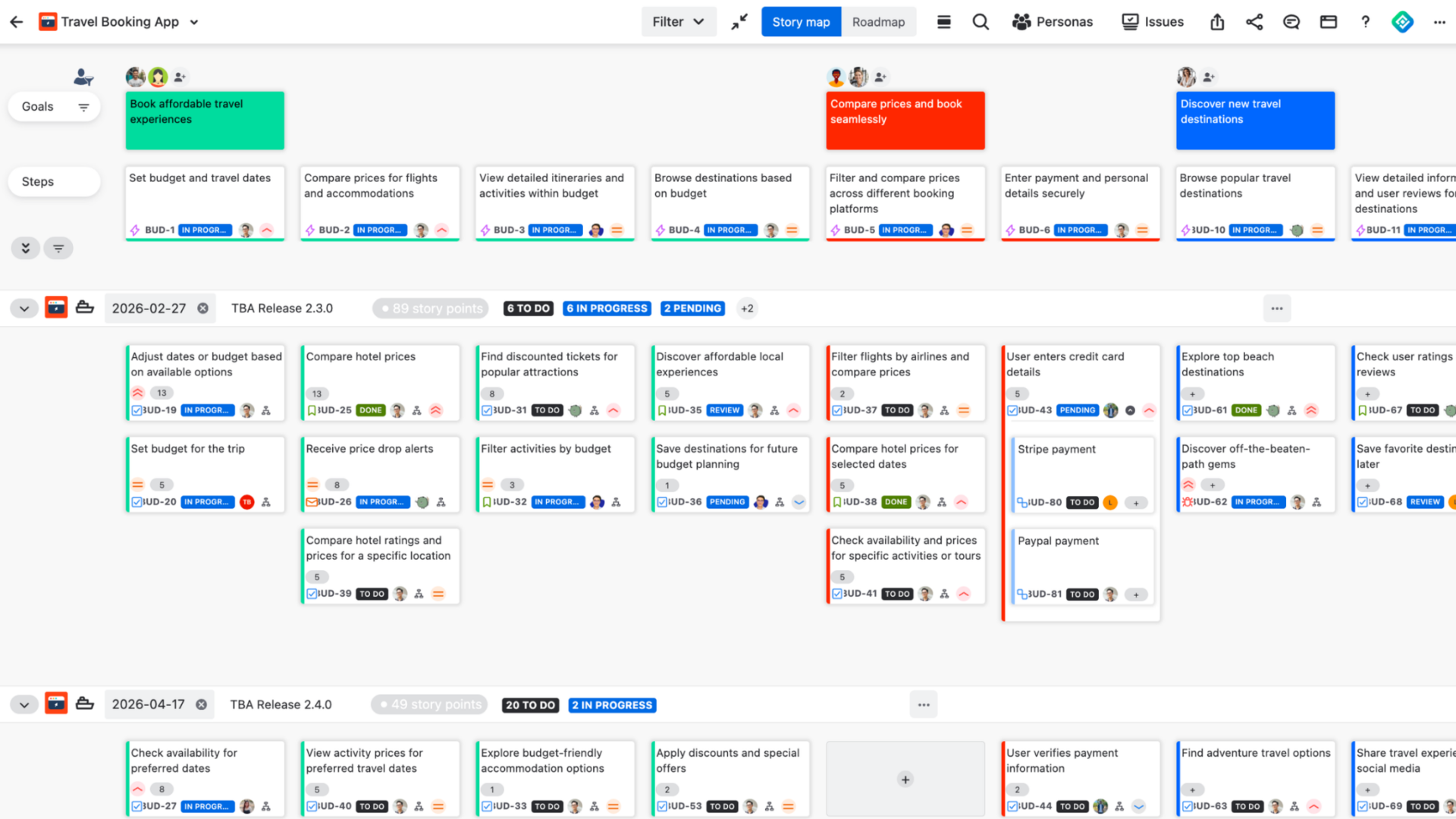
ProductGo brings a complete visual story mapping experience directly into Jira. In Isolated Cloud, those capabilities operate within your secure Atlassian environment.
Here’s what you get:
- Visual story maps. Lay out your product as a map of the user’s journey, with a goal layer sitting on top of your Jira epics for multi-level planning.
- Personas. Build detailed user personas and attach them to your work, so the team stays focused on real users.
- Roadmaps. Plan releases and track your timeline with milestones and dependencies.
- Portfolio view. Combine multiple projects into one board for cross-team planning.
The part that matters most for Isolated Cloud teams: Because ProductGo is a Runs on Atlassian application, your story maps, personas, and roadmaps remain inside your Atlassian environment. The application does not need to send your planning data to external servers in order to function.
What changes in the Isolated Cloud version of ProductGo?
A few features work differently in Isolated Cloud. Each difference comes from the same underlying principle: protecting the boundary of the environment.
These are not random feature reductions. They are features that would normally require information to move outside your environment.
Here’s the honest list:
- Public sharing of a story map board is not available.
- AI-generated story maps are not available.
- Story maps can’t be shared through the Confluence macro.
- Personas use predefined avatars only, with no external image upload.
- Kanban isn’t available yet.
If you’re moving from Data Center, that list should be a relief. Four of the five (except Kanban) were never part of the Data Center edition, so you won’t feel their absence when you switch. It’s hard to miss what you never had.
If you’re coming from Commercial Cloud instead, the full list matters more, since Commercial Cloud does have AI, sharing, and Kanban.
→ Read more: Running ProductGo in Isolated Cloud: What Changes and What Doesn’t
How to plan your story mapping migration
A little prep makes this painless. Here’s a simple order of operations:
- List the story mapping features your team uses every week.
- Check that list against what the Isolated Cloud version supports.
- Flag anything that relies on external sharing or AI, and decide whether it’s essential.
- Confirm ProductGo and your other apps are available on Isolated Cloud.
- Migrate, then rebuild or re-import your maps and personas.
If everything your team depends on is supported, the move tends to feel like a non-event, which is the best kind of migration there is.
Continue your story mapping journey in Isolated Cloud
Moving to a more secure cloud environment does not mean giving up the planning tools your product teams rely on.
With ProductGo, teams can continue creating user story maps, managing personas, planning releases, and aligning product decisions inside Atlassian Isolated Cloud.
The migration decision is not just about moving data from one place to another. It is about choosing an environment where your teams can keep working effectively while meeting the security requirements of your organization.
If you are preparing a move to Isolated Cloud and want to confirm whether your current story mapping workflow is supported, reach out to us. We are happy to help you review your setup.
Frequently asked questions
Is ProductGo available on Atlassian Isolated Cloud?
Yes. ProductGo is available on Isolated Cloud as a Forge app with the Runs on Atlassian badge.
Does story mapping data leave the Isolated Cloud boundary?
No. Because ProductGo runs entirely inside Atlassian’s infrastructure, your story maps, personas, and roadmaps stay within your Isolated Cloud environment.
Will I lose my story maps when I migrate from Data Center?
No. Your story mapping carries over to the Isolated Cloud version, with a few feature differences noted above.
Is ProductGo a Runs on Atlassian app?
Yes. The Isolated Cloud version of ProductGo is built on Atlassian Forge and carries the Runs on Atlassian designation.
Why is the Isolated Cloud app catalog smaller?
Because every app must be rebuilt on Forge to run inside the isolated environment, so only apps designed for it are available.
What’s the difference between a user story map and a Jira backlog?
A backlog is a flat, prioritized list of work. A user story map organizes that same work visually by the user’s journey and by priority, so you can see the whole product and plan releases, not just the next ticket.
Do I need a separate app for story mapping in Jira?
Jira handles backlogs and boards well, but it doesn’t offer true user story mapping on its own. An app like ProductGo adds the visual, journey-based view on top of your existing Jira issues.