
We are back with a big update for GanttTable version 3.10.0 this December 2025. In this new release, you can expect the smart column to be enhanced with Custom formulas, copying and pasting values while selecting multiple cells, and many more exciting new features.
New features in GanttTable version 3.10.0
1. Smart column and Custom formulas
In this new version, GanttTable users can use the Smart column to show calculated or derived information of two Jira work item fields in the details, depending on the Type, Sum-up style, and Jira fields.
To top it up, we also added Custom formulas to make these smart columns even better. With this new feature, you can create custom values without needing to create custom work item fields.
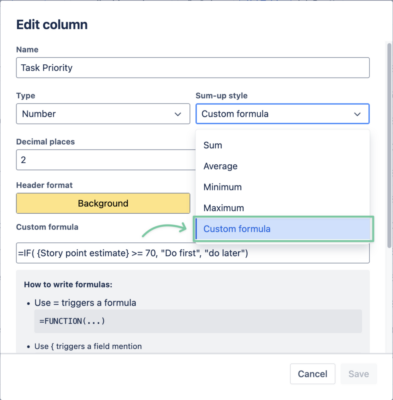
Just use functions such as IF, SUM, AVERAGE… and choose available Jira fields, making it an Excel or Google Spreadsheet, but for Jira.
2. Select multiple cells and copy/paste values
In GanttTable version 3.10.0, you can select multiple cells in the table using the cursor or hotkeys. For example, you can hold Shift and use the arrow keys to navigate the cells you want to select.
Combining with the app’s new Copy/Paste ability, you can make bulk editing cells quick and simple. Just keep in mind that these cells share the same value, so the copy and paste feature can work properly.
3. Attachment and Comment columns
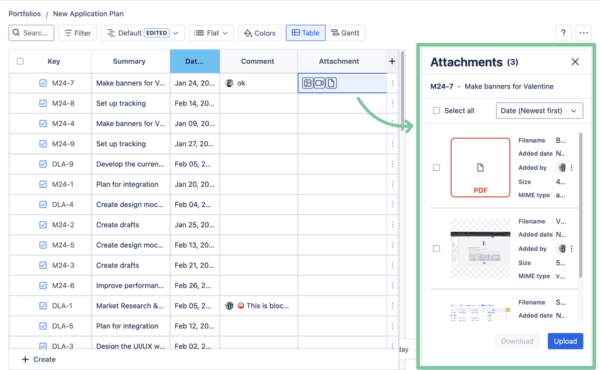
We added a section that lets you preview a work item’s attachments and comments. In this Attachment area, you can easily upload, delete, or download files, images, and videos.
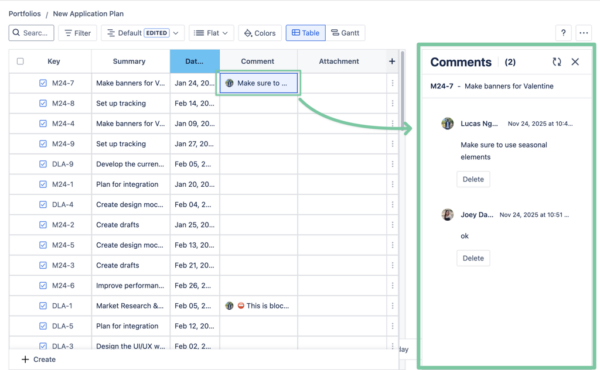
You can also view Comments at a glance to quickly read notes from your team.
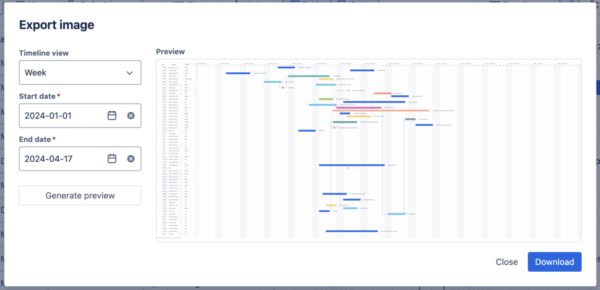
4. Export GanttTable as PNG
Last but not least, users can now export GanttTable boards as PNG images for external purposes. This means including both the Table and Gantt views on the same page for a complete overview of task management and timeline.
Improvements
Along with these new features, we also implemented improvements to enhance your experience with GanttTable:
- UI improvements
- Performance improvements
That’s all for what to expect in the new version of GanttTable. If you have any questions or need further assistance, please feel free to send us an email at [email protected] or create a ticket in the Support Desk.