Here’s something that catches a lot of project managers off guard in their first week on Atlassian Isolated Cloud: there’s no work breakdown structure (WBS) in the box. Jira has never had a native WBS, and the workarounds teams rely on in standard Jira Cloud don’t all make the trip into Isolated Cloud.
That’s awkward timing. The organizations buying Isolated Cloud tend to work in regulated industries, where contracts and audits often expect a proper WBS. Telling an auditor “it’s mostly in our epics” rarely goes down well.
This article covers what a WBS needs, how teams usually build one in standard Jira Cloud (Jira Plans included), why those options fall short in Isolated Cloud, and how GanttTable gives you a complete, numbered WBS that stays inside the boundary.
A quick look at Atlassian Isolated Cloud
Atlassian Isolated Cloud became generally available on June 29, 2026. It gives one organization its own dedicated environment, with separate compute, storage, and networking, instead of sharing infrastructure with other Atlassian customers. Data egress is blocked by default, and customers can bring their own encryption keys. If you want the full tour, start with Introducing Atlassian Isolated Cloud.
For this article, one detail matters more than the rest: which apps are allowed in. Isolated Cloud only runs apps built on Forge, Atlassian’s app platform where apps run on Atlassian’s own infrastructure. You can only install apps listed in the Isolated Cloud collection on the Marketplace. Keep that in mind, because it comes back later in this article.
What a work breakdown structure actually is
A work breakdown structure is a hierarchical breakdown of the total scope of a project, organized around what the project delivers. You start with the final result at the top, split it into major deliverables, then split those again until each piece is small enough to estimate, assign, and track.
Four rules that make a WBS a WBS
- The 100% rule. Each level contains all of the scope of its parent, and nothing extra. If the children don’t add up to the parent, something is missing, or something has wandered in.
- No overlaps. Each piece of scope appears in exactly one place, so nothing gets counted, built or paid for twice.
- Nouns, not verbs. Elements are named after deliverables (“Login module”) rather than activities (“Build the login page”). The activities come later, in the schedule.
- Work packages at the bottom. The lowest level holds work packages, small enough to estimate with a straight face. A common rule of thumb is between 8 and 80 hours of effort each.
The parts people forget
A proper WBS also comes with a few extras that make it useful beyond the kickoff meeting:
- WBS codes such as 1, 1.2 and 1.2.3, so anyone can point to an exact piece of scope.
- A WBS dictionary that describes what each element includes and excludes.
- A baseline, the approved version of the scope that changes are measured against.
- Where a formal WBS is required
In some industries, a WBS isn’t a nice-to-have. Defense contracts often follow MIL-STD-881 WBS templates. Earned value management, used on many government and large engineering programs, is built on WBS elements.
Additionally, pharma and medical device teams use it to show that a validated release covered everything it claimed to. These are, not by coincidence, the same kinds of organizations that buy Isolated Cloud.
How teams build a WBS in Jira Cloud
In (multi-tenant) Jira Cloud, nobody gets a WBS out of the box either. Teams usually piece one together from three parts.
1. Jira’s built-in hierarchy
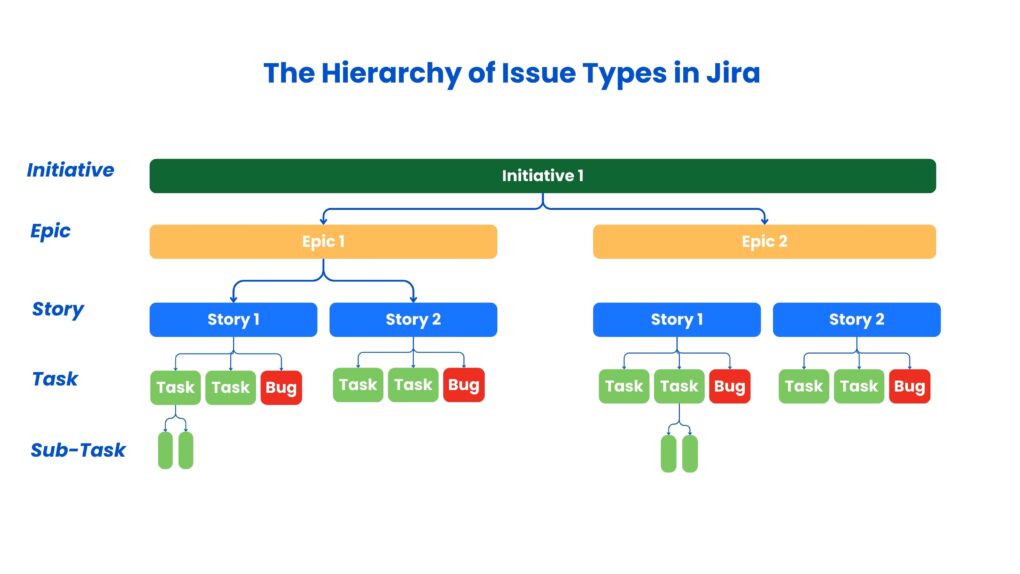
Epic at the top, then Story, Task, and Bug, then Sub-task. It’s great for running delivery, but it’s organized by work type rather than by deliverable; the same levels apply to the whole site, and there are no WBS codes. Many teams simply call their epics deliverables and hope nobody looks too closely.
2. Jira Plans
Jira Plans (formerly Advanced Roadmaps) comes with Jira Premium and Enterprise. It pulls work from several boards, projects, and filters into one plan, and admins can add hierarchy levels above Epic, such as Initiative. It also handles dependencies, team capacity, and what-if scenarios.
Although Plans is the closest thing Jira has to a WBS, it’s built to answer “when will this ship?” rather than “what exactly are we delivering?” It has no WBS codes and no check that the children of an item cover all of its scope.
Besides, its extra levels apply to every project on the site, and its scenarios are sandboxes for trying ideas, not approved baselines.
3. Marketplace WBS and portfolio apps
To fill the remaining gaps, many teams add a portfolio or WBS app from the Marketplace. There’s plenty of choice, but many of these apps were built in the Connect era, when apps processed your data on the vendor’s own servers. In standard Cloud, that’s business as usual.
Put together, Plans and a Marketplace app give standard Cloud teams a workable WBS. In Isolated Cloud, both pieces get much harder to come by.
Why it’s important to use a WBS in Isolated Cloud
Moving to Isolated Cloud is usually a decision about control: who can see your data, where it lives, and what can leave. A WBS brings the same kind of control to your project scope. In this environment, it matters more, not less.
1. Auditors and contracts expect it
Teams in defense, government, pharma, and finance often have to show exactly what a project covers, and prove that nothing was added or dropped without approval. A numbered WBS with an approved baseline gives them that evidence. A list of epics usually doesn’t, however neatly it’s named.
2. Your scope record should live where your data lives
If the WBS sits in a spreadsheet on someone’s laptop, the most complete picture of your project lives outside the environment you paid extra to lock down. It also goes stale the moment someone changes a ticket in Jira. Keeping the WBS inside Isolated Cloud keeps it both secure and current.
3. Jira’s own tools only get you part of the way
Jira’s hierarchy is organized by work type, not by deliverable. Jira Plans adds levels above Epic, but Atlassian’s list of supported Isolated Cloud features doesn’t mention Plans, and even where Plans is available, it has no WBS codes or completeness check. Without a deliberate WBS, scope ends up scattered across epics, and nobody can say for sure what’s in or out.
GanttTable: a complete WBS for Isolated Cloud
GanttTable for Jira is a Forge-native app that combines a spreadsheet-style table with a Gantt chart, and it’s available in the Isolated Cloud collection. All of its data stays on the Atlassian platform, so your WBS lives inside the same boundary as the Jira work it describes. The Gantt chart for Isolated Cloud article explains why it qualifies.
It closes both gaps at once: it gives you the WBS structure that Plans doesn’t, inside an environment that most WBS apps can’t enter.
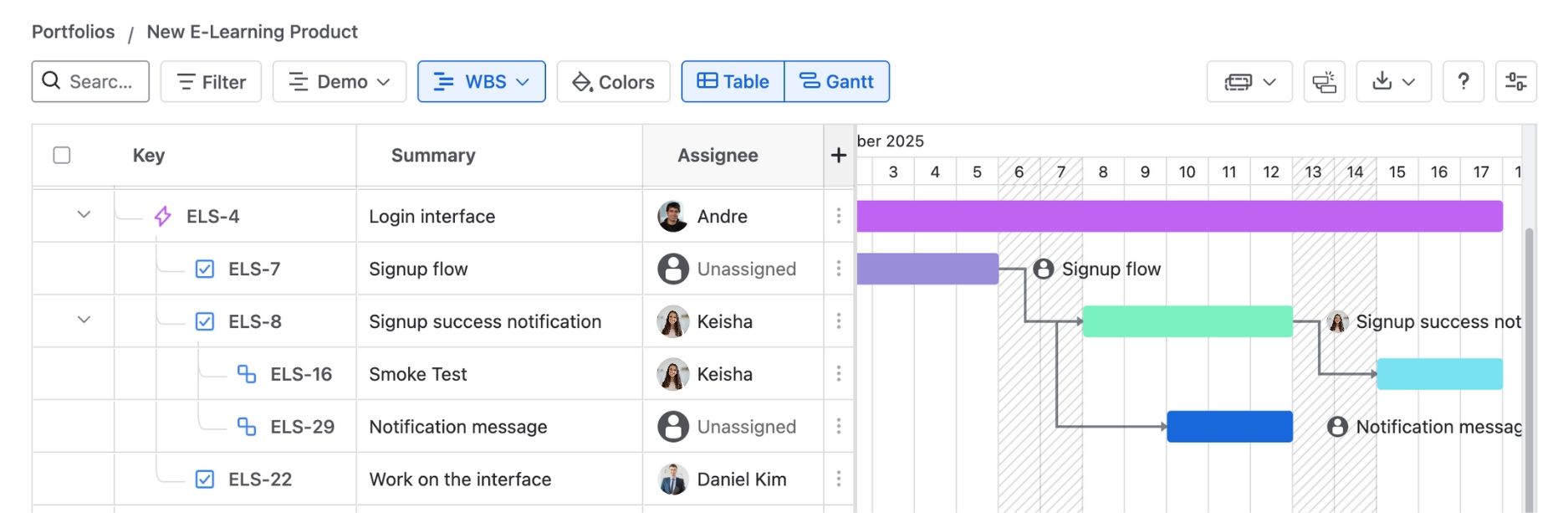
- See the whole program in one tree. Bring every Jira project behind a release into one portfolio, so your WBS covers the full scope, not just one team’s corner of it. Work items sync automatically, so the structure never falls behind what’s happening in Jira.
- Organize scope by deliverable, not by ticket type. Use Jira’s built-in hierarchy when it fits, or build a custom structure from work item links and fields such as Fix Version. The tree then matches how your project actually delivers, not how Jira happens to label things.
- See the full hierarchy at a glance. Your WBS shows up as an indented tree you can expand and collapse, from the program down to individual work packages. Parent rows roll up progress and date ranges from everything underneath, so you can spot a lagging branch without opening a single ticket.
- Work on scope like a spreadsheet. Edit fields, bulk update work items, and add formula columns right in the table, without exporting anything or switching tools.
- Give each audience the view it needs. Save the WBS layout as its own view for the PMO, and keep other views, such as one grouped by assignee, for workload checks. Everyone works from the same live data.
The result is a WBS that’s built from live Jira data, numbered the way a PMO expects, and never leaves the Isolated Cloud boundary.
Conclusion
Isolated Cloud gives your Jira data a locked-down home, but it doesn’t give you a work breakdown structure. In standard Jira Cloud, teams fill that gap with Jira Plans and a Marketplace app. In Isolated Cloud, Plans isn’t available, and most WBS apps can’t get through the door.
GanttTable closes the gap: a deliverable-based WBS built from live Jira data, with a Gantt chart and baselines right next to it, and nothing leaving the boundary. Your PMO gets the scope view it needs, and your security team gets to keep its weekends.
FAQ
Is a Jira epic the same as a WBS element?
Not quite. An epic is a work type that groups related tickets. A WBS element is a defined piece of scope with its own code and description. An epic can represent a WBS element, but nothing in Jira checks that it covers the full scope it’s meant to.
Can Jira create a work breakdown structure natively?
No. Jira gives you a basic tree through Epic, Story, and Sub-task, and Jira Plans adds levels above Epic on Premium and Enterprise. Neither provides WBS codes, a WBS dictionary, or a check that each level covers its parent’s full scope. In Isolated Cloud, the practical answer is a Forge app from the Isolated Cloud collection, such as GanttTable.
Is Jira Plans available in Isolated Cloud?
Atlassian’s list of Isolated Cloud features doesn’t mention Plans as supported or as not yet supported. Ask your Atlassian contact before you plan around it.
Can I use Jira Plans as a WBS?
It can stand in for one on simple projects, but it’s built for scheduling and capacity, not scope. It has no WBS codes, no completeness check, and no approved baseline, and its hierarchy levels apply to the whole site.
How many levels should a WBS have?
Most projects need three to five. Stop breaking down when each work package can be estimated, assigned, and tracked. Going deeper usually adds admin work rather than clarity.
Do WBS numbers replace Jira work item keys?
No. Work item keys identify individual tickets, and WBS codes show where a piece of scope sits in the overall structure. You’ll use both: keys for the delivery team, codes for scope reviews and reports.