If you’ve browsed the Atlassian Marketplace recently, you may have noticed something new on certain cloud apps: editions.
Instead of one “all-in” version of an app, Marketplace partners can now offer two separate editions under a single listing – Standard and Advanced. Atlassian calls this capability App Editions, and it’s generally available for cloud Marketplace apps.
What are Atlassian App Editions?
App Editions let a Marketplace partner package an app into different versions – typically Standard and Advanced – and show them within one Marketplace listing.
A few key points to know:
- App Editions currently apply to cloud Marketplace apps and are limited to apps that are Paid via Atlassian (PvA).
- There are two edition types: Standard and Advanced.
- Customers can purchase a Marketplace app edition regardless of their Atlassian product plan. For example, a team on Jira Cloud Free can still install an Advanced Marketplace app edition, and an Enterprise Jira customer can choose a Standard edition if that’s what they need.
In short: editions add more flexibility – without forcing vendors to create separate products or separate Marketplace listings.
Why App Editions matter for customers
App Editions aren’t just a Marketplace change. They shape how you evaluate apps, how you buy them, and how you expand your setup over time.
A clearer “right-fit” choice up front
With editions, you can compare Standard vs. Advanced directly inside the same listing. Atlassian also frames Advanced editions as “Standard plus more,” which makes the decision easier: start with the core version, and move up only if the extra capability is worth it for your team.
A smoother upgrade path (without switching apps)
A major benefit of editions is that you can grow inside the same app.
Existing customers remain on Standard by default, and can be invited to trial or upgrade to Advanced later if they need more.
Customers can manage upgrades and downgrades through admin.atlassian.com (or via certain partner-managed channels).
A better experience across team sizes
One practical win of editions is that smaller teams don’t have to pay for features they don’t need yet, while larger teams can get the advanced capability they actually require.
Atlassian has highlighted common themes you’ll see in Advanced editions across Marketplace apps, such as advanced features, more admin insights, and sometimes extended support coverage – things that matter more as teams scale.
How App Editions change the day-to-day app experience
A common worry is: “Will Standard become a second-class experience?”
Atlassian explicitly encourages partners to keep the end-user experience strong across all editions, even if features differ. In other words, editions should feel like different levels of capability, not “good vs. bad.”
From a customer standpoint, what you should expect is:
- Same app, same data, same workflows
- A clear feature comparison on the listing
- Extra capabilities unlocked when you’re on Advanced
Exactly what’s included in Advanced depends on each app, but the structure is intended to be straightforward: choose the edition that matches your needs today, and upgrade later if your process grows.
→ Related article: Marketplace Search is Now More Accurate and Relevant
DevSamurai’s first app with editions: ProductGo
At DevSamurai, we build Jira apps that help teams plan, organize, and deliver work more clearly.
ProductGo is our product planning toolkit for Jira. It brings structured product practices – like story mapping and roadmapping – into the place your team already works.
With Atlassian App Editions now live, ProductGo is also our first app that ships with editions.
What’s new in ProductGo Advanced: Advanced Kanban
The biggest unlock in ProductGo Advanced is Advanced Kanban.
Advanced Kanban is designed for teams who want more control over how work is visualized and managed on a board – especially when Jira’s default board structure doesn’t match the workflow you actually use.
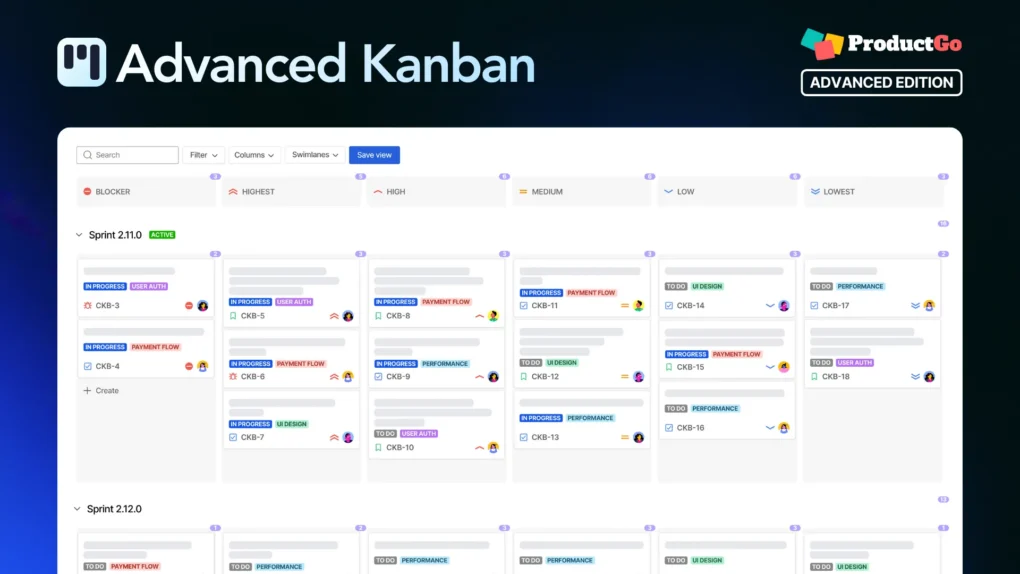
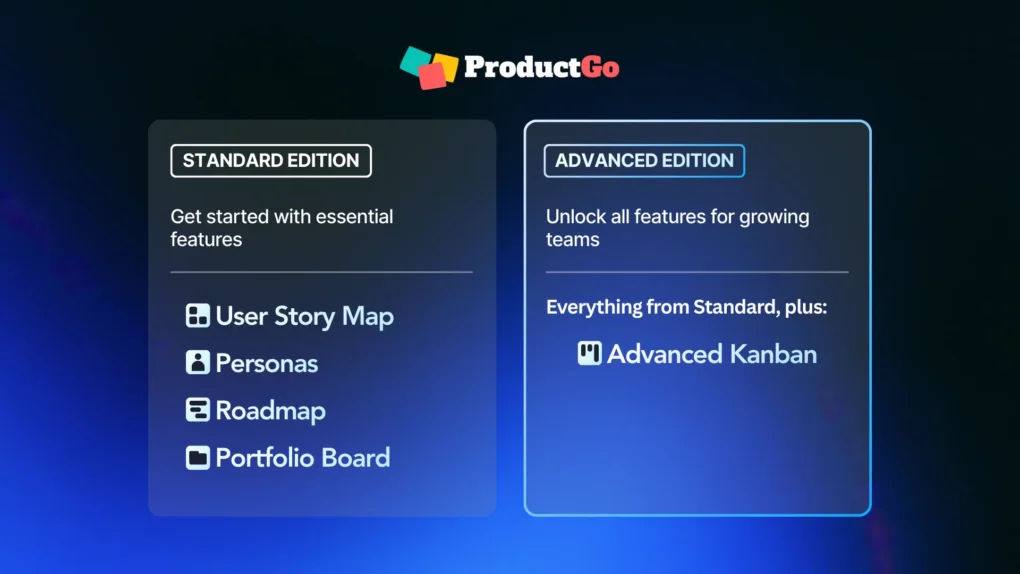
The Advanced edition includes all Standard features (User Story Maps, Personas, Portfolio Board, Roadmaps), plus Advanced Kanban, which supports deeper Kanban customization to fit specific workflows
And if you’re already using ProductGo Standard, this is exactly where editions help: you can keep your existing setup and move to Advanced when your workflow needs that extra capability.
→ Read more: Advanced Kanban is here – a smarter way to organize your work in Jira
How to decide between Standard and Advanced
If you’re choosing an edition, a simple way to decide is to think about how your team works today.
Standard is usually the right starting point if your team wants a clean, effective planning setup in Jira and doesn’t need heavy customization.
Advanced makes sense when your workflow needs go beyond the basics – especially if the way you plan and track work requires a more tailored board experience (like Advanced Kanban) or more structured controls as your process matures.
One helpful mindset is: start where you are, then upgrade when the extra capability clearly removes friction for your team.
Wrapping up
Atlassian App Editions are a meaningful shift in how Marketplace apps are packaged and purchased.
For DevSamurai, this is also an exciting milestone: ProductGo is our first app to support editions, with Advanced Kanban available in the ProductGo Advanced edition.
If you’d like to explore further, check ProductGo’s edition overview in our docs and review the Standard vs. Advanced comparison in the Marketplace listing.