If your team uses Jira to organize work across a timeline, moving to Atlassian Isolated Cloud doesn’t mean losing that visual planning experience. Two DevSamurai apps, ProductGo and ProScheduler, are now available in this environment, giving teams different ways to view and manage work over time.
Both apps help you understand what is scheduled and when it needs to happen. However, they serve different planning needs. ProductGo offers a straightforward timeline for product planning, while ProScheduler provides a dedicated Gantt chart with more advanced scheduling capabilities.
This guide is for teams migrating to Isolated Cloud, mostly from Data Center, and for anyone who wants their planning data to stay inside a secure boundary. We’ll compare the two and help you pick.
(And yes, we make both apps. We’ll keep this honest anyway, including where each one fits.)
Both apps give you a timeline. The difference is depth.
A timeline, at heart, displays planned work across dates, helping everyone understand what is scheduled and when it should happen. Both ProductGo and ProScheduler offer this visibility, but the level of planning detail is quite different.
You can think of them as two approaches:
- ProductGo: A straightforward timeline that’s simple to create, easy to follow, and useful for communicating product direction.
- ProScheduler: A fully featured Gantt chart designed for detailed scheduling, dependency management, and resource planning.
Consider a product launch as an example. Using ProductGo, you can arrange releases along a timeline and show which goals are expected in each quarter. The result is a clear overview that takes only a few minutes to prepare and is easy for stakeholders to understand.
ProScheduler approaches the same launch from a delivery perspective. You can divide it into individual tasks, establish dependencies, assign resources, create a baseline, and monitor how changes to dates affect the critical path.
Both approaches support planning, but they operate at different levels of detail. Neither is universally the better option. The right choice depends on how your team organizes and manages its work.
ProductGo: a simpler, product-focused timeline
ProductGo‘s timeline view (it calls it a roadmap) is the lightweight option, and that’s a feature, not a shortcoming. It’s part of a broader product-planning app, sitting alongside user story maps and personas, so your timeline connects directly to what you’re building and why.
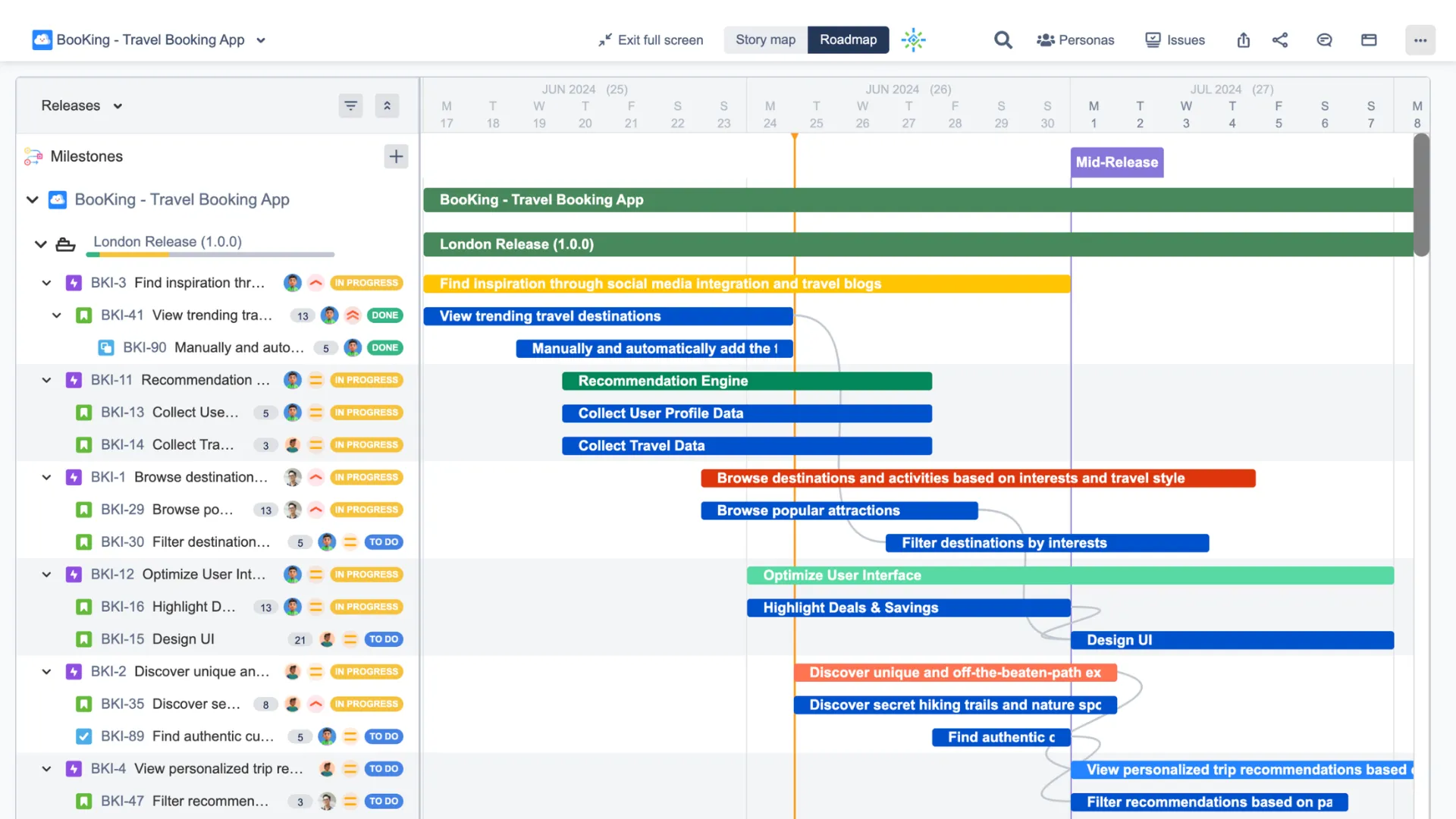
With ProductGo you can:
- Lay out releases and milestones on a clean visual timeline.
- Tie the timeline to goals and epics from your story map.
- Keep personas and product context one click away.
- Share the plan with stakeholders who just need the big picture.
It’s the right choice when you want a timeline that’s fast to build and easy to talk through, without wrangling a full project schedule. Product managers and teams who think in releases, rather than task dependencies, tend to feel at home here.
ProScheduler: a dedicated Gantt chart with the full toolkit
ProScheduler takes the timeline in the other direction, all the way into serious project scheduling. Its Gantt chart is the main event, not a side feature.
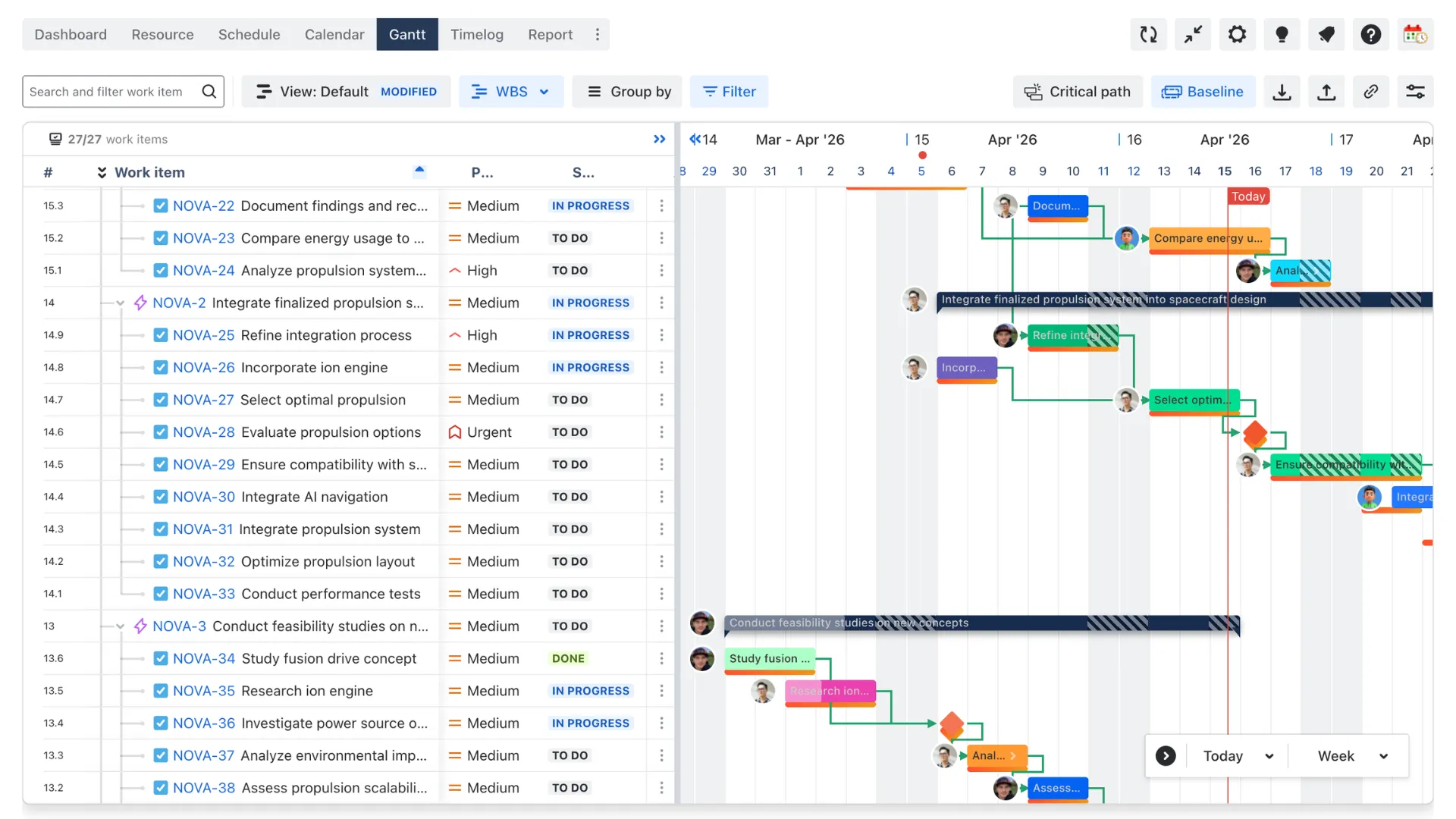
With ProScheduler’s Gantt you can:
- Build a work breakdown structure with critical path, baselines, and milestones.
- Set dependencies and let the Gantt auto-schedule around them.
- Plan resources and capacity, so your dates reflect who’s actually available.
- Follow the Jira hierarchy, from initiatives down to subtasks.
- Group projects into programs for portfolio-level reporting.
One detail worth noting: ProScheduler’s Gantt has no hard issue limit, where Jira’s own Advanced Roadmaps caps out at 5,000 issues. For large, dependency-heavy portfolios, that headroom matters.
It’s the right choice when timing is complex, dependencies are real, and someone needs to answer, “Can we actually hit this date, and who’s doing the work?”
So which one do you need?
The decision becomes easier when you start with your team’s planning requirements:
- Choose ProductGo if you need a straightforward timeline connected to product goals, story maps, and release planning.
- Choose ProScheduler if your projects require detailed Gantt scheduling, task dependencies, baselines, and resource management.
- Still undecided? Start with the simpler timeline approach. You can move to a dedicated Gantt solution when your scheduling requirements become more demanding.
You don’t necessarily have to choose just one. Some teams use ProductGo to communicate product direction and ProScheduler to manage the detailed delivery schedule. The two apps can serve different purposes within the same organization.
However, most teams can begin by identifying how much scheduling detail they actually need today.
Why it matters that both run in Isolated Cloud
Here’s what makes all of this relevant if you’re moving to Isolated Cloud.
Isolated Cloud only runs apps built to stay inside your boundary, which is why its app catalog is smaller than the standard Marketplace. Each app has to be rebuilt specifically for the environment. So “is my timeline tool even available here?” is a fair question.
For both of these, the answer is yes. ProductGo and ProScheduler run inside Isolated Cloud, which means your timelines, Gantt charts, and resource plans stay within your secure environment. Nothing has to leave the boundary for you to plan.
That matters more than it first sounds. A timeline reveals your strategy, your priorities, and sometimes your staffing. Keeping it inside the boundary isn’t a nice-to-have for a regulated team. It’s the point.
(Each app’s Isolated Cloud version may have small feature differences from its standard-cloud version, so check your must-have features before you migrate. For ProductGo, we’ve written that comparison up in detail: Running ProductGo in Isolated Cloud: What Changes and What Doesn’t)
Frequently asked questions
Can I use a Gantt chart or timeline in Atlassian Isolated Cloud?
Yes. Both ProductGo and ProScheduler run on Isolated Cloud. ProductGo offers a simpler timeline view, and ProScheduler offers a full Gantt chart.
What’s the difference between ProductGo and ProScheduler?
ProductGo gives you a simpler, product-focused timeline tied to story maps and releases. ProScheduler gives you a dedicated Gantt chart with dependencies, baselines, critical path, and resource planning.
Which one should I choose?
Choose ProductGo for a lightweight timeline and product planning. Choose ProScheduler for detailed project scheduling. Some teams use both.
Do my timelines stay inside the Isolated Cloud boundary?
Yes. Both apps run inside your Isolated Cloud environment, so your plans stay within the boundary.
If you’d like a hand working out which fits your team, or checking feature support in your target environment, reach out. We’re happy to walk through it.