
If you have tried to plan a real project using Confluence’s built-in Roadmap macro, you know how that story ends: it works fine until your project grows past a few boxes on a timeline, and then it doesn’t.
Dedicated Gantt chart apps fill that gap, but Confluence has far fewer of them than Jira does. Most well-known Gantt tools in the Atlassian ecosystem were built for Jira and only tag along with Confluence, if at all. So the real shortlist is short, and getting the choice right matters more.
We’ve made a list of Gantt chart tools for Confluence specifically, based on ease of setup, Jira integration, dependency and milestone support, auto-scheduling, pricing, and ratings. However, not every app is the right fit for everyone, so we’ll walk through where it shines and where a heavier tool might serve you better.
App Overviews
1. ConfluPlan
ConfluPlan is a Confluence Cloud app from DevSamurai that bundles three planning views into one tool: a Timeline/Roadmap view, a Kanban board, and a Gantt chart. Instead of installing separate apps for each, you get all three under one roof.
Confluence users can freely schedule Gantt tasks in ConfluPlan with summary, assignee, duration, and color coding in a hierarchical structure. Additionally, ConfluPlan allows enabling the auto-scheduling feature to adjust task dates automatically as dependencies shift.
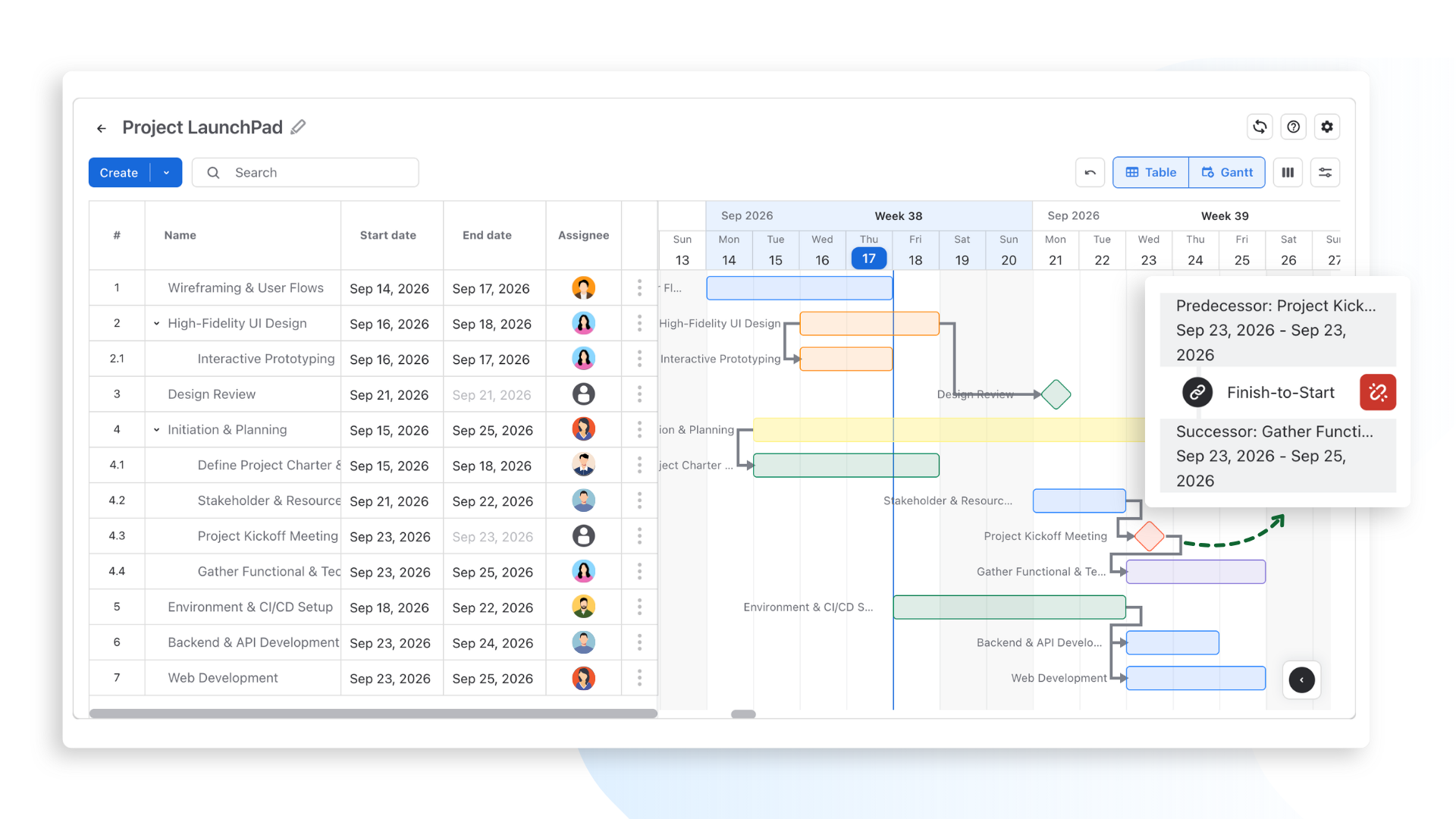
More importantly, ConfluPlan supports Jira integration to help synchronize Jira tickets from your workspace for Timeline and Kanban board types (Gantt chart will also be supported soon). As a result, you can plan and schedule tasks and share roadmaps directly from where your documents live.
Other features:
- All four dependency types: Start-to-Start, Start-to-Finish, Finish-to-Start, and Finish-to-Finish
- Milestones, which you can add directly or convert from an existing task
- Boards embed directly into Confluence pages via a macro and can be shared with people outside your organization
- Dark theme support
Pricing: Free for up to 10 users with all features available. Pricing plans start from $16.5 per month with a 30-day free trial.
Rating: 4.1/5 stars with 1,653 installs.
Best for: Teams that want roadmap, Kanban, and Gantt planning in one place without paying anything, and who need their Gantt chart to talk to Jira.
Limitation: ConfluPlan does not have critical path highlighting or resource and capacity management. Auto-scheduling will keep your task dates in sync, but it will not tell you which task is the one that, if delayed, sinks the whole project, and it will not flag when you have accidentally scheduled one person to do three things at once.
2. Table Filter, Charts & Spreadsheets for Confluence (Stiltsoft Europe OÜ)
This is less a dedicated Gantt app and more a full reporting toolkit that happens to include a solid Gantt chart. It is one of the most established apps on the Atlassian Marketplace, built by Stiltsoft Europe OÜ, and used by a large number of Confluence teams for filtering, pivoting, and charting table data of all kinds.
This Gantt chart tool for Confluence offers a Gantt chart macro built directly from Confluence table data, allowing you to save time and effort from creating a chart from scratch. Moreover, it can also pull data from Jira Issues, Page Properties Report, CSV, and JSON sources
Other features:
- Task dependencies between items on the Gantt chart
- Milestones and specific dates on the Gantt timeline
- Comes bundled with 15+ other chart types (pie, column, bar, and more), pivot tables, filtering, and Excel-like spreadsheets
- SOC 2 certified, with the app currently being migrated to Forge (Atlassian’s app platform)
Pricing: Starting around $8.03/month for small teams (in the Standard plan), with a 30-day free trial.
Rating: 4.7/5 stars with 15,000 installs.
Best for: Teams that already want a broader reporting and dashboard solution in Confluence, and are happy to get a capable Gantt chart as part of that package rather than as the main event.
Limitation: The Gantt chart here is one feature among many, not the core focus of the app. If all you want is a Gantt chart, you may end up paying for a lot of reporting functionality you will never touch.
3. Easy Gantt Charts for Confluence (Narva Software)
This is a no-frills macro that turns a Confluence table into a Gantt chart. You enter your data (or paste in an existing table), and it renders as a chart.
Similar to other Gantt charts for Confluence, you can make table-based data entry using drag-and-drop with basic task dependencies and progress bar indicators.
Other features:
- Hierarchical, nested task trees
- Build charts directly from existing Confluence tables
- Configurable time scales: day, week, month, quarter, year
Pricing: Free plan available. Pricing starts from $5.5 per month with a 30-day free trial.
Rating: 3.4/5 stars with 600 installs.
Best for: Teams that just want a visual timeline without any project management overhead.
Limitation: No Jira integration, no resource management, no critical path. This is a chart, not a planning system, and it does not pretend otherwise.
4. Smartsheet for Confluence
This app embeds Smartsheet’s Gantt charts, worksheets, dashboards, and calendars directly into a Confluence page.
Key features:
- Full Smartsheet Gantt view embedded in Confluence
- Access to Smartsheet dashboards and calendars from within Confluence
- Useful if your organization already runs project data through Smartsheet
Pricing: Free plan available. Pricing starts from $3.3 per month with a 30-day free trial.
Best for: Teams that already use Smartsheet and want that data visible alongside their Confluence documentation.
Limitation: You need a separate Smartsheet subscription, and your project data technically lives outside Confluence. It is less “one tool” and more “two tools wearing a trench coat.”
Side-by-side Comparison
|
Tool |
Best For |
Jira Integration |
Auto-Scheduling |
Critical Path |
Runs on Atlassian |
|---|---|---|---|---|---|
|
ConfluPlan |
All-in-one (Roadmap + Kanban + Gantt) |
✅ Yes |
✅ Yes |
❌ No |
✅ Yes |
|
Table Filter, Charts & Spreadsheets (Stiltsoft) |
Broader reporting with Gantt included |
Via Jira Issues macro |
❌ No |
❌ No |
Not yet (migrating to Forge) |
|
Easy Gantt Charts (Narva) |
Simple visual timelines |
❌ No |
❌ No |
❌ No |
Not confirmed |
|
Smartsheet for Confluence |
Existing Smartsheet users |
Limited |
✅ Yes (via Smartsheet) |
Varies (via Smartsheet) |
❌ No |
Feature lists are useful, but the right tool for your team depends on a handful of practical factors more than which app has the most checkmarks.
1. Team size and project complexity
A five-person team with a straightforward launch timeline does not need the same tool as a fifty-person team juggling a dozen interdependent workstreams. Simple projects are fine with a basic visual macro.
On the other hand, complex ones need dependency mapping, milestones, and ideally auto-scheduling, so the plan does not fall out of date the moment something shifts.
2. Jira integration needs
If your team already lives in Jira, look for a Gantt tool that syncs with it. Otherwise, you end up updating the same task in two places, which is exactly the kind of busywork these tools are supposed to eliminate. If Jira is not part of your stack, this factor matters less, and you can weigh other features more heavily.
3. Depth of planning features
Some teams only need task bars and a few dependency lines. Others need critical path analysis, baselines, and resource or capacity management to run projects at scale. Be honest about which camp you are in. A tool that is too simple will not hold up under a complex project, and a tool that is too complex will slow your team down with features nobody asked for.
4. Where your data lives
Native Confluence apps keep everything under one roof. Tools that embed a separate platform, like Smartsheet, require maintaining a second subscription and account.
Related to this is whether the app “Runs on Atlassian,” meaning it operates on Atlassian’s own infrastructure rather than a third-party server, like ConfluPlan. This can matter for compliance, data residency, and simplifying your vendor list.
5. Budget
Free tiers, often capped by number of users, work well for smaller teams. Paid tiers usually unlock higher user limits, deeper features, or dedicated support. Therefore, you should weigh the cost against the actual time the tool saves your team, not just the sticker price.
6. Ease of use and setup
The most feature-rich tool in the world is worthless if your team never gets around to actually using it. Therefore, you should consider how much onboarding a tool requires before people are comfortable with it.
Sometimes the simplest tool your team will actually adopt beats the powerful one that ends up abandoned in a sidebar.
Final Verdict
The right Gantt chart tools for Confluence come down to matching your team’s actual workflow, not picking whichever app has the longest feature list.
For most teams, ConfluPlan hits the strongest balance: free at any team size, native Timeline, Kanban, and Gantt views, Jira integration, and auto-scheduling that keeps timelines current without manual babysitting. It also runs directly on Atlassian’s infrastructure and is easy enough to set up that your team can start using it the same day.
If your needs lean more toward broad table reporting and dashboards with a Gantt chart as a bonus feature, Stiltsoft’s Table Filter, Charts & Spreadsheets is worth a look. And if you are already committed to Smartsheet, embedding it may save you from switching tools altogether.
FAQ
Does Confluence have a built-in Gantt chart?
No. Confluence includes a basic Roadmap macro, but it lacks dependencies, milestones, and auto-scheduling. For anything beyond a simple visual timeline, you will need a dedicated app like ConfluPlan from the Atlassian Marketplace.
Can I sync a Gantt chart between Jira and Confluence?
Yes, with the right app. For example, ConfluPlan supports Jira integration, so tasks and their statuses can stay connected between the two tools instead of being tracked separately.
What’s the free Gantt chart option for Confluence?
ConfluPlan is free regardless of team size. Ricksoft’s Gantt Chart Planner is also free, but only for up to 10 users before you need to upgrade to a paid tier.
