If you’re moving to Atlassian Isolated Cloud and your team builds user personas, here’s the good news: you can keep doing it. ProductGo manages user personas inside Isolated Cloud, so the profiles that keep your team focused on real users stay right where your security team wants them, inside the boundary.
This guide is for teams migrating to Isolated Cloud, mostly from Data Center, and for anyone who wants their product data to stay inside a secure environment. We’ll cover what a persona is, what changes when you move, and how ProductGo handles it.
(Yes, we make ProductGo. We’ll be straight with you anyway, including the one thing that actually changes.)
What is a user persona, and why does it matter in product development?
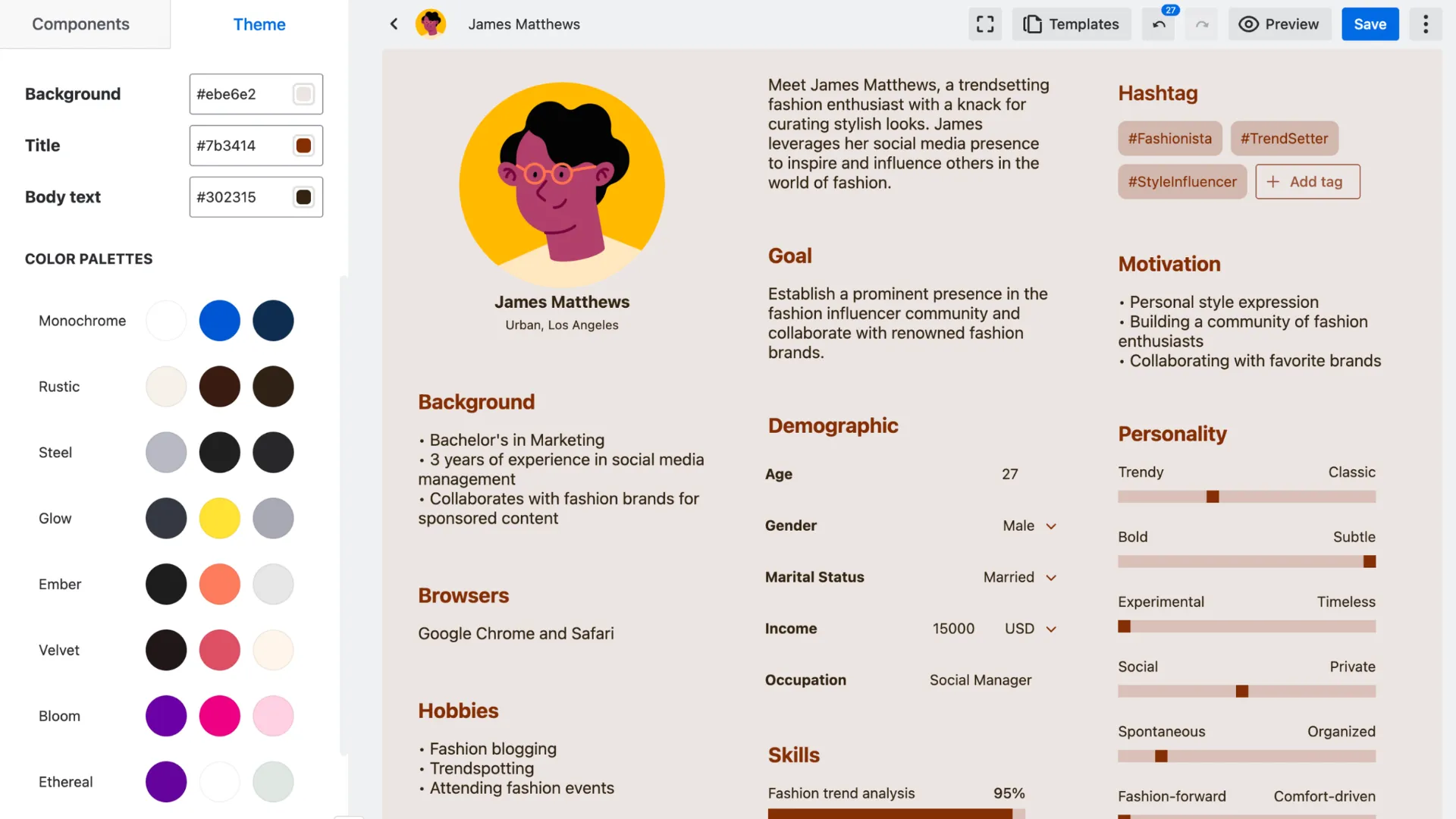
A user persona is a short, realistic profile of a type of person your product serves. It captures who they are, what they’re trying to do, and what gets in their way, so the whole team pictures the same user when they make decisions.
Here’s why it matters. Without personas, “the user” becomes an abstraction, and teams quietly start building for themselves instead. A good persona turns “users want this” into “Emma, our busy ops manager, needs this because of that,” which is a far more useful sentence to plan around.
In my experience, personas earn their keep in the arguments you don’t have. When everyone agrees on who you’re building for, a lot of “should we build this?” debates answer themselves.
What happens to your personas when you migrate from Data Center to Isolated Cloud?
The good news is that your personas remain available when you move to Isolated Cloud. There is just one minor visual difference in how they’re presented.
Migration is also an opportunity to review the other applications your organization depends on. Not every Data Center app currently has an Isolated Cloud equivalent, so checking compatibility beforehand can help prevent unexpected gaps. If you’re still considering the transition, our Data Center migration guide explains the end-of-life timeline and available options.
As for ProductGo, the essential persona information stays intact. Your profiles, custom fields, and connections to product work remain part of the planning experience. We’ll explain the small visual adjustment in a later section.
Can you manage user personas in Atlassian Isolated Cloud?
Yes, as long as the tool is built for it. Isolated Cloud only runs apps built on Atlassian Forge that carry the Runs on Atlassian designation, so they run entirely inside Atlassian’s infrastructure with no external hosting.
Jira doesn’t manage personas on its own, so this is exactly the kind of capability you’d add with an app. ProductGo is one of the apps already available on Isolated Cloud, which means persona management isn’t something you give up when you choose a locked-down environment.
How ProductGo handles personas in Isolated Cloud
ProductGo treats personas as a first-class part of planning, not a sticky note off to the side. And because it’s a “Runs on Atlassian” app, your personas live inside your Isolated Cloud environment, not on an outside server.
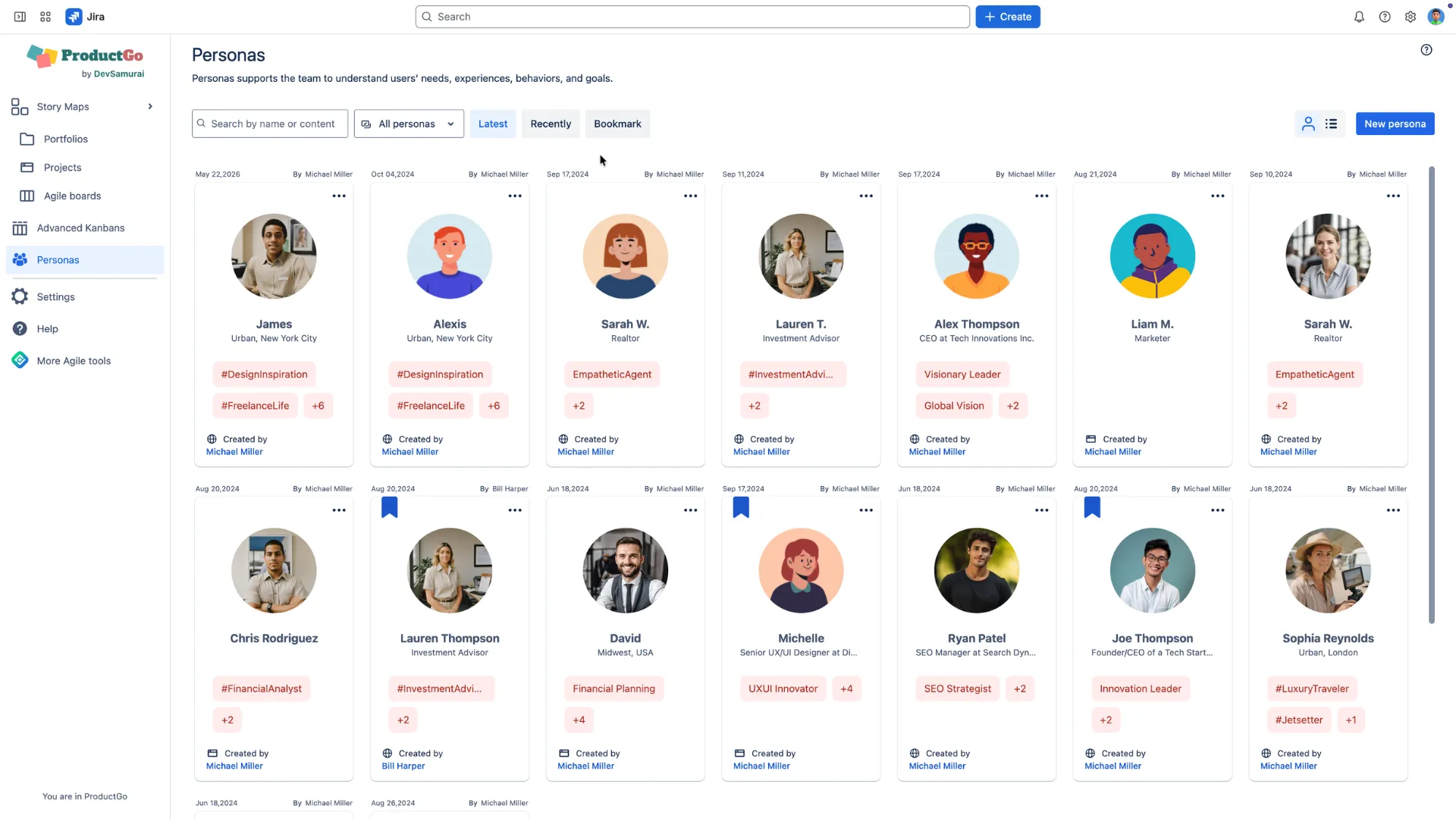
Here’s what you get:
- A dedicated persona editor. Build detailed, realistic profiles with drag-and-drop components, so you capture goals, frustrations, and context, not just a name and a photo.
- Templates to start fast. Begin from ready-made persona templates instead of a blank page, and apply theme colors to keep them consistent.
- Personas attached to your work. Pin a persona above the goals on your story map, so everyone can see who each story is for.
- User journeys. Map how a persona moves through your product, to spot gaps and set priorities.
- Centralized management. Share global or project-specific personas across maps, boards, and teams. Update a persona once, and it updates everywhere.
The result: the person you’re building for is always one glance away, and all of that context stays inside your boundary.
What changes in the Isolated Cloud version?
Let me be straight, because this one is different from some of our other features. With personas, there is one real change in Isolated Cloud, and if you’re coming from Data Center, it’s the single thing you’ll notice.
On Data Center, and on Commercial Cloud, you can upload your own custom images for persona avatars. In Isolated Cloud, you choose from a set of predefined avatars instead. External image upload isn’t available, because pulling in an outside image would cross the boundary, and the whole point of Isolated Cloud is that nothing crosses it unless you allow it.
That’s the entire change. Everything else about personas, the profiles, components, templates, journeys, story-map links, and centralized management, works exactly as it does elsewhere. For most teams, swapping a custom headshot for a predefined avatar is a shrug, not a dealbreaker. Your persona was never really about the photo anyway. It’s about understanding the person.
Getting the most from personas
A few habits make personas actually stick, in any environment:
- Keep them short. A persona nobody reads helps nobody.
- Base them on real evidence, not guesses, and update them as you learn.
- Attach them to your story map, so they show up where the work happens.
- Share them centrally, so the whole team builds for the same person.
Do that, and personas stop being a workshop artifact and start shaping real decisions.
Frequently asked questions
Can I use user personas in Atlassian Isolated Cloud?
Yes. ProductGo provides user persona management on Isolated Cloud as a Forge app with the “Runs on Atlassian” designation.
Do persona profiles leave the Isolated Cloud boundary?
No. Because ProductGo runs inside Atlassian’s infrastructure, your personas stay within your Isolated Cloud environment.
What’s different about personas in the Isolated Cloud version?
You choose from predefined avatars instead of uploading custom images, because external image upload would cross the boundary. Everything else about personas works the same.
Does Jira manage user personas on its own?
No. Jira has no built-in persona management. An app like ProductGo adds personas and links them to your story maps and issues.
Can I attach a persona to my user story map?
Yes. In ProductGo, you attach personas above the goals on your story map, so everyone sees who each story is for.
If you’d like a hand checking whether your persona setup is ready for Isolated Cloud, reach out. We’re happy to walk through it with you.