In short: Atlassian Isolated Cloud (AIC) controls who can reach your data and where it can go, but it doesn’t make that data recoverable. Native backups last 30 days, restore whole sites into an empty target, and exclude Marketplace app data. Recovering from deletion, bad automation, or compromised credentials remains the customer’s responsibility.
Atlassian Isolated Cloud solved the problem that kept a certain kind of enterprise on Data Center: a security policy that wouldn’t accept shared infrastructure. Since general availability on June 29, 2026, those organizations have had somewhere to go.
That’s not the end of the security conversation. Atlassian’s own documentation turns up a few gaps:
- Nowhere to restore to. Native restore needs an empty target site, and AIC offers neither sandboxes nor self-serve site provisioning.
- The key cuts both ways. The customer-managed key that protects your data is also the fastest way to lose it.
None of these are flaws in isolation. Isolation just isn’t backup. This guide covers where data loss still happens, who owns recovery, and what to verify before sign-off.
What Atlassian Isolated Cloud protects against
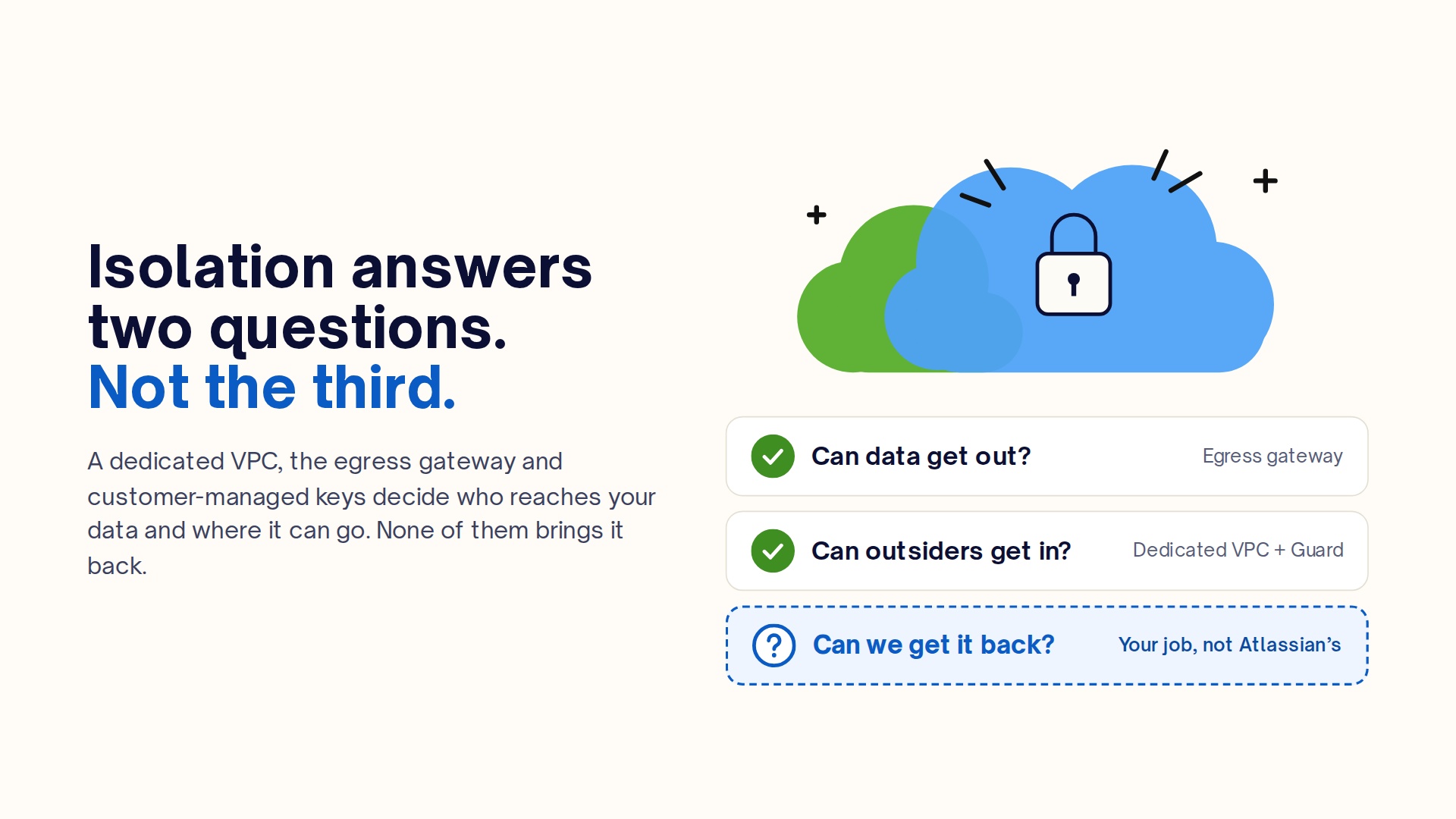
Atlassian Isolated Cloud gives each customer a dedicated AWS Virtual Private Cloud (VPC) with its own compute, storage, and networking. Isolated Cloud blocks egress by default and routes outbound traffic through the Isolated Context Gateway for filtering. As a result, apps can’t reach an external domain until an admin approves it. Your organization keeps the encryption keys in its own AWS KMS, while the data stays in its provisioning region and Guard Premium monitors it.
Our introduction to AIC and Data Center vs. AGC vs. Isolated Cloud comparison cover the architecture in depth.
Every one of those controls answers one of two questions: can data get out, and can outsiders get in? None of them answers the third: can we get it back?
Where data loss still happens in Atlassian Isolated Cloud
Data loss in AIC comes from inside the boundary. Every scenario below starts with a valid session, which is why isolation never sees it.
Accidental deletion: An admin cleaning up after migration deletes the wrong project or space. Trash gives you a window to undo it, but only if someone notices in time.
Bulk edits and automation rules:A rule designed to reset a custom field runs against the wrong JQL scope and overwrites values across 40,000 work items, even though the team carefully tested it on four issues in the test project. Since the rule deletes nothing, the trash offers no help.
App misconfiguration: Egress consent controls where an app can send data. It doesn’t control what the app does to data inside the tenant. A faulty sync or a buggy bulk operation writes straight to production.
Insider error: A reworked permission scheme, a workflow scheme applied to the wrong project, or a deleted custom field can quietly change how thousands of issues behave. Configuration needs a recovery point as much as content does.
Credential compromise: An attacker holding a valid admin session is, as far as the platform can tell, an admin. Guard Detect can flag the unusual activity. Detection tells you when to start recovering, not how.
The shared responsibility model applied to AIC
In Atlassian Isolated Cloud, Atlassian is responsible for the platform being available, and you are responsible for your data being recoverable. Atlassian’s cloud shared responsibility model predates AIC, and isolation doesn’t change it. Atlassian states that it does not use its infrastructure-level backups to reverse destructive changes customers make themselves, such as deleting issues or projects or overwriting fields.
| Area | Atlassian | You |
|---|---|---|
| Infrastructure, VPC, network isolation | Operates and secures | — |
| Egress enforcement | Enforces gateway and policies | Approve, review, and revoke app and integration egress |
| Encryption at rest | Supports customer-managed keys | Own the KMS key lifecycle |
| Platform availability | Enterprise uptime SLA | — |
| Identity and access | Provides Guard controls | Configure IdP, SCIM, admin roles, break-glass accounts |
| Native Backup and Restore | Provides the tool and stores backups for 30 days | Create and schedule the policy, test restores |
| Recovery from your own destructive changes | Not covered by infrastructure backups | Yours, end to end |
| Retention beyond 30 days, independent copy | — | Yours |
Understanding the basis of the Atlassian Cloud Security Shared Responsibility Model shows why infrastructure isolation cannot be treated as an operational safety net. Atlassian guarantees that the VPC environment is accessible, but the integrity of the data inside Jira remains 100% customer-owned.
However, to meet compliance or regulatory frameworks like NIS 2, DORA, and ISO 27001, organizations cannot rely solely on the platform. Meeting compliance mandates requires implementing an independent, automated data protection strategy that enforces the 3-2-1 backup rule and allows to keep data decoupled from Atlassian’s infrastructure, stored in secondary environments, and retained according to strict organizational governance.
The biggest misconception that customers might have when it comes to the Shared Responsibility Model is assuming that because Atlassian guarantees platform uptime, they will also recover customer data if a project is deleted, corrupted, or compromised. Atlassian is only responsible for the infrastructure’s availability, when it comes to protecting and recovering the actual data inside Jira site is entirely on customers.
Daria Kulikova
Partnership & Project Marketing Manager at GitProtect (Linkedin)
The restore you can’t rehearse: native backup limits in AIC
Native restores in Atlassian Isolated Cloud are whole-site, require an empty target, and draw on backups that expire after 30 days. Atlassian Backup and Restore is available by default and is a real safety net, but its restore mechanics are worth reading before an incident rather than during one.
Restores need an empty target
The destination can’t contain any user-generated content, whether active, deleted, or archived. On Commercial Cloud, teams usually restore into a fresh sandbox. The AIC feature list marks sandboxes as unsupported, and new apps and sites can’t be self-provisioned. In a real incident, the first question may not be “which backup?” but “restore into what?” Ask Atlassian now and write the answer into your runbook.
Restores are whole-site
You can’t select specific projects or spaces. Every native restore brings back the entire site, so recovering one damaged project means restoring everything to a separate target first. AIC’s feature list marks cloud-to-cloud migration as unsupported, so the usual tool for moving a project between cloud sites isn’t available. Restore time also scales with the whole site, not with the one project you need.
Backups can’t leave Atlassian storage
They expire after 30 days and can’t be downloaded, so no copy exists under your own control.
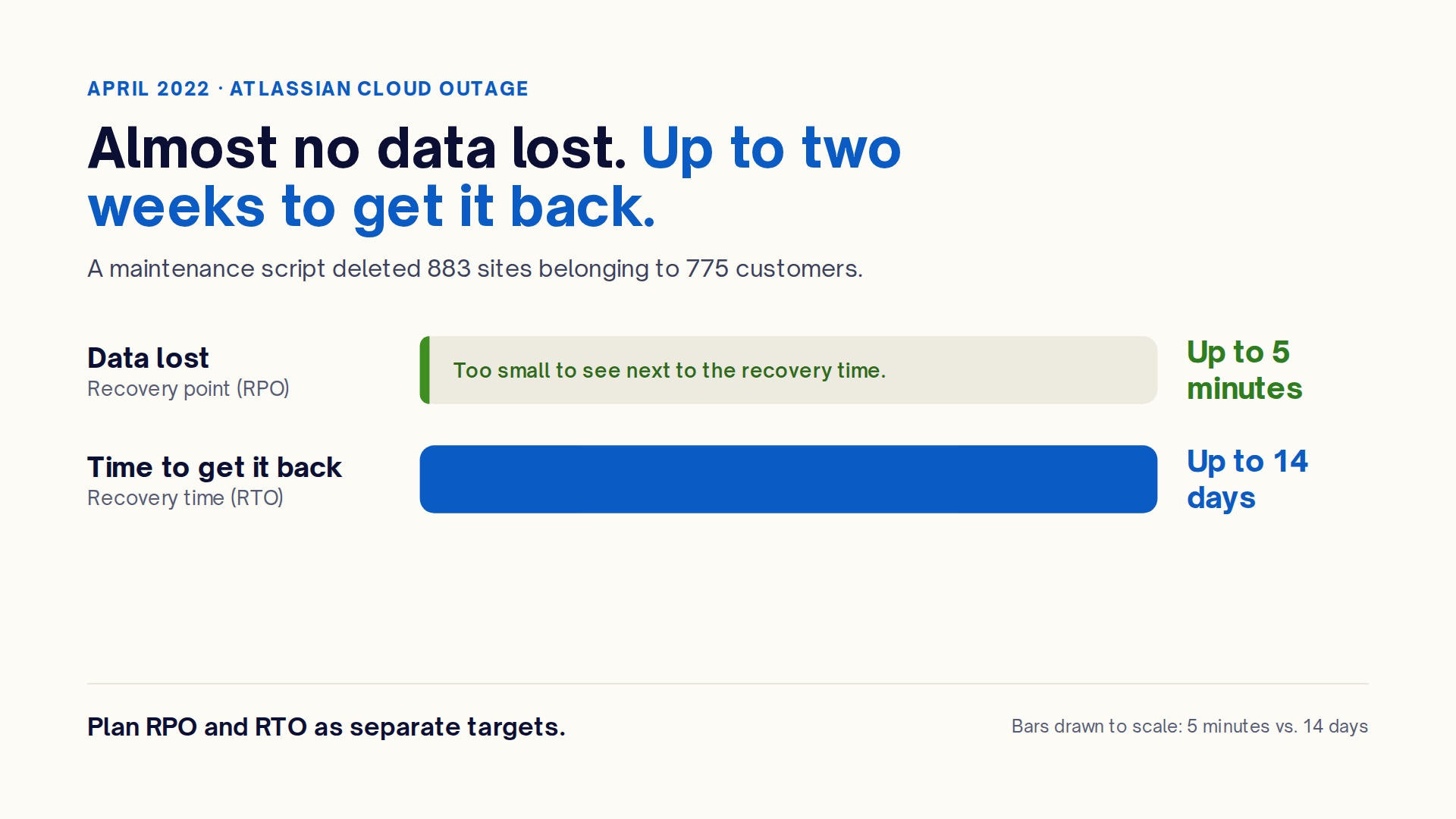
For a sense of what full-site recovery looks like at scale, consider Atlassian’s own April 2022 incident. A maintenance script deleted 883 sites belonging to 775 customers. Although no customer lost more than five minutes of data, some customers waited up to 14 days before they got it back. This incident pairs an excellent recovery point with a very long recovery time. More importantly, it shows why teams should plan RPO and RTO separately.
Part of the delay came from extracting individual customers’ data from shared, multi-tenant data stores. AIC’s dedicated design should, in principle, make that simpler. But volume and validation still take time, and one detail from that incident deserves its own section.
What your backup can’t restore: your key, your login, your runbook
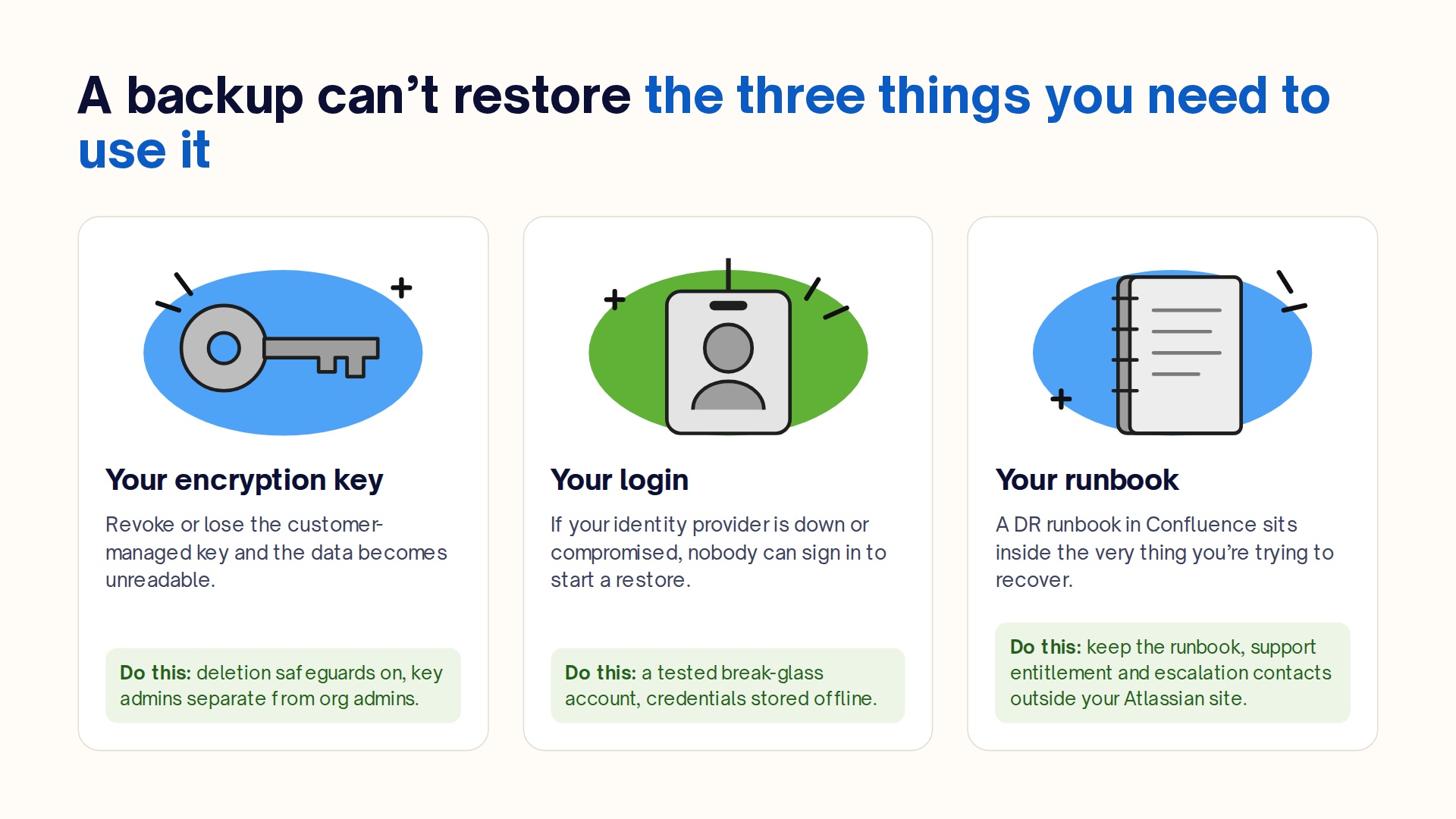
A backup can’t restore the three things you need in order to use it: the encryption key that makes data readable, the login that lets you start a restore, and the runbook that tells you how.
 Your encryption key
 Your encryption key
With customer-managed keys, your data is only readable while the key in your AWS KMS is available. Revoke it, delete it, or lose access to the AWS account that holds it, and the data becomes unreadable. Treat the key like production:
- Enable deletion safeguards.
- Keep key administrators separate from Atlassian org admins.
- Route every change to the key policy through change control.
If your backups also use customer-managed encryption, confirm which key protects them. Don’t let production and backup depend on the same single key.
Your login
AIC signs users in through your identity provider. If the IdP is down, misconfigured, or compromised, nobody can log in to start a restore. The AIC feature list includes break-glass accounts for emergency admin access. Set one up, store its credentials offline, and test it on a schedule.
Your runbook
During the 2022 outage, some affected customers couldn’t file support tickets because their contact details had been deleted along with their sites. The lesson generalizes: if your DR runbook lives in Confluence, it’s inside the thing you’re trying to recover. Keep the runbook, your support entitlement details, and your escalation contacts somewhere that doesn’t depend on the tenant.
The first 30 days after cutover
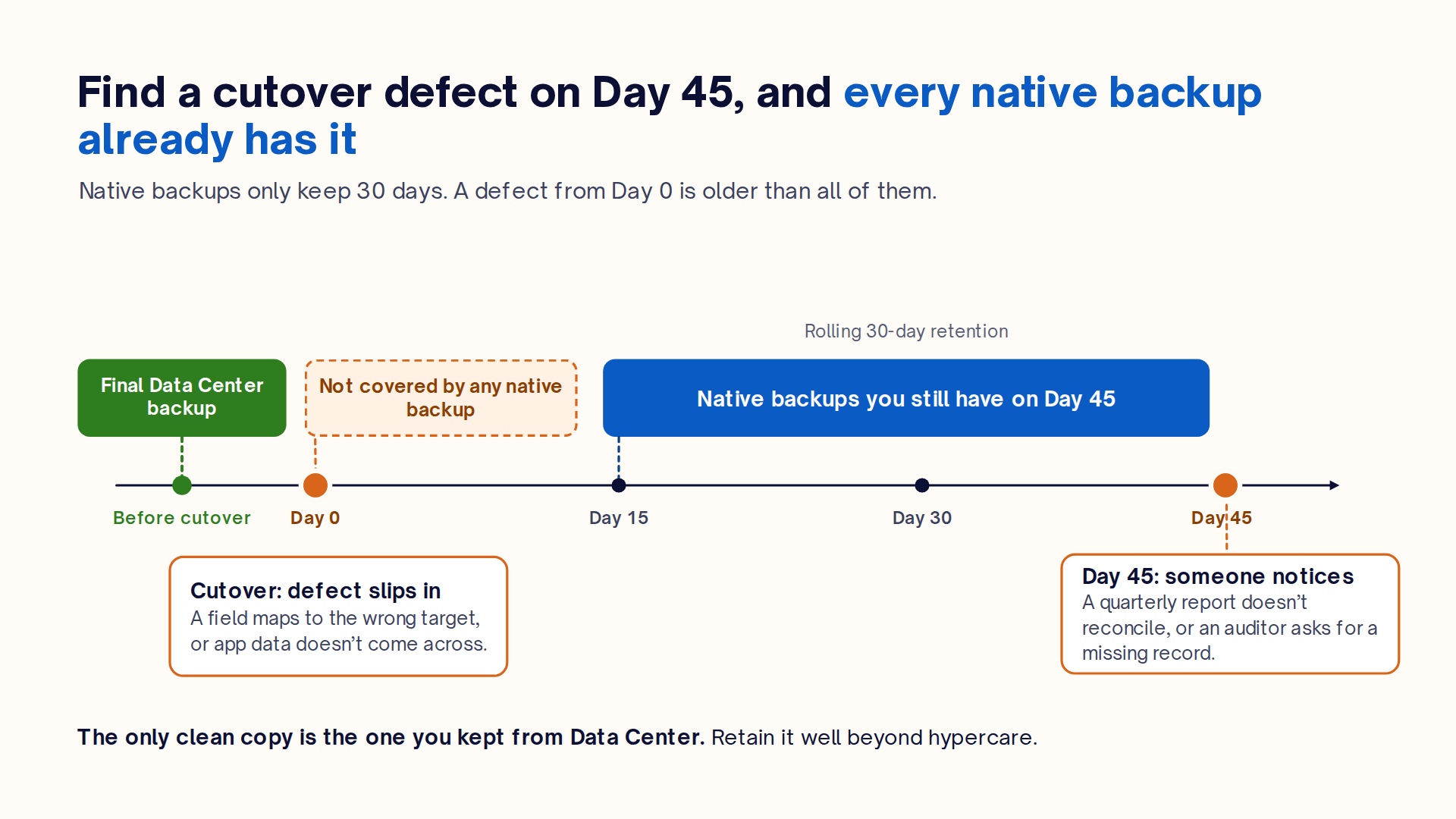
The month after cutover is the riskiest window for Isolated Cloud data loss, because migration defects surface late. Links break, app data doesn’t come across, fields map to the wrong target, and someone runs a cleanup script a week after go-live. These problems tend to appear when a quarterly report doesn’t reconcile, or when an auditor asks for a record that should exist.
Native backups keep 30 days. A defect introduced at cutover and discovered on day 45 predates every backup you have, and the only clean copy is whatever you kept from Data Center.
Three precautions follow:
- Take a final, verified Data Center backup at cutover. Retain it well beyond your hyper-care period.
- Keep the Data Center instance read-only until the team signs off on post-migration validation, if licensing allows. Then, re-migrate affected projects with Atlassian’s migration tooling or reconcile them manually.
- Hold off on bulk cleanup in AIC until you have a backup you’ve actually restored from. That includes deleting duplicate projects and archiving old spaces.
The Atlassian Marketplace app gap
Atlassian Backup and Restore does not back up Marketplace app data, and in AIC that gap covers every app you run. AIC only runs apps from its Isolated Cloud Marketplace collection. In practice, those are Forge apps whose data lives on Atlassian’s infrastructure.
If you restore a Jira site from a native backup, your issues come back. The test cases, story maps, resource plans, and time logs your apps stored alongside them do not. For estates leaving Data Center, which are typically the most app-heavy in the ecosystem, every app is a separate data store with its own recovery story.
The hardest part was rethinking every outbound call. On Isolated Cloud, egress is blocked by default, so we had to map exactly what each app sends out and why. That exercise showed us that for most of our apps, the data that matters most, like test cases, time logs and resource plans, can live entirely inside Atlassian’s infrastructure. The real work is making sure it reconnects cleanly to the right issues and projects after a restore.
John Nguyen
Tech Lead, Isolated Cloud at DevSamurai (Linkedin)
How to audit your app estate before migration
- Export your installed app list from Admin Hub and tag each app with the business process it supports.
- Ask each vendor three things: where its data lives, whether that data can be exported, and whether it can be restored to a new site and re-linked to restored issues and projects.
- Review egress approvals in Admin Hub. Any app with an approved remote processes data outside the tenant, and backing up that data is the vendor’s job, not Atlassian’s.
- Rank the apps by recovery priority and record the answers in your DR runbook.
DevSamurai Progress on Atlassian Isolated Cloud
As a Marketplace vendor, we’ve faced the app gap from the other side. Preparing our apps for Isolated Cloud meant answering the same questions this guide asks you to put to every vendor: where the data lives, how it’s backed up, and how it reconnects after a restore. We’re working through our portfolio one app at a time, and here’s where things stand.
Available on Atlassian Isolated Cloud now:
- Agile Test: Enterprise QA Testing, Test Management for Jira
- ProScheduler – Project Management, Resource Planning & Gantt Chart for Jira
- TimePlanner – Timesheets, Time Tracking & Capacity Resource Planning
- ProductGo – Agile User Story Map, Portfolio Roadmaps & Persona
- GanttTable – Gantt Charts, Structure Sheets Tables
- AgileBox – Agile Planning Poker, Retrospectives, Daily Standup for Jira
If your AIC migration depends on any of these apps, talk to us early: [DevSamurai Contact]. We can share where each app’s data lives and provide more timeline details.
Why dedicated Jira Cloud backup is the real operational priority
While infrastructure isolation addresses network perimeters and data tenancy, focusing exclusively on hosting isolation overlooks where data loss actually occurs on a daily basis.
In Jira Cloud, data loss rarely stems from physical data center failures. Instead, it is driven by everyday operational disruptions:
- Autonomous AI agent rewrites and deletions, as engineering teams integrate AI agents to triage tickets, reformat backlogs, and automate sprint planning, non-deterministic agent actions can execute destructive bulk edits or delete custom field histories across thousands of issues in seconds. And then comes the question of what to do and how to restore them as soon as possible.
- Ransomware which is aimed at cloud SaaS targets API tokens and service accounts to overwrite text fields, inject malicious scripts, or wipe critical boards.
- Human error and cascading automation, as misconfigured JQL cleanup routines, mistaken project deletions, or flawed workflow transitions can silently corrupt production environments without triggering a system alert.
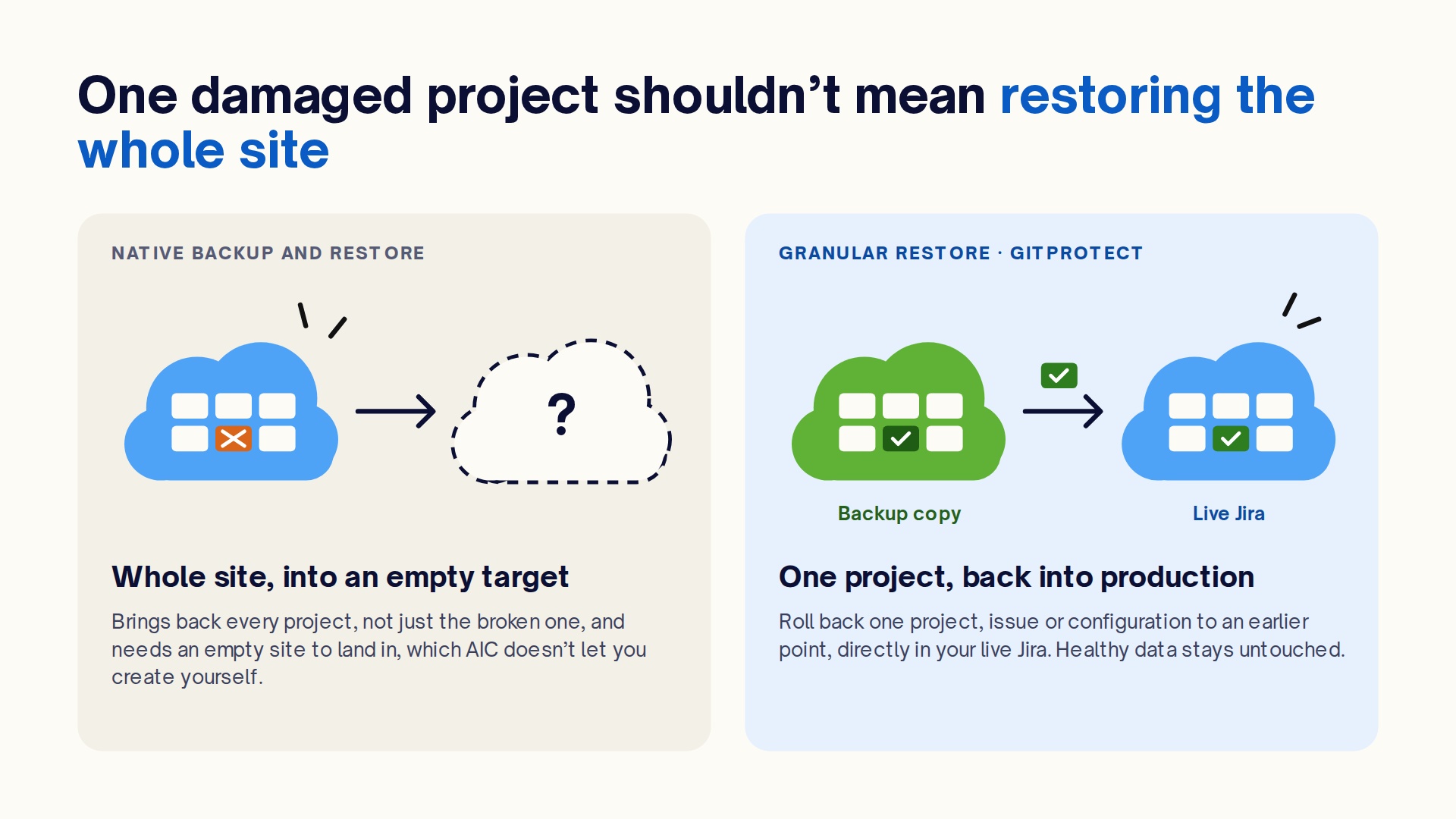
Because native tools treat every restore as an all-or-nothing, full-instance event that requires an empty target, relying on native snapshots to fix localized data damage is impractical. Protecting Jira Cloud requires granular operational recovery, independent data ownership, and strict following to the 3-2-1 backup rule.
How GitProtect delivers true Jira Cloud data resilience
Every gap in this guide comes back to the same fact. Native backup runs on Atlassian’s terms: in Atlassian’s storage, for 30 days, restored a whole site at a time. Closing those gaps means adding a second layer that runs on yours.
GitProtect.io provides automated, policy-driven backup and granular restore built specifically for Jira Cloud, helping organizations address the compliance and operational gaps left by native tooling:
- Granular, point-in-time restore. Instead of wiping or provisioning whole sites, GitProtect allows surgical recovery. Organizations can restore individual projects, issues, etc. directly back into their active Jira instance without overwriting healthy production data.
- The 3-2-1 backup rule for compliance. Organizations can meet DORA, NIS 2, and ISO 27001 requirements by keeping their data for as long as they need due to unlimited retention. Also, they can have three copies of their data across different separate media types, both cloud and local. GitProtect provides complete storage independence – organizations can store their backups in GitProtect Cloud Storage, any S3-compatible cloud (AWS S3, Azure Blob, Google Cloud Storage), or their own on-premises infrastructure.
- Data residency of choice. Organizations can maintain complete sovereignty over where their backups are – Europe, USA, Australia or custom. Everything to align with internal governance and cross-border compliance mandates.
- Automated, scheduled protection. Organizations can create backup rules to run their backups automatically at customized intervals, ensuring recent changes are continuously protected.
- Beyond issues. Back up Jira Service Management, Assets, and Automation Rules alongside project data, so configuration has a recovery point too.
Try GitProtect for free here: [Atlassian Marketplace].
Jira disaster recovery readiness checklist for AIC
A migration to Atlassian Isolated Cloud is ready for sign-off when every question below has a documented pass. Work through all ten before cutover.
-
Are RPO and RTO defined per product?
Pass: written targets for Jira, JSM, and Confluence, approved by each product’s business owner. -
Is a native backup policy active?
Pass: a scheduled policy and a recent backup marked complete. -
Do you know where a restore will land?
Pass: Atlassian has confirmed how restore targets are provisioned in your AIC environment, and you’ve timed a test restore. -
Does 30-day retention meet your obligations?
Pass: compliance signs off on it, or a second copy covers the gap. -
Can you recover one project, or one field, without a full-site restore?
Pass: a tool that recovers granularly, or a documented and accepted risk. -
Does every Marketplace app have a documented recovery path?
Pass: vendor answers are recorded for each app. -
Is your customer-managed key protected?
Pass: deletion safeguards are enabled, and key administration is separate from Atlassian org admin roles. -
Can you log in and find your runbook if the tenant or IdP is down?
Pass: a tested break-glass account, and a runbook stored outside the tenant. -
Is your Data Center fallback intact?
Pass: a verified final backup is retained, and the instance stays read-only until validation is signed off. -
If a backup tool needs egress, has security approved the data flow?
Pass: the domain is approved in Admin Hub, logged, and reviewed against your data classification policy.
Before you sign off on the migration
Atlassian Isolated Cloud does what it promises. Your data sits on dedicated infrastructure, stays in its region, and leaves only when you approve it. What isolation doesn’t decide is how you get that data back. That’s still your call, and the time to make it is before cutover, not during an incident.
Start with the checklist above. If your current DevSamurai app stack is part of the plan, don’t hesitate to talk to us: [Contact Us]