How often has your team lost valuable hours switching between apps, digging through scattered notes, or waiting for a reply—only for a sprint to end with unfinished tasks and missed deadlines?
However, if your team is managing projects in Jira but still relying on external documents, ping-ponging messages across channels, or juggling cross-project updates, you’re not alone.
Abstract: The Hidden Cost of Context Switching
Ultimately, these delays aren’t just annoying; they are a direct threat to your project health. For a Project Manager, the impact is a daily struggle:
- Risk to Deadlines: Tasks roll over, creating a ripple effect on your roadmap.
- Wasted Budget: Time spent searching is time not spent building.
- Loss of Visibility: Critical context is hidden, making risk assessment impossible.
- Team Burnout: Frustration from fragmented work leads to disengagement.
📊 The Atlassian Reality Check: According to recent research, workers lose an average of 51 minutes per week to “tool fatigue” (context switching between apps), which adds up to over 44 hours of lost time per year, per employee! You are losing over a week of productive time for every team member, every year.
Fortunately, one simple but mighty fix: Centralize your knowledge in Confluence, and fully connect it to Jira. It’s built for purpose, offering real-time context and a single source of truth, so your team stops wasting time and starts moving projects forward, together.
When Your Team Loses Time Before You Even Notice
Many high-performing Jira teams face hidden communication bottlenecks that directly slow project velocity and increase risk. For a Project Manager (PM), these are the top four culprits:
- Tool Overload & Context Switching: Teams juggle multiple apps (Slack, email, spreadsheets, external drives). Every switch breaks focus and adds friction. This is the number one killer of efficiency and is often invisible in a status report.
- Scattered Strategic Knowledge: Project plans, requirements, and key decisions are lost across chat threads or siloed documents. When new members join or an audit is required, finding the “why” behind the “what” takes hours, making a mockery of your documentation efforts.
- Cross-Project Ping-Pong: Dependencies across teams create endless back-and-forth communication. When a team member waits for an update from another department, your entire workflow stalls, and you lose control over your timeline.
- Unclear Decision Trails: Without a central, auditable place to track decisions, task ownership, and requirements, teams risk duplicating work or scope creep because the original intent of the work is unclear.
The result? Frustrated teams, wasted budget, and project managers constantly firefighting communication issues instead of steering the project to success.
Best Practices for PMs: How to Master Jira/Confluence Alignment
Therefore, improving team communication isn’t just about tools—it’s about implementing PM-friendly habits and processes that keep every sprint aligned and productive.
| PM Challenge | Strategic Solution with Jira & Confluence |
| Lack of Visibility/Risk | Centralize Context: Use Confluence as the Single Source of Truth for all Project Plans, Requirements, and Stakeholder reports. Link these pages directly to your Jira Epics/Tasks. |
| Task-to-Knowledge Gap | Reduce Tool Hopping: Create Jira issues directly from a highlighted requirement in a Confluence page. Embed live Jira reports (like burndown charts) into your Confluence Status Reports. |
| Misaligned Priorities | Clarify Decision-Making: Use Confluence pages to document all key decisions and ensure every Jira issue links back to the originating requirement document in Confluence. |
| Inefficient Status Meetings | Structured, Asynchronous Updates: Use consistent Confluence templates for Status Reports, Retrospectives, and Meeting Notes. Tag the relevant Jira tickets/dashboards to provide real-time data without manual updates. |
Go Further: Blockers Vanish with Marketplace Apps
If you recognize your team in these common struggles, you are ready to move beyond core Confluence/Jira and adopt tools that solve communication challenges at the point of work.
1. Chat for Jira: Stop Hunting for Context
The Problem: It’s mid-sprint, and a critical task is blocked. Your team jumps into Slack, pings three people, or checks email to find context. Precious hours are lost, and the task risks rolling over.
The PM Value: Instantaneous, Contextual Resolution.
With Chat for Jira, that scenario changes. Instead of switching tools, your team discusses blockers, asks questions, or shares updates right inside the Jira issue.
👤 User Story: Clearing a Design Blocker in Minutes
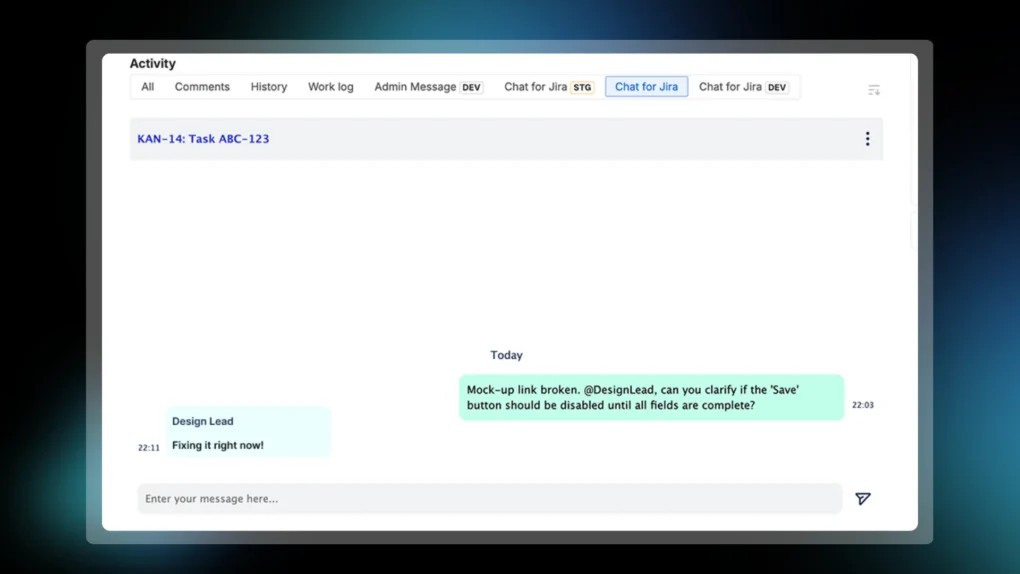
Imagine Camille, a front-end developer, is working on Task ABC-123. She notices the mock-up link is broken and a design requirement is ambiguous.
❌ Without Chat for Jira: Camille takes a screenshot, opens Slack, searches for the Design Lead, drafts a message, and waits. The Design Lead is in a meeting and sees the message 45 minutes later. They ask for the Jira issue key. Camille replies. Another 15 minutes passes. An hour of valuable coding time is lost.
✅ With Chat for Jira: Camille immediately opens Task ABC-123 and posts a question and the screenshot directly in the issue chat: “Mock-up link broken. @DesignLead, can you clarify if the ‘Save’ button should be disabled until all fields are complete?”
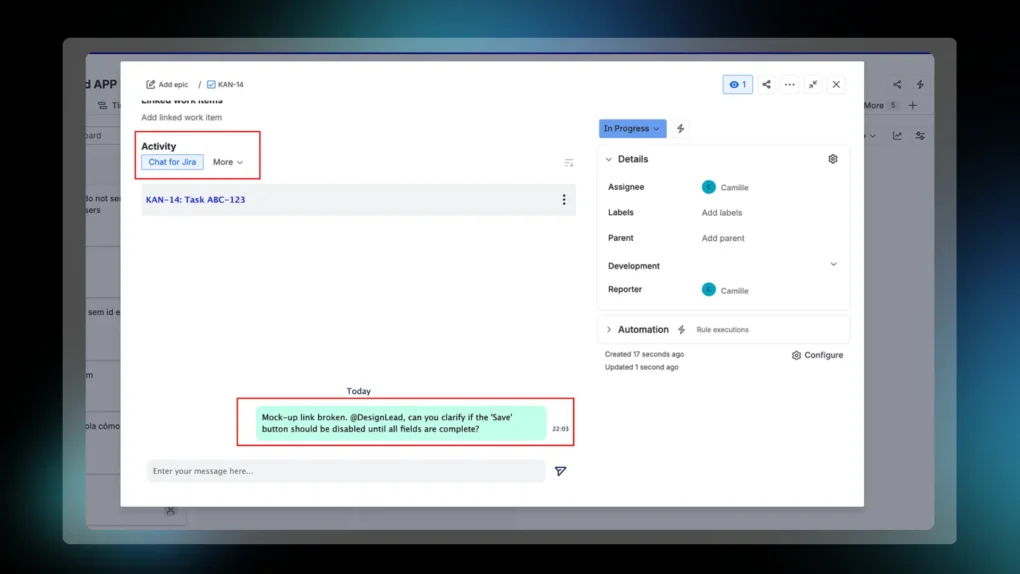
Result: The Design Lead sees the message, fix the link, and provide the clarity in a 2-line chat reply within 5 minutes. Camille continues coding with zero context switching.
PM Benefit: As the Project Manager, you see the rapid communication exchange in the issue’s activity log. You know the blocker was handled immediately, ensuring the task stays green and on track for the sprint goal.
- No Lost Context: The conversation is permanently attached to the task. When a new person takes over the issue, the full communication history is there.
- Targeted Communication: Eliminate the guesswork of who to ping. Everyone knows exactly where to go—the right chat, under the right issue or project.
- Actionable Threads: Quickly turn a chat comment or decision into a new sub-task without ever leaving the Jira interface, keeping momentum high.
Result for the PM: Reduced cycle time, fewer missed deadlines, and a real-time picture of work momentum. Your team spends more time doing the work instead of looking for the context.
TRY CHAT FOR JIRA NOW FOR FREE! (Why waste another minute?)
2. AgileBox: Move from Guesswork to Agile Precision
The next challenge for a Project Manager is preventing those blockers in the first place by ensuring tasks are accurately estimated and that daily progress and risks are captured effectively and auditable.
The Problem: Sprints fail before they start because of inaccurate estimations, leading to tasks rolling over. Furthermore, time spent in status meetings often results in crucial context being lost or undocumented, leaving the PM vulnerable to information gaps.
The PM Value: Auditable Accuracy and Effortless Alignment. AgileBox embeds essential team rituals directly into Jira, ensuring decisions are documented and work estimates are genuinely collaborative and realistic.
Mastering Estimation and Alignment
Accurate sprint planning is the foundation of project success. When estimates are guesses, deadlines are risks.
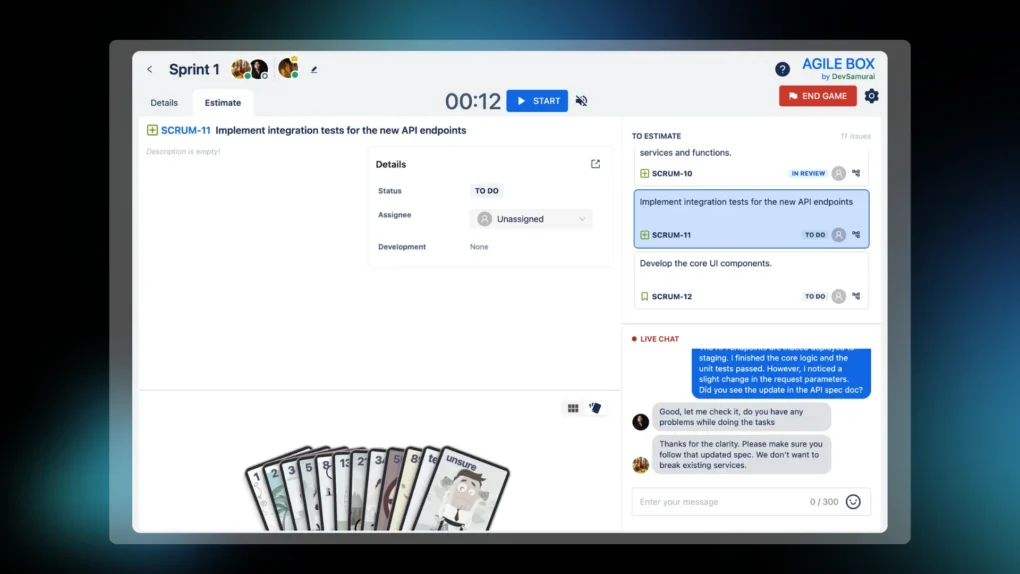
- Planning Poker in Jira: AgileBox brings Scrum Planning Poker directly into your Jira project or across multiple boards. By standardizing estimation with methods like Fibonacci or T-Shirt sizing, you move beyond guesswork and ensure every team member has a voice, leading to better buy-in and more reliable delivery dates.
Result for the PM: Your project roadmap is based on consensus, significantly reducing the likelihood of task rollover and allowing for accurate velocity tracking.
Turning Meetings into Auditable Data
Meetings should result in clarity, not more confusion.
- Automated Daily Standup Logs: Stop relying on fragmented meeting notes. AgileBox automates your Daily Standup process, logging all reports in a consistent, searchable format. This feature integrates seamlessly with popular communication tools, ensuring your team stays on the same page and providing the PM with an auditable record of commitments and blockers.
Result for the PM: Enhanced Loss of Visibility becomes robust status tracking. The team daily report provides a single source of truth for progress, allowing you to quickly check the pulse of the sprint without having to manually chase updates.
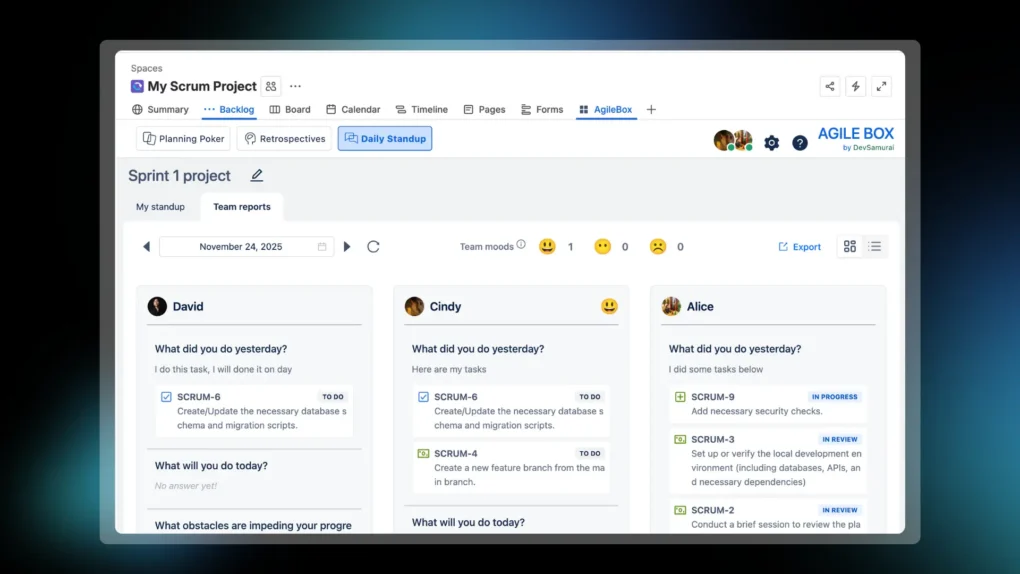
RESULT FOR THE PM: AgileBox ensures that the communication driving your project is both structured (in the planning phase) and documented (in the execution phase), giving you the control needed to confidently steer your projects to success.
TRY AGILEBOX NOW FOR FREE! (Start planning smarter today.)
Key Takeaways
- Centralize Knowledge: Keep all project context in Confluence linked to Jira to reduce wasted time.
- Stop Tool-Hopping: Chat for Jira moves daily communication directly under issues, projects, or channels.
- Reduce Missed Deadlines: Instant, contextual communication ensures blockers are cleared faster.
- Clear Ownership: Structured documentation and linked decisions prevent duplicated work.
- Auditable Processes: AgileBox ensures estimates, stand-ups, and status updates are recorded and searchable.
- Boost Team Productivity: Less context switching means your team spends more time executing.
- Predictable Sprints: Aligned communication and centralized knowledge make sprints more predictable and manageable.
Closing Thoughts
Communication is the heartbeat of every successful project. Scattered messages, lost context, and constant tool switching don’t just slow your team down—they put your sprints, deadlines, and budget at risk. By centralizing knowledge in Confluence, keeping conversations directly in Jira with Chat for Jira, and adopting structured, auditable practices with tools like AgileBox, project managers gain visibility, control, and speed.
Finally, the result is clear: fewer blocked tasks, faster decision-making, predictable sprints, and a team that spends its energy on building, not chasing context. Start small, measure the impact, and scale what works—because when communication flows where the work happens, your projects flow too.