Shadow AI is AI used for work without the organization’s knowledge, approval, or oversight. It covers three fairly different problems that usually get counted as one, which is why most shadow AI numbers mean very little. This guide separates them, explains why employees end up there, ranks the risks honestly, and walks through nine places to look with a frank account of what each one can and cannot see.
What counts as shadow AI
The term is used loosely, usually to mean anything the security team did not buy. That looseness is fine in conversation and useless the moment you try to report a number, because the umbrella covers three states that need three completely different responses.
|
State |
What it means |
What it needs |
Who usually owns it |
|---|---|---|---|
|
Undiscovered |
The organization does not know the use exists |
Discovery and investigation |
Security, IT |
|
Unreviewed |
The use is known, but no applicable governance decision exists |
Confirm ownership, screen, assess, and decide |
Governance |
|
Unauthorized |
An applicable decision or policy exists, and the use contradicts it |
Restrict, remediate, or escalate |
Governance coordinates; Security, the business owner, Legal, or HR act |
|
Governed |
A valid decision and an accountable owner exist |
Monitor and reassess |
The named owner |
All three of the first rows are shadow AI in ordinary usage. They are not the same problem.
Undiscovered AI is a visibility problem, and the fix is in this article. Unreviewed AI is a governance problem, and the fix is an intake process people will actually use. Unauthorized AI is a policy problem, and the action is usually done elsewhere, though governance still records the breach, tracks the remediation, and keeps the audit trail. Reporting all three as a single figure hides which kind of work you are facing, and it is the most common reason a shadow AI programme stalls after its first scan.
These are operational categories, not mutually exclusive database states. A use can be unreviewed and also violate an existing policy. An approved use can lose its owner without losing its original decision. Track discovery, governance decisions, policy violations, ownership, risk, and lifecycle separately. The categories tell you what needs attention; the underlying records tell you why.
If you only take one thing from this section: the useful question is not whether something is shadow AI. It is which of those three gaps you are looking at.
One more distinction, which matters more than it sounds.
Shadow AI is not a property of a tool. The same product can be governed in one team and shadow in another. Finance using an approved assistant on public market data is governed. Someone in HR using the identical product to rank job applicants, with nobody informed, is unreviewed. The tool is not the unit. The use is. Which means you cannot produce a shadow AI number from a list of tools, only from a list of uses, and uses are much harder to see.
Against the five questions from the first article, undiscovered AI fails question one: what is it. Unreviewed AI can pass question one completely, and may well pass question two, and still fail three and four: what was decided and on what basis. That is precisely why a single count tells you so little. The three states fail different questions and need different work from different people.
How it relates to shadow IT
Shadow IT is the older idea: software and services adopted without going through IT. The two overlap heavily, but one is not simply a subset of the other.
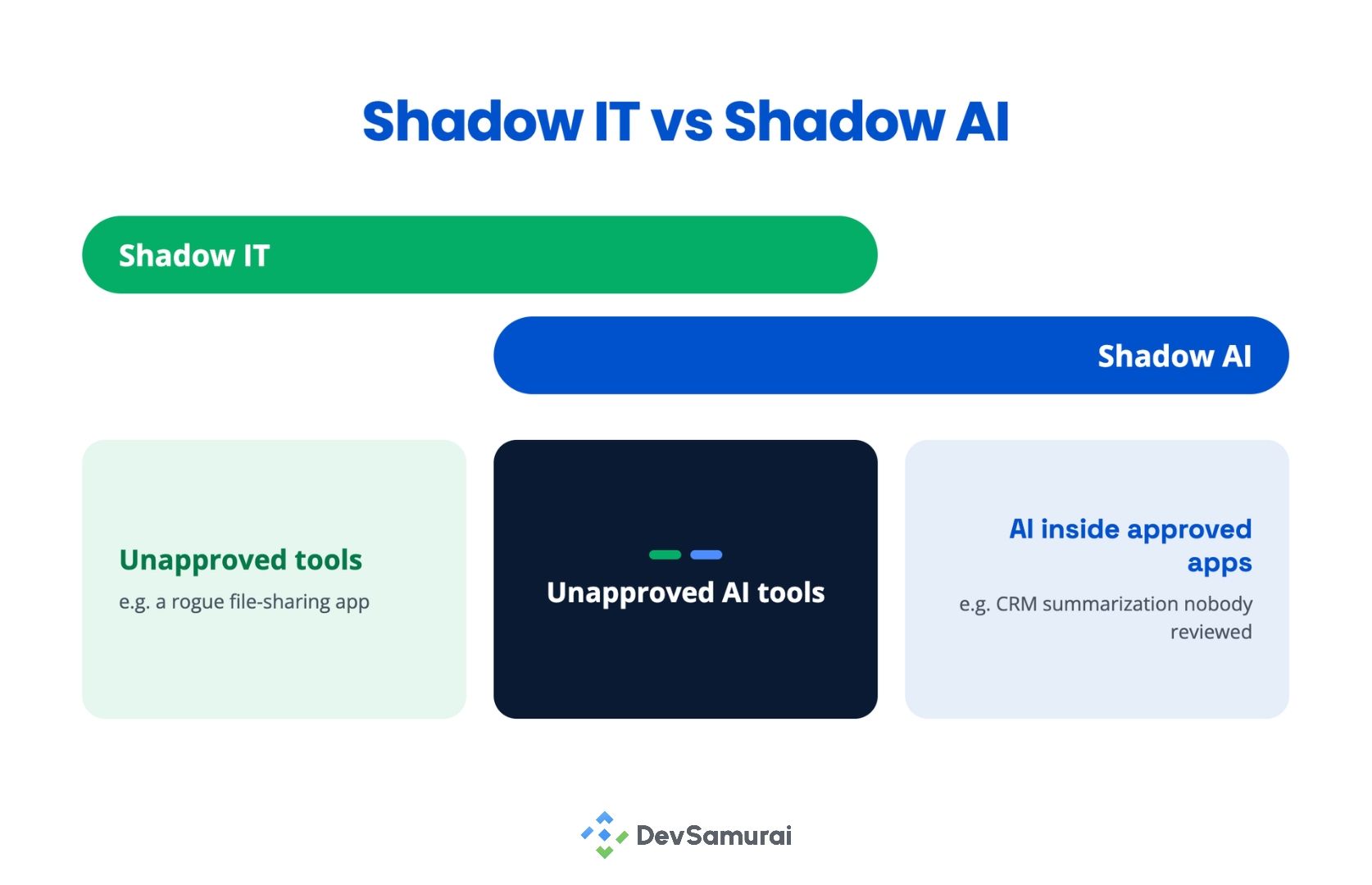
An unsanctioned AI tool is a form of shadow IT, and everything that makes shadow IT hard to find applies to it. But shadow AI also appears inside applications IT approved years ago, when an AI feature or a new use starts operating without anyone governing it. Your CRM is not shadow IT. Its summarization feature processing customer records, which nobody reviewed, is still an ungoverned AI use.
The underlying difference is what each discipline has to examine. Shadow IT is largely a question about the technology: is this service sanctioned, is it secure, is it paid for? Shadow AI has to ask what the technology is being used to do, because that is where the risk actually varies.
Two further things set it apart. The data exposure is usually larger than the tool suggests, since what gets sent to an AI service is often the content itself rather than a record about it. And an AI use can produce decisions about people.
A rogue file-sharing tool is a data problem. A rogue model scoring job applicants is a data problem, a fairness problem, and a regulatory problem at once.
Why it happens, and why that matters
The usual framing is that employees are careless, or that they need more training. I think that is mostly wrong, and believing it sends you after the wrong fix.
1. The person using shadow AI is usually the person doing their job
Someone has a deadline, a tool exists that halves the work, and the route to ask permission is either unclear or slower than the deadline. They are behaving rationally. A programme built on the assumption that they are not will produce compliance theatre and little else.
Four causes, in no particular order of size, because I have no data that would let me rank them honestly.
2. AI arrives inside software you already bought
This is the one I would check first, and the one least likely to be on anyone’s list. Your CRM shipped a summarization feature. Your help desk added a reply drafter.
Your document tool now suggests edits using a model you have never named in a contract. Nobody chose this, nobody announced it internally, and conventional application discovery will not flag it, because the vendor was approved years ago and the traffic looks the same as it always did.
3. Governance is slower than the work
Covered in the first article and still true. A review that takes a fortnight on an integration that takes two days is not a control. It is an incentive to stop asking.
4. There is no obvious way to ask
If an employee wanted to register a new AI use today, could they, in under five minutes, without first working out who owns the process? In a lot of organizations, the honest answer is no.
5. Spending is decentralized
Team cards, personal subscriptions reimbursed as expenses, free tiers that need no payment at all. Procurement sees none of it.
Three of those four are your process rather than your people. That is the useful conclusion. A good deal of shadow AI is a measurement of how hard you have made it to do the right thing.
The risks, ranked honestly
Most articles on this subject open with a fine or a breach. I would rather be useful than alarming.
1. What I would look at first
1.1 Decisions about people, made by something nobody assessed
A manager using a model to rank candidates, triage grievances, score performance or decide who gets a discount. This category produces real harm to real individuals, attracts regulators in every jurisdiction, and generates the complaints you cannot settle quietly.
It is also the category telemetry is worst at surfacing, and not mainly because the volume is small, though it is: one person, a few dozen prompts a month. The deeper reason is that a log can tell you a recruiting manager reached an AI service.
It cannot tell you she used it to rank applicants. Detecting the service and identifying a consequential use of it are two different problems, and only one of them has a technical solution.
1.2 Data leaving under terms nobody read
Not only the dramatic version where someone pastes source code into a chat window. The quieter version too: a free tier whose terms permit training on inputs, a vendor whose subprocessor list includes a jurisdiction your customer contract prohibits, a retention period measured in years.
The exposure is the same whether or not anyone intended it, and you often find out when a customer sends a due diligence questionnaire.
1.3 The prototype that became load-bearing
Someone built a thing in a week to prove a point, and eighteen months later three teams depend on it; it runs on a personal API key, and the person who built it has left. No governance decision was ever made, because at the time there was nothing to decide.
This is almost invisible to discovery tooling and usually found by accident.
1.4 Agents holding credentials
An autonomous agent with an API token and permission to act, rather than suggest, is a different category of exposure from a chat window. It can write, send, approve, and delete.
A single ungoverned agent of that kind deserves more attention than a large number of ungoverned chat accounts.
2. What gets too much attention compared with everything else
The employee leaking confidential data to a chatbot. I want to be careful here, because this risk is real and for some organizations it is the dominant one. If you handle regulated data, customer confidential information, trade secrets or material under contractual confidentiality obligations, leakage through consumer AI services belongs near the top of your list, and enterprise tenants, data loss controls and acceptable use rules are a sensible response.
My argument is narrower. This is the story that has absorbed most of the attention in this space for three years; it is the easiest one to tell, and a programme shaped entirely around stopping copy and paste will not notice the recruiting model at all. Protect against leakage. Do not stop there.
Volume as a proxy for risk. The tool with four thousand users and no sensitive data is usually less of a problem than the tool with one user and a connection to your customer database. Shadow AI reports sort by user count because user count is easy to measure. Resist that.
Nine places to look
The first article said to start with your identity provider and your expense data, and said plainly that neither gives you a complete picture. This is the longer answer.
Something worth holding onto first. Discovery is a question you ask your own infrastructure, and infrastructure only answers what it was built to notice. Every source below has a shape, and the shape determines what is invisible to it.
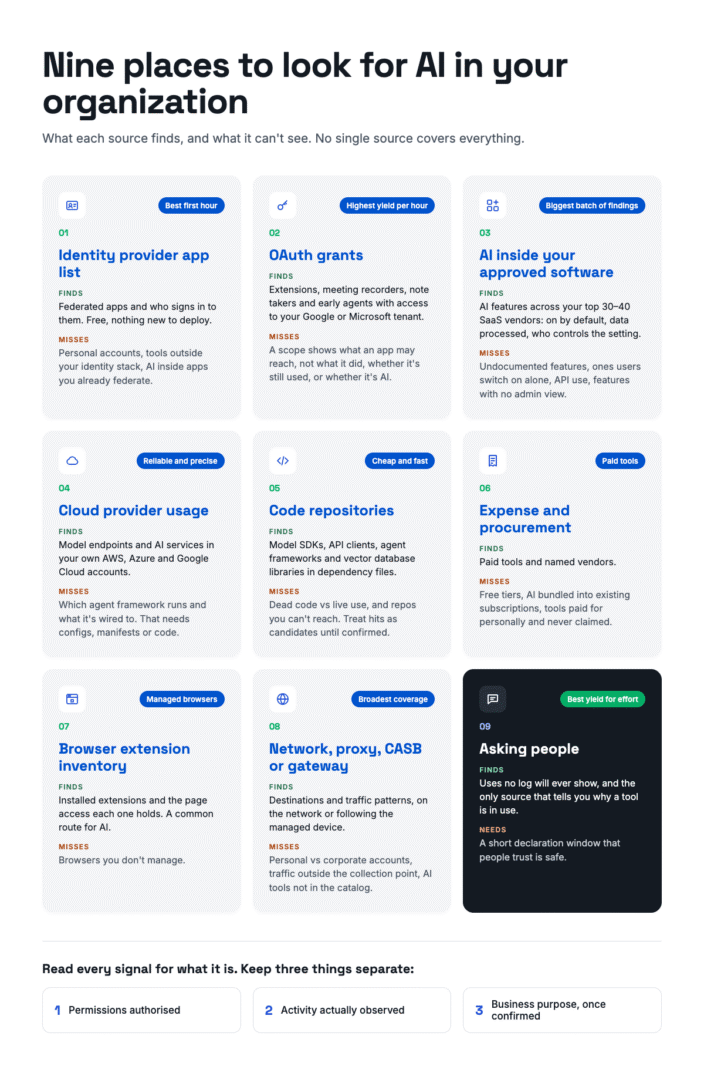
The skill is not running the query. It is knowing what the query cannot return.
1. Identity provider application list
Your best first hour. Shows federated applications and who authenticated to them. Finds sanctioned and semi-sanctioned tools quickly, at no cost, with nothing new to deploy.
Blind to anything reached with a personal account, anything that does not use your identity infrastructure, and anything embedded in an application you already federate.
2. OAuth grants
Often the highest yield per hour of work, and frequently skipped. Look at what third-party applications users have granted access to your Google Workspace or Microsoft 365 tenant. This is where browser extensions, meeting recorders, note takers, and early agents live.
Read the scopes carefully, and read them for what they are. A granted scope tells you what an application may reach, not what it has reached, not whether it is still in use, and not whether it uses AI at all. Treat a broad grant as a reason to investigate, and keep three things separate: the permissions authorized, the activity actually observed, and the business purpose once someone confirms it.
3. The AI already inside your approved software
Conventional application discovery tends to miss this, because the vendor is already approved and nothing about the traffic changes. Vendor administration APIs and configuration reviews will close part of the gap, and some vendors now report feature usage.
The rest is manual: list your top thirty or forty SaaS vendors, open each admin console, and record which AI features exist, whether they are on by default, what data they process, and whether the setting is even yours to control. Tedious, and likely to produce your biggest single batch of findings.
What it still will not show you is undocumented features, anything a user can switch on individually, use through the vendor’s API rather than its interface, and features with no admin visibility at all.
4. Cloud provider usage
Model endpoints and AI services in AWS, Azure, and Google Cloud. Reliable and precise for inference traffic and provisioned services, and limited to your own cloud accounts. Note that billing and service usage alone will rarely tell you which agent framework is deployed or what it is wired to. For that, you need the workload configuration, the deployment manifests, or the code.
5. Code repositories and dependency files
Search for model SDKs, API clients, agent frameworks, and vector database libraries. Cheap, fast, and almost nobody does it.
Treat what comes back as candidates rather than findings: a declared dependency may be dead code from an abandoned experiment, and a live workload may be running from a repository you cannot reach. Confirm against a deployment or a running service before you register anything. Used that way, it is one of the better routes to the prototype that became load-bearing.
6. Expense and procurement records
Finds paid tools and named vendors. Blind to free tiers, to anything bundled into an existing subscription, and to anything an employee paid for personally and never claimed.
7. Browser extension inventory
If you manage browsers, you can see what is installed and what page access each extension holds. A fair amount of AI reaches employees this way.
8. Network, proxy, CASB, or secure web gateway telemetry
The broadest coverage available and the heaviest instrument on the list. What it actually gives you is destinations and traffic patterns. It does not, on its own, tell you whether someone reached a service with a personal account or a corporate one, because both look like the same domain. Separating those needs a second signal, usually from the identity provider or the vendor’s own tenant logs.
Coverage depends entirely on where the telemetry is collected. Proxy and gateway collection sees traffic that crosses the corporate network.
Collection on the managed endpoint follows the device home, which is a meaningfully different privacy conversation as well as a different coverage profile. Both also depend on the product recognizing the service at all, which for newer AI tools is often a catalog gap rather than a detection failure.
9. Asking people
The source with the best ratio of yield to effort, and the one most programmes skip because it feels unrigorous. A short, credibly safe declaration window will surface uses that no log will ever reveal, including the recruiting model and the finance spreadsheet with a model behind it. It is also the only source that tells you why a tool is in use, which is the thing you actually need in order to govern it.
A sensible sequence
The principle is to use the least intrusive source that answers the question, not to follow a fixed order. If you already have well-governed network telemetry, there is nothing virtuous about ignoring it. In most organizations, the ordering below gets you furthest for the least exposure.
- Start with administrative visibility you already have. Identity provider, OAuth grants, procurement records, cloud AI usage.
- Add technical discovery and human declaration together. SaaS admin reviews, repository scans, and managed extensions, alongside an open and credible reporting channel. Running these at the same time matters: the declarations explain what the technical findings mean.
- Investigate the gaps. Correlate signals, confirm which are the same thing, and resolve unknown ownership.
- Extend to deeper telemetry where it is justified. Proxy, gateway, CASB, or endpoint collection, with the privacy controls and permissions in the next section in place first.
A signal is not an asset
Everything those nine sources return is a signal. A signal is evidence that something exists. It is not an inventory record, and treating it as one is how you end up with a register nobody trusts by the end of the quarter.
Here is the shape of the problem, with illustrative numbers.
|
Signal |
What it shows |
|---|---|
|
OAuth grant |
An assistant has been granted access to Drive |
|
Expense record |
Finance pays for a subscription to that assistant |
|
Network traffic |
Devices reach the service on most working days |
|
Employee declaration |
Two teams report using it, for two different purposes |
Four signals. One AI asset. Two use cases, and only one of them is governed:
- Use case A: Summarizing published research. Decision recorded, owner named, low risk. Governed.
- Use case B: Analyzing confidential customer contracts. No decision, no owner, sensitive data. Unreviewed.
If you had counted signals, you would have reported four. If you had counted tools, you would have reported one, and called it approved. Neither number tells you that contracts are being processed by a service nobody assessed for that purpose.
Which means you need a decision, written down before you start, about what counts as one asset. Most teams land near product plus tenant or account plus environment, so your production and sandbox deployments of the same service are two records rather than one. Whatever you choose, write it down, because in six months nobody will remember and your numbers will quietly stop meaning the same thing from month to month.
Two rules that save pain later.
Keep signals and records separate. Detections are evidence about an asset. They should stay attached to it as provenance after it is registered, not be converted into it and discarded. When someone asks in a year why you believed a thing was in use, the signal is your answer.
Unrecognized is not unsafe. You will have a pile of things you cannot identify. They are unidentified, which is a different state from dangerous. If your process treats every unknown as a risk finding, your team will learn to stop looking, and you will have built an incentive against discovery inside your discovery programme.
Finding it without building a surveillance habit
This section matters more than its length suggests, and it is where this kind of programme is most likely to do damage.
AI discovery that identifies individuals can constitute employee monitoring, and can trigger privacy and workplace consultation obligations. That is a legal category, not a rhetorical point. In Germany, section 87(1)(6) of the Works Constitution Act gives the works council codetermination rights over technical systems designed to monitor employee behaviour or performance, which bites before deployment rather than after.
Meanwhile in the Netherlands, the data protection authority’s guidance is that staff tracking arrangements generally need the works council’s agreement. In Japan, where I work, APPI governs the personal data involved and is the binding regime sitting underneath a largely voluntary AI framework.
I am not a lawyer, and this is the point in the project where you stop reading articles and talk to counsel and, if you have one, your works council. The design principles I would hold to in any jurisdiction.
1. Aggregate by default
Reports show departments and counts. “Twenty-six people in engineering reached this service last month” answers the governance question completely. A list of their names does not answer it any better.
2. Do not assume aggregation means anonymity
One person in a three-person team is identifiable no matter how you phrase the report, and unusual activity identifies people even in large groups. Set a minimum group size below which you show a range or nothing at all, and restrict the detailed views where someone could be picked out.
3. Individual identity behind a permission and a reason
There are legitimate moments to need a name, usually an actual investigation. Make that a separate permission, require a stated reason, and log the reveal itself as an auditable event. If everyone who can see the dashboard can see the names, you have not built a control; you have built a directory.
4. Purpose limitation that survives contact with other departments
Build the capability to attribute AI use to named individuals, and you will be asked to use it for performance management, for an HR dispute, for an unrelated investigation. Decide now, in writing, what it may be used for, and expect the question.
5. Retention set per source
Proxy telemetry does not need to live as long as governance decisions. Set the window by source, and set it before you turn the source on.
One sentence I would put in front of any security team about to deploy network discovery for this purpose. You can find shadow AI without building a surveillance capability, and if you build the surveillance capability, you will eventually be asked to use it for something that has nothing to do with AI.
What to do with what you find
The instinct is to block. I would resist it as a default, for a practical reason rather than a principled one.
1. Blocking is not a finding
Blocking a domain removes your visibility of it without removing the need that drove people there. The need routes around you, often to a personal device, where you can see nothing at all. You have traded a problem you could measure for one you cannot.
That is a default, not a rule. When there is credible evidence of serious exposure, restrict first and investigate afterwards. Regulated data going somewhere it must not, a use that breaches a customer commitment, an agent with write access behaving unexpectedly: none of those wait for a governance queue. The judgement is proportionate response, not patience.
For everything else, the ladder is register, assign an owner, screen lightly, and decide. Two things make that work, and neither is technology.
2. A declaration window with honest boundaries
Tell people you want to know, and say why: the purpose is to find and govern AI use, not to punish people for experimenting. Then be specific about the protections. Declaring something in good faith does not get you in trouble.
It cannot erase a serious incident, deliberate misuse of customer data, or a live contract breach, and those will be handled under existing processes. An unconditional promise you may not be able to keep is worse than a qualified one you will, because the first time you have to break it, nobody declares anything again.
3. A route to ask that is faster than not asking
If registering a new AI use takes five minutes and returns an answer within days for low-risk cases, people will use it. If it takes an hour and vanishes into a committee queue, they will not, and you will be generating fresh shadow AI while still clearing the backlog of the old.
Build the fast path before you open the declaration window, or you will create a queue you cannot clear and teach everyone that declaring things is a mistake.
Counting it without lying to yourself
The rule from the first article applies with particular force here, because shadow AI is the number most likely to end up on a board slide.
Always show the denominator, and always show the unit.
“We have 49 instances of shadow AI” is not a statement. Forty-nine what? Tools, accounts, users, use cases, detections? Out of how many? How did you find them, and when did you last confirm the source was still running?
Something closer to this survives being questioned.
Of 118 registered AI uses, 27 have no applicable governance decision. Nine of those also have no named owner. A further A further 31 signals from the last ninety days remain unmatched to known assets. These are investigation candidates, not confirmed Shadow AI uses. They may resolve to one or more assets and use cases, or none. Identity and OAuth sources are current as of yesterday. Network discovery is not deployed, so use reached through personal accounts is probably underrepresented here, and our current sources give no reliable coverage of that category.
Longer, less quotable, and it holds up. It also tells the reader something the short version hides, which is the shape of the blind spot.
Three related habits.
Report the three states separately. Undiscovered, unreviewed, and unauthorized need different work from different people. One combined figure tells nobody what to do next.
A silent source is not a clean result. If your OAuth export has not run since August, a September report showing no new AI is not good news. Put the last successful collection date on the face of the report, beside the number rather than in a footnote.
Expect the number to rise before it falls. For the first couple of quarters, better discovery produces worse figures. Say so in advance to the people who will see the chart, or you will spend your second quarterly review defending your own progress.
The signal source table
Take it, use it, no attribution needed. Score your own coverage by filling in the last column.
Privacy impact below is a relative judgement, not a legal rating. What it actually depends on is which fields you collect, how identifiable they are, how long you keep them, who can see them, and where you operate.
|
Source |
Finds |
Misses |
Privacy impact |
Effort |
Deployed? |
|---|---|---|---|---|---|
|
Identity provider apps |
Federated apps, who used them |
Personal accounts, embedded AI |
Low to medium |
Hours |
|
|
OAuth grants |
Extensions, recorders, agents, authorized scopes |
Anything not granted through your tenant; actual use |
Low to medium |
Hours |
|
|
AI inside approved SaaS |
Features present and switched on in software you own |
Undocumented features, user-level activation, API use, anything with no admin view |
Low to medium |
Days, manual |
|
|
Cloud provider usage |
Endpoints, services, provisioned workloads |
Anything outside your cloud accounts; framework detail without config or code |
Low to medium |
Hours |
|
|
Code and dependencies |
SDKs, frameworks, candidate prototypes |
Anything not in your repos; dead dependencies look live, so confirm against a deployment; may surface secrets, handle with care |
Low to medium |
Hours |
|
|
Expense and procurement |
Paid tools, named vendors |
Free tiers, bundled AI, personal spend |
Low to medium |
Hours |
|
|
Browser extensions |
Installed extensions and their page access |
Unmanaged browsers and devices |
Medium |
Hours |
|
|
Network, proxy, CASB, endpoint |
AI destinations and traffic patterns |
Account type without a second signal; coverage varies by collection point |
Medium to high |
Weeks |
|
|
Asking people |
Purpose, context, the uses no log shows |
Whatever people choose not to say |
Low to medium |
Days |
|
If the only row you have deployed is the telemetry one, you have built the most intrusive version of this programme and skipped the cheap parts. It is a common place to end up and is worth correcting before anyone outside the security team sees the results.
Where to start this week
Pull your OAuth grants, with their scopes, and sort by what each application is authorized to reach rather than by how many people installed it.
The top of that list will hold applications with broad access to mail, calendars or files. Some are legitimate and well known to you. Some may use AI. Some will have permissions nobody has looked at since they were granted. None of them is confirmed shadow AI yet, and that is the point: what you have is a short, ranked list of things worth an hour each. Find out what each one does, whether the access is still needed, and whether anyone ever decided anything about it.
It costs you an afternoon, it uses a console you already own, and it will tell you which of the three gaps you are actually dealing with.
I work on AI governance software, so these are problems I think about constantly. This series is about sharing what I have learned trying to make governance practical, including what does not work.
Next in the series: AI inventory versus AI use cases, and why you need both.
This article is not legal advice. Employee monitoring rules vary by country and by site, and the discovery sources described here are exactly the kind of thing to raise with counsel before you deploy them.