In most teams, miscommunication does not happen because people are careless. It happens because each team sees the work from a different angle.
Product managers think about customer needs, priorities, and outcomes. Developers focus on building the solution. QA looks for gaps, edge cases, and whether the feature works as expected. Ops wants a smooth release with the right process and supporting materials in place.
Everyone is doing their job. But if those pieces are not connected clearly, work can start to drift. This is a common problem in Jira-based teams. And it usually shows up in the space between planning and delivery.
The good news is that this gap can be reduced. With the right workflow, teams can stay aligned from the moment a requirement is defined to the moment work is delivered.
The real cost of miscommunication between teams
Miscommunication sounds like a soft problem, but its impact is very real.
It affects delivery speed, quality, and team confidence. Even small misunderstandings can lead to extra work later.
Where miscommunication usually starts
In many cases, the problem begins during handoff.
A requirement is discussed in a meeting, written briefly in a ticket, and then passed along. But what one team considers “clear enough” may not be enough for the next team.
This often happens when:
- stories do not include enough context
- files are stored in different places
- teams rely on chat messages or memory for important details
- people assume others are looking at the same version of a document
The issue is not only missing information. It is also disconnected information.
When requirements, documents, and approvals live in separate places, people fill in the gaps on their own. That is when confusion starts.
Why this creates delays, rework, and confusion
Once miscommunication enters the workflow, the effects can spread quickly. This creates a few common problems:
- work gets delayed while teams wait for missing information
- issues move forward before they are truly ready
- completed work needs to be reworked later
- simple tasks become more complex than they should be
Over time, this does not just slow delivery. It also creates frustration. Teams spend more time clarifying than moving forward.
Why Jira work often breaks between requirements and delivery
Jira is great for tracking work. But tracking work is not always the same as connecting work.
That is where many teams struggle.
A Jira issue can show status, assignee, and due date. But if the story behind the work is unclear, or if the right files are missing, the issue alone does not solve the problem.
This is why work often breaks between requirements and delivery.
Planning may happen in one view. Supporting documents may be stored elsewhere. Approval decisions may happen via email or chat. Then, when the issue moves across teams, people do not always have the same context.
The result is a fragmented workflow.
The team can see the issue, but not always the full picture around it.
To reduce miscommunication, teams need more than visibility into tasks. They need a workflow that connects planning, documentation, and delivery in a way that is clear for everyone involved.
A better approach: One shared workflow inside Jira
A better workflow does not mean adding more process for the sake of it. It means making the existing work easier to understand and easier to follow.
For cross-team collaboration to work well, teams need two things. First, they need a shared understanding of what is being built and why. Second, they need a shared source of truth for the files, approvals, and supporting information that go with that work.
When both of those exist inside Jira, handoffs become smoother.
Instead of asking, “Where is the latest version?” or “Was this approved yet?” teams can stay focused on moving work forward.
That is where tools like ProductGo – Agile User Story Map for Jira and Cloud Attachments & Workflow Automation for Jira can work well together.
ProductGo helps teams see the same product vision
One of the biggest reasons teams fall out of sync is that they do not all see the requirement in the same way.
This is where ProductGo – Agile User Story Map, Portfolio Roadmap, and Persona for Jira – play an important role.
As a user story mapping tool, ProductGo helps teams organize work in a way that is easier to understand. Instead of looking at a flat list of tickets, teams can see how stories connect to the larger user journey and product goal.
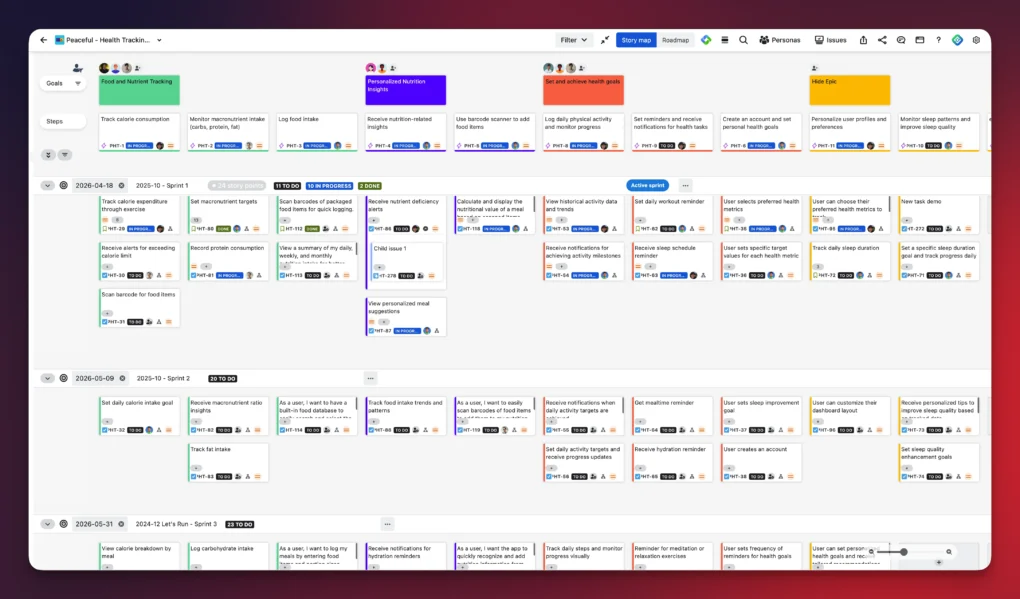
That matters because people work better when they understand more than just the task in front of them. With a clearer product view, teams can:
- understand what the feature is trying to achieve
- see how smaller stories fit into the larger workflow
- identify priorities and gaps earlier
- reduce confusion before development begins
This shared view is especially helpful across Product, Dev, and QA. It brings more structure to planning and gives everyone a clearer starting point.
In simple terms, ProductGo helps teams move from “Here is a ticket” to “Here is the bigger picture behind this work.”
That shift can make a big difference.
ikuTeam: Building Execution Discipline with Automated Truth
Effective delivery often fractures due to the “Toggle Tax”. According to the Harvard Business Review, switching between Jira and external storage nearly 1,200 times a day costs teams up to 9% of their weekly productivity.
This is where the team at ikuTeam helps. Their app, Cloud Attachments & Workflow Automation for Jira, eliminates this mental drain by turning Jira into a secure command center for your documents.
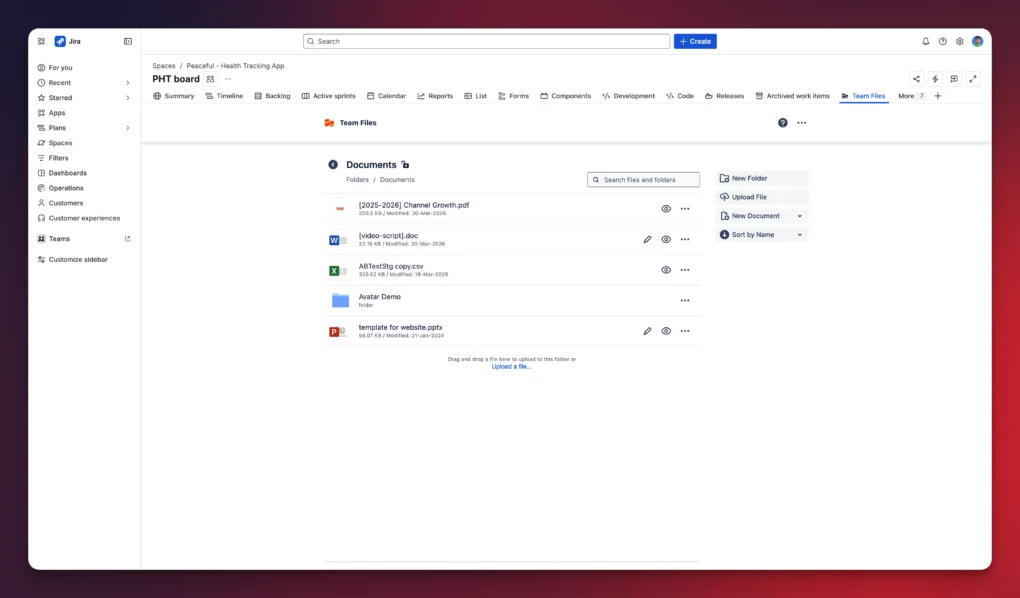
While ProductGo maps the journey, Cloud Attachments & Workflow Automation for Jira ensures the Single Source of Truth is present at every stop.
- Automated Folder Governance: Automatically create and link dedicated cloud folders the moment a Jira issue is created. Every Story and Epic stays organized from day one.
- Live Multi Cloud Integration: Mirror permissions for SharePoint, OneDrive, Google Drive, Box, Dropbox, or Egnyte directly inside Jira. Preview and manage files without ever leaving the ticket.
- Workflow Driven Compliance: Use automation triggers to transition Jira issues the moment a required document is updated in your cloud storage.
- Integrated AI Insights: Use built-in AI capabilities to instantly summarize massive SharePoint specifications or extract action items without toggling away from the Jira board.
By integrating these capabilities, you ensure that Execution Discipline is an automated part of your workflow. ProductGo ensures you are building the right thing; ikuTeam ensures you are building it from the right evidence.
How the two apps support cross-team collaboration
Used together, ProductGo and Cloud Attachments & Workflow Automation for Jira help solve two different parts of the same problem.
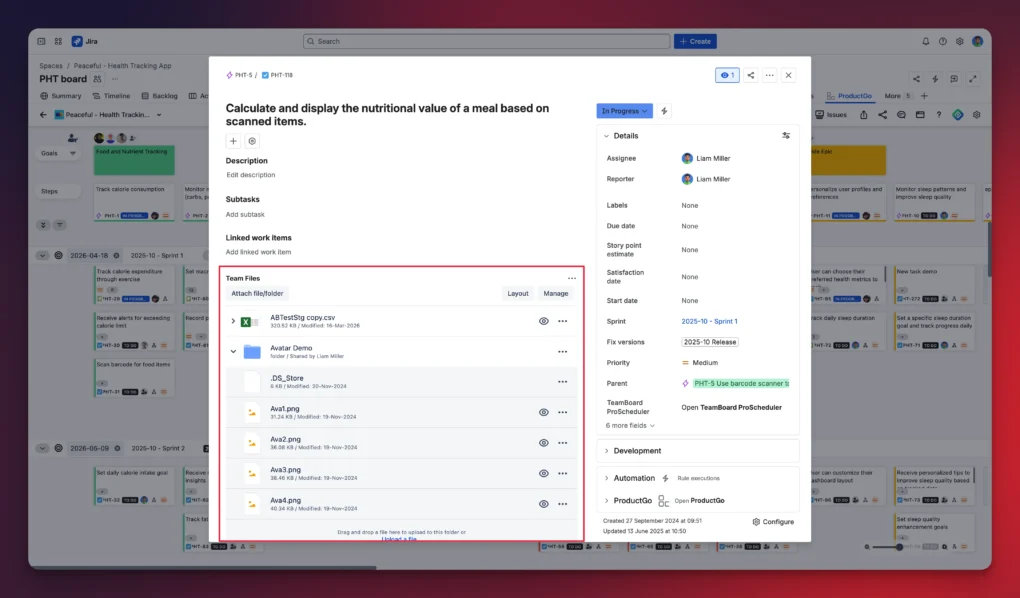
ProductGo helps teams align on the work itself. Cloud Attachments & Workflow Automation for Jira helps teams stay aligned on the documents and approvals that support the work.
That combination is valuable because cross-team collaboration depends on both. A shared plan is important. But so is a shared source of truth.
When teams use both well inside Jira, the workflow becomes more connected from start to finish.
Instead of each team working from its own partial view, everyone works from the same connected process.
You can think of it like this:
- ProductGo supports shared product vision
- Cloud Attachments & Workflow Automation for Jira supports shared execution discipline
Together, they help reduce the gaps that often appear between requirements and delivery.
And that is often where the biggest communication problems begin.
Best practices for reducing miscommunication in Jira
There is no single tool that removes miscommunication completely. But there are a few practical habits that make a big difference.
Start by making requirements easier to understand before work begins. A story should not only say what needs to be done. It should also give enough context for the next team to act with confidence.
It also helps to keep supporting files close to the work itself. When documents, approvals, and updates are tied directly to Jira issues, teams spend less time searching and second-guessing. Even when key details are stored as PDFs, teams can easily extract text from any PDF document.
A few simple best practices can go a long way:
- make the purpose of each story clear, not just the task
- keep important files connected to the relevant issue
- avoid handling approvals only in side conversations
- make sure teams know which version is current
- define what is needed before work moves to the next stage
- reduce handoff ambiguity wherever possible
The goal is not to create a heavier process. The goal is to create a clearer one.
When expectations are visible and supporting materials are easy to trust, teams can move faster with fewer misunderstandings.
Better teamwork starts with better workflow connection
Miscommunication between requirements and delivery is common, especially when teams work across different roles and responsibilities.
When teams can see the bigger product picture and trust the files, approvals, and supporting materials tied to the work, collaboration becomes much easier. Handoffs improve. Rework is reduced. Delivery becomes smoother and more predictable.
ProductGo helps teams align around a shared product vision.
Cloud Attachments & Workflow Automation for Jira helps teams work from a shared source of truth.
Together, they support a more connected Jira workflow – from structured product planning to controlled execution, all inside Jira.
And when planning and delivering, stay connected; teams do not just work harder. They work better together.