As a project manager or team leader, ensuring smooth communication across your team is one of your primary responsibilities. With tools like Jira, managing tasks, progress, and product issues becomes easier. However, as your project grows and your team expands, the volume of comments in Jira can quickly become overwhelming. While comments are an essential part of collaboration, they can also clutter tasks and slow down workflows if not managed effectively.
Managing comments in Jira at scale can be challenging, especially when handling multiple projects and coordinating a large team. However, with the right strategies, it’s possible to manage comments effortlessly, ensuring they enhance your project management efforts rather than complicate them.
In this article, we’ll explore practical tips for managing comments in Jira at scale and how integrating tools like GanttTable can make your life easier.
Understanding how comments in Jira are used
Before diving into strategies for managing comments, it’s important to understand their role in Jira. Comments are a key tool for communication and collaboration within Jira.
They are used for:
- Sharing updates: Team members use comments to share task status, keeping everyone informed of progress and any roadblocks.
- Providing context and clarifications: Often, comments are used to clarify certain aspects of a task. This can include providing more information, asking questions, or offering solutions to challenges.
- Actionable information: Comments often contain action items, decisions, and next steps, making them vital for moving tasks forward.
- Team communication: In larger teams, comments serve as a way for developers, testers, and other stakeholders to communicate asynchronously, which is essential for distributed teams or remote work.
Given their central role, comments can quickly accumulate in Jira, making it harder to manage large projects or tasks. If left unmanaged, the sheer volume of comments can make it difficult to retrieve key information or track decisions.
Common problems with unmanaged Jira comments at scale
While Jira comments serve an essential function, they can create several problems when not properly managed, especially at scale. As the number of work items and users grows, these problems tend to compound.
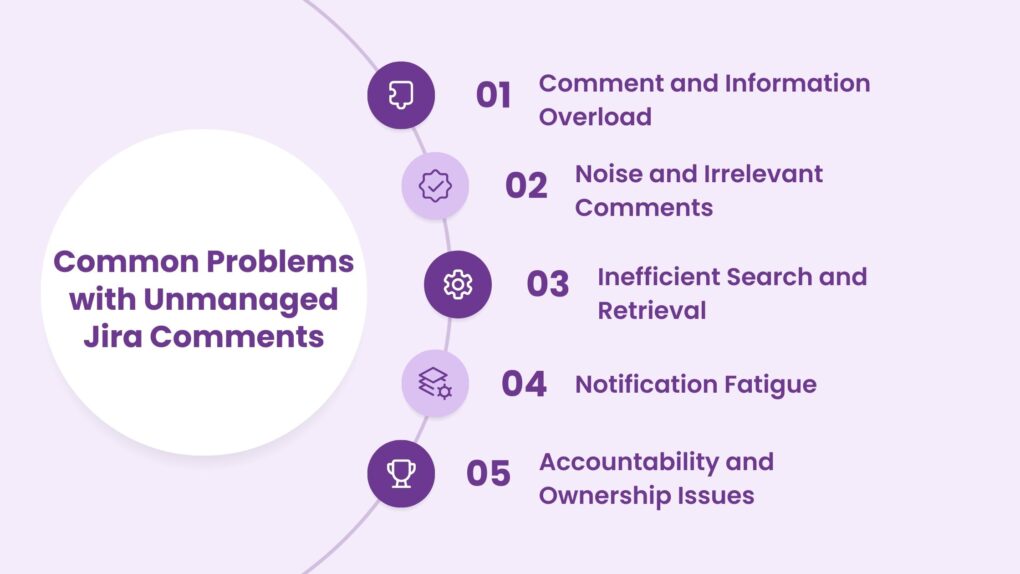
1. Comment overload and information overload
One of the most common issues is the sheer volume of comments on tasks and Jira work items. Over time, this can make it difficult to sift through a large number of comments to find the most relevant or actionable information.
In large projects, this can lead to important updates getting buried under irrelevant comments.
2. Noise and irrelevant comments
In some cases, comments in Jira can become cluttered with off-topic discussions or irrelevant updates. While team collaboration is encouraged, excessive side conversations or general comments not related to the task at hand can quickly overwhelm the task’s comment section, making it harder for users to focus on what matters.
3. Inefficient search and retrieval
With a growing number of comments, finding the right one can become a tedious task. Jira’s default search functionality may not always help you quickly find the exact comment you need, especially when there’s no clear structure or tagging to categorize comments.
4. Notification fatigue
As the volume of comments increases, so do the notifications. Overuse of @mentions or notifications for every comment update can quickly lead to notification fatigue.
As a result, this can cause team members to disengage or ignore important notifications altogether.
5. Accountability and ownership issues
Without clear organization or structure, it becomes difficult to hold team members accountable for their contributions. Important action items may get lost in a sea of comments, and unclear responsibilities can delay project timelines or create confusion about task ownership.
Practical tips for managing comments in Jira
Managing Jira comments effectively at scale requires a combination of clear guidelines, tools, and strategies to help streamline the process. Below are some practical tips that will help you manage comments effortlessly:
1. Establish clear commenting guidelines
One of the first steps in managing comments at scale is to set clear guidelines for how and when comments should be used. Additionally, it is recommended to encourage team members to be brief, focused, and respectful in their comments.
Some best practices to follow:
- Define the purpose: Make sure everyone knows when to use comments versus other tools like internal notes or documentation. Comments should be used for updates, action items, questions, and decisions directly related to the task at hand.
- Keep comments concise: Encourage concise, actionable comments. Long-winded explanations can create confusion and make it harder for others to follow.
- Standardize formats: For recurring tasks like bug reporting, testing updates, or status reviews, you should set up templates or standardized formats. This ensures consistency and helps team members easily identify key information.
2. Use @mentions and notifications wisely
Using @mentions is an excellent way to draw attention to a specific person in a comment. However, as mentioned earlier, overusing them can lead to notification overload.
So, how should you use it? Here are a few tips for managing @mentions and notifications:
- Targeted @mentions: Only use @mentions when ABSOLUTELY necessary. Overusing them can flood team members’ inboxes and cause them to ignore important notifications.
- Customize notifications: Encourage team members to customize their notification settings to ensure they’re only receiving notifications about the comments that are relevant to them.
3. Organize comments with labels and keywords
Using labels and keywords is one of the most effective ways to manage comments in Jira at scale. This helps categorize comments and makes them easier to search. Here’s how you can implement this strategy:
- Add labels to comments: Encourage team members to add specific labels or keywords to comments. This could include terms like “bug,” “feedback,” “question,” or “urgent” to help identify the nature of the comment.
- Searchable keywords: Ensure that comments include key terms or actions that can be easily searched for later, making it simple to track discussions or find critical updates when needed.
4. Utilize Jira’s comment visibility features
Jira offers features that can help manage comment visibility, ensuring sensitive information is not unnecessarily exposed to all team members. For example:
- Internal vs. External comments: Use Jira’s permissions to restrict the visibility of comments based on the audience. This is especially helpful when dealing with customer-facing tasks or when discussing sensitive internal matters.
- Permissions for comments: Set up permissions to control who can comment on certain work items, preventing unnecessary or irrelevant comments from being added.
- 5. Automate commenting workflows
Automation is key to managing comments efficiently, particularly when working on large teams or projects. Jira allows you to create automation rules that can help manage comments, reducing the need for manual updates:
- Automated responses: Set up automated comments for routine updates. For example, when a Jira work item moves to a certain status, Jira can automatically post a comment, reducing the need for team members to do it manually.
- Follow-up reminders: Create automation rules to remind team members to follow up on comments that require action. This ensures that important tasks aren’t missed.
6. Regularly review and archive comments
Another key strategy for managing comments is to regularly review and archive outdated or irrelevant comments. Over time, Jira work items accumulate lots of comments, some of which may no longer be relevant.
- Archiving old comments: Set up a process to periodically archive comments that are no longer relevant to the project. This helps keep the item details page clean and improves overall performance.
- Reviewing comments for action items: Regularly review comments to ensure that all action items have been addressed. Comments with unresolved actions can be flagged for follow-up.
7. Set commenting reminders and follow-ups
Set up reminders within Jira for comments that require follow-up. This ensures that key action items are not forgotten and helps track the progress of tasks efficiently.
- Set due dates for action items: If a comment contains an action item, link it to a due date and ensure it gets tracked properly.
- Automated follow-ups: Set reminders for tasks that have pending comments or unresolved action items.
How GanttTable helps manage projects and comments in Jira simultaneously
Managing comments alongside project timelines and tasks can be a daunting task, especially when dealing with multiple teams. However, using a tool like GanttTable for Jira can help you streamline both project management and comment organization in Jira.
GanttTable is a powerful Gantt chart add-on for Jira that allows you to visualize your project’s timelines and manage tasks with ease. It also integrates seamlessly with Jira’s comment system, offering a comprehensive view of both project progress and communication in one place.
1. Centralized view of tasks and comments
GanttTable provides a centralized view of tasks and comments in your project. This allows you to visualize project timelines while managing and responding to comments related to specific tasks.
No longer do you have to toggle between multiple views to track comments and project progress. Everything you need is in one place. GanttTable also enhances communication by integrating Jira’s comments from multiple projects into one visual project timeline.
2. Streamline communication with better comment management
With GanttTable, you can manage large numbers of comments more effectively. By using a custom column, you can quickly get the total number of comments in each Jira work item. Not only that, the latest comment will replace older comments inside the Comment column of the table grid.
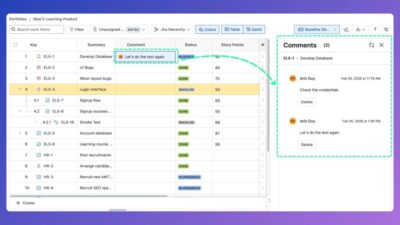
This helps keep everyone on the same page, ensuring that all stakeholders are aware of project developments from team to team and can contribute to the discussion directly in the Gantt chart interface that runs on Atlassian.
Conclusion
Managing comments in Jira at scale can be challenging, but with the right strategies and tools in place, it’s entirely possible to streamline the process and improve team communication. By establishing clear commenting guidelines, using automation, and integrating tools like GanttTable, project managers and team leaders can ensure that comments remain organized, relevant, and actionable.
As your team grows and projects become more complex, adopting a structured approach to managing comments in Jira will save time, reduce confusion, and enhance overall project productivity. By following these tips, you can keep your Jira environment clean, efficient, and focused on what matters most: delivering successful projects.